 IG
IG FOREX.com
 CMC Markets
 XTB
XTB eToro
eToro Capital.com
 AvaTrade
 XM
XM Pepperstone
 FP Markets
 Tickmill
 HFM Markets
Best NinjaTrader Brokers for 2026

Written by Steven Hatzakis
Director of Online Broker Research

Edited by Hannah Smith
Staff Editor

Fact-checked by Joey Shadeck
Research Analyst
Steven HatzakisDirector of Online Broker Research
Steven Hatzakis is the Global Director of Online Broker Research for ForexBrokers.com. He is a forex industry expert and an active fintech and crypto researcher.


 Why you can trust us
Led by Steven Hatzakis, Global Director of Online Broker Research, the ForexBrokers.com research team collects and audits data across more than 100 variables. We analyze key tools and features important to forex and CFD traders and collect data on commissions, spreads, and fees across the industry to help you find the best broker for your needs.
We also review each broker’s regulatory status; this research helps us determine whether you should trust the broker to keep your money safe. As part of this effort, we track 100+ international regulatory agencies to power our proprietary Trust Score rating system.
Our researchers open personal brokerage accounts and test all available platforms on desktop, web, and mobile for each broker reviewed on ForexBrokers.com. Learn more about how we test.
NinjaTrader has long been a favorite among futures traders for its advanced charting, automation, and analytics. You can trade futures through NinjaTrader's own licensed brokerage, but to trade forex and other markets, you'll need to pair the platform with a supported third-party broker.
In May 2025, NinjaTrader was acquired by the crypto exchange Kraken in a $1.5 billion deal. It now operates as a standalone platform within Kraken's lineup, as the company builds toward multi-asset trading across crypto, futures, and beyond. For forex traders, though, the approach is unchanged: you connect NinjaTrader to one of its supported brokers. Having spent years in the futures markets as a registered representative, I've put together this guide to the best brokers for NinjaTrader in 2026, judged on pricing, market access, and platform integration.
Using NinjaTrader with a third-party broker
To connect any of these brokers and place live trades, you need to purchase NinjaTrader's Multiple Broker Add-on. It costs $99 per month and renews every 30 days from your purchase date. The add-on works only on the NinjaTrader Desktop app; you can't connect a third-party broker on NinjaTrader's web or mobile apps. If you bought a Lifetime License before March 4, 2023, it's already included at no extra cost.
Best NinjaTrader Brokers in 2026
How we tested the best NinjaTrader brokers
At ForexBrokers.com, we test brokers each year using hands-on accounts and thousands of hand-collected data points. For this guide, I focused on how well each broker pairs with NinjaTrader, since a great broker isn't much use here if the connection is limited or unreliable. Here's what I weighed:
- NinjaTrader support: I confirmed each broker is a currently supported connection through NinjaTrader's Multiple Broker Add-on, and which assets you can actually trade through it, whether forex, futures, or stocks.
- Market access: I looked at the range of markets each broker opens up through NinjaTrader, from spot forex and CFDs to futures and equities.
- Pricing: I factored in both the broker's own spreads and commissions and the $99 per month add-on every third-party connection requires, so the all-in cost is clear.
- Execution and tools: I assessed order routing, supported order types, and how well each broker handles NinjaTrader's advanced execution and automation features.
Every broker here is a verified NinjaTrader connection. Rankings reflect testing and data collected by our research team, not information supplied by the brokers.
- Minimum Deposit: $0
- Trust Score: 99
- Tradeable Symbols (Total): 8500
Interactive Brokers is the most versatile broker to pair with NinjaTrader, opening up forex, stocks, options, and more across 170-plus market centers. With the Multiple Broker Add-on active, it's also the only broker in this guide that lets you trade futures through NinjaTrader Desktop. Pricing is competitive, with low commissions and margin requirements. Read full review
- Only broker here that trades futures via NinjaTrader
- Widest market access, 170+ market centers in 36 countries
- Competitive commissions and low margins
- TWS platform overwhelming for beginners
- No spot forex for U.S. retail unless an ECP
- $2 minimum forex commission costly on small trades
- Minimum Deposit: $100
- Trust Score: 99
- Tradeable Symbols (Total): 5500
FOREX.com supports NinjaTrader for forex trading and is a highly trusted, StoneX-backed broker. You can trade more than 4,500 CFDs outside the U.S. alongside its forex lineup, though futures run through a separate StoneX One account rather than NinjaTrader. It shares its NinjaTrader connection with sister brand City Index. Read full review
- Solid NinjaTrader forex pairing from a trusted broker
- 4,500+ CFDs outside the U.S.
- Award-winning Trading Academy education
- No futures through NinjaTrader
- Standard-account spreads above average
- Shares one connection with City Index (same parent)
- Minimum Deposit: £100.00
- Trust Score: 99
- Tradeable Symbols (Total): 13500
City Index supports NinjaTrader for forex and CFD trading, making it a strong option for non-U.S. traders who want broad market access. It offers over 80 forex pairs and more than 13,500 CFDs, plus spread betting for U.K. residents. Like FOREX.com, it's a StoneX brand and shares the same NinjaTrader connection. Read full review
- Forex, CFDs, and U.K. spread betting via NinjaTrader
- 80+ forex pairs and 13,500+ CFDs
- Drag-to-modify orders on Web Trader charts
- No futures through NinjaTrader
- Average pricing, behind low-cost brokers
- No MT5 in most regions
- Minimum Deposit: $0
- Trust Score: 99
- Tradeable Symbols (Total): 40000
Schwab connects to NinjaTrader for stocks, equity options, and indexes, making it a fit for equities traders who want NinjaTrader's charting and execution. The connection is in beta and desktop-only, and it doesn't support forex or futures through NinjaTrader. For those, you'd use Schwab's own thinkorswim platform instead. Read full review
- Run NinjaTrader with a highly trusted, multi-asset broker
- Strong for stocks, equity options, and indexes
- Commission-free forex on thinkorswim (spread only)
- No forex or futures through NinjaTrader
- Connection is beta and desktop-only
- Forex limited to thinkorswim, U.S. residents only
- Minimum Deposit: Starts from $50
- Trust Score: 95
- Tradeable Symbols (Total): 440
FXCM supports NinjaTrader for forex and CFD trading and is the top pick here for algorithmic traders, with wide support for specialty algo platforms. It earned Best in Class honors for Algo Trading and Trading Platforms in our 2026 Annual Awards. Note that FXCM left the U.S. market in 2017, so it's open to non-U.S. traders only. Read full review
- Excellent for algorithmic trading via NinjaTrader
- Best in Class for Algo Trading and Platforms in 2026
- Publishes detailed execution statistics
- No futures through NinjaTrader
- Narrow market range, under 500 symbols
CFDs are complex instruments and come with a high risk of losing money rapidly due to leverage. Between 51% and 89% of retail investor accounts lose money when trading CFDs. You should consider whether you understand how CFDs work and whether you can afford to take the high risk of losing your money.
1. Interactive Brokers — Best for trading the widest range of markets
Interactive Brokers (IBKR) is the most versatile broker to pair with NinjaTrader, thanks to its wide range of markets you can trade beyond just futures. With an active Multiple Broker Add-on, IBKR is also the only broker in this guide that lets you trade futures through NinjaTrader Desktop, alongside forex and other markets.
Range of investments: Its extensive multi-asset offering spans futures, forex, stocks, options, and more across more than 170 market centers in 40 countries. IBKR's futures offering is vast, covering contracts on key exchanges worldwide. Prediction markets sit in the same account, with binary-style contracts on geopolitical, climate, and economic events.
Steven's take
"In my experience, Interactive Brokers is an excellent choice for seasoned forex traders. Its advanced tools and access to global currency markets provide a professional-grade solution that can handle the demands of complex trading strategies."
Steven Hatzakis
Director of Online Broker Research
Platforms and tools: NinjaTrader connects to IBKR's full range of markets, though note these third-party connections work only on NinjaTrader's Desktop app, not its web or mobile apps. IBKR's own Desktop platform is also available, offering a simplified experience with a good balance of features for both beginner and intermediate traders. I found it easier to navigate than IBKR's other platforms, with research well-integrated alongside news headlines from providers including Dow Jones, Reuters, and Benzinga.
Pricing and fees: Beyond NinjaTrader's $99 per month Multiple Broker Add-on, IBKR offers competitive commission rates and low margin requirements. Futures trading costs just $0.85 per contract on its fixed pricing plan, and high-volume traders can access rates as low as $0.25 per contract when trading 20,000 contracts per month. In the U.S. and Singapore, IBKR Lite offers commission-free stock trades, while IBKR Pro's tiered pricing provides superior order execution without payment for order flow. Everywhere else there is a single universal account.
Best for: Advanced traders who want to pair NinjaTrader with a globally diversified portfolio. Because IBKR connects to so many exchanges worldwide, you get futures access not just in the U.S. but also across South America, Europe, and Asia-Pacific, plus forex and other markets from one account.
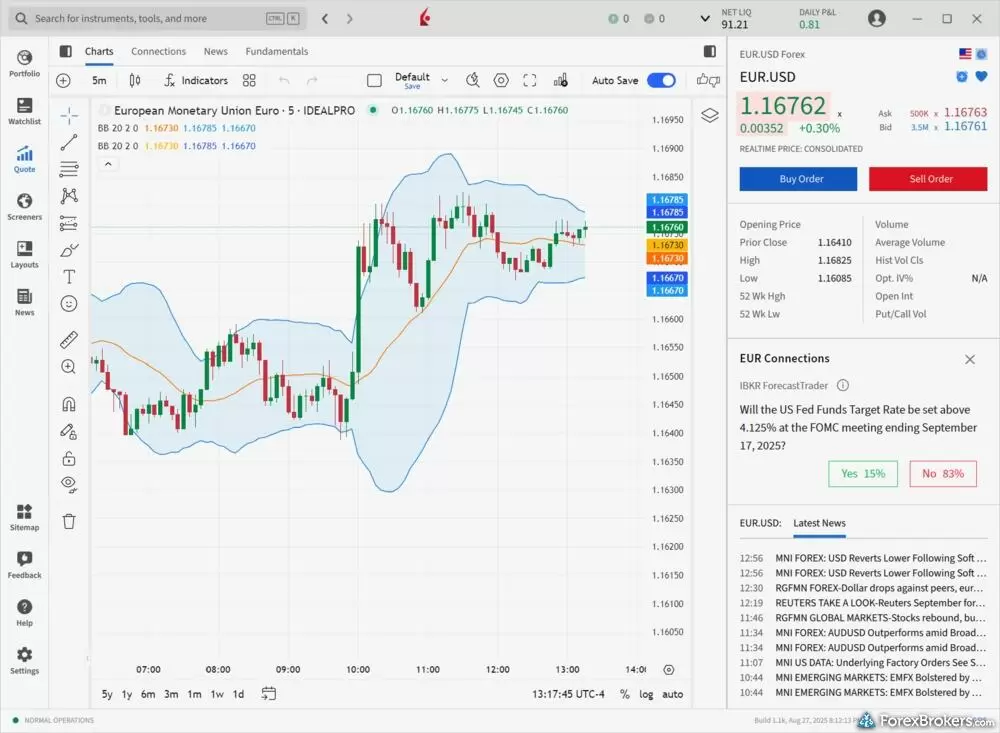
My layout on the IBKR Desktop platform includes a chart of the EUR/USD pair, a trading panel, and news headlines from Reuters.
2. FOREX.com — Best for trading forex on NinjaTrader
| Company | Overall Rating | Tradeable Symbols (Total) | Cryptocurrency (Underlying) | U.S. Stocks (Shares) |
 FOREX.com FOREX.com
|
|
5500 | No | Yes |
FOREX.com, part of the StoneX Group, supports the NinjaTrader platform for forex trading. Futures aren't supported through NinjaTrader at FOREX.com; for those you'd use a separate StoneX One account and switch between platforms. Note that FOREX.com shares its NinjaTrader connection with sister brand StoneX Trading, since both sit under StoneX.
Range of investments: Outside the U.S., FOREX.com offers more than 4,500 CFDs (up to 7,000 in its European entity) across forex, commodities, and metals, alongside its forex lineup. Its futures markets, available through StoneX One rather than NinjaTrader, cover currencies, energies, financials, grains, indices, meats, metals, and soft commodities.
Platforms and tools: Beyond NinjaTrader, FOREX.com offers its proprietary Web Trading and Advanced Trading platforms, plus TradingView and the full MetaTrader suite. The Web Trading platform's charts are powered by TradingView with nearly 100 indicators, and it supports advanced order types like OCOs, on-chart order editing, and one-click trading.
Pricing and fees: To trade through NinjaTrader you'll need its $99 per month Multiple Broker Add-on, which works only on NinjaTrader Desktop. On FOREX.com's side, forex pricing is average unless you trade at higher volumes: EUR/USD spreads averaged about 1.0 pip outside the U.S. in October 2025, while its commission-based RAW account narrows that to around 0.137 pips plus commission. FOREX.com is also one of my top picks among market-maker brokers, with transparent execution statistics.
Best for: Traders who want to pair NinjaTrader's charting and automation with FOREX.com for forex, and who don't need to trade futures through the NinjaTrader platform itself.
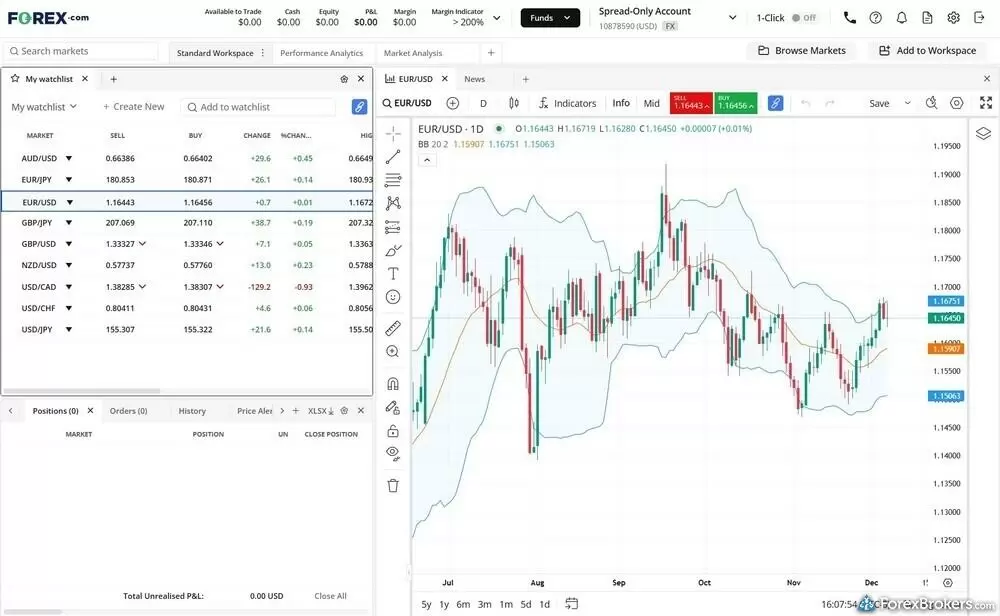
The FOREX.com web platform features a cohesive workspace that pairs a customizable, real-time watchlist with advanced charting tools, allowing traders to track live spreads and percentage changes alongside technical indicators like Bollinger Bands. This layout streamlines the trading workflow by centralizing market scanning, position tracking, and one-click execution within a single, intuitive interface.
3. StoneX Trading - Best for CFDs and spread betting
| Company | Overall Rating | Tradeable Symbols (Total) | Cryptocurrency (Underlying) | U.S. Stocks (Shares) |
 StoneX Trading StoneX Trading
|
|
13500 | No | No |
Also under the StoneX Group umbrella, StoneX Trading supports NinjaTrader for forex and CFD trading, making it a solid option for traders outside the U.S. who want broader market access. Futures aren't supported through NinjaTrader at StoneX Trading. As its sister brand, StoneX Trading shares a single NinjaTrader connection with FOREX.com, since both sit under StoneX.
Range of investments: Known for its global footprint, StoneX Trading offers over 80 forex pairs and more than 13,500 CFDs, along with forex options and forwards. U.K. residents can also access spread betting, which provides tax efficiencies that aren't available when trading CFDs. Across its CFD lineup you can trade forex, indices, commodities, bonds, and cryptocurrencies (via CFDs).
Platforms and tools: Beyond NinjaTrader, StoneX Trading offers its proprietary Web Trader platform and MetaTrader 4. Web Trader is built for everyday traders, with predefined screeners and layouts, complex order types like OCOs, and TradingView-powered charts carrying nearly 90 indicators. On those charts you can drag a stop-loss or limit to a new price to update it instantly, a useful touch for active trading.
Pricing and fees: To trade through NinjaTrader you'll need its $99 per month Multiple Broker Add-on, which works only on NinjaTrader Desktop. StoneX Trading's own pricing sits in line with the industry average, with EUR/USD spreads around 0.74 pips. Active traders can earn volume-based rebates, which in the U.K. start at £4 per million for monthly volumes above £25 million.
Best for: International traders, including U.K. spread betters, who want to pair NinjaTrader with StoneX Trading for forex and CFDs, and who don't need futures through the NinjaTrader platform itself.

StoneX Trading's web platform includes trading layout charts, watchlists, news headlines, and Trading View signals.
4. Charles Schwab — Best for trading stocks on NinjaTrader
| Company | Overall Rating | Tradeable Symbols (Total) | Cryptocurrency (Underlying) | U.S. Stocks (Shares) |
 Charles Schwab Charles Schwab
|
|
40000 | No | Yes |
Charles Schwab is a highly trusted, multi-asset broker, but its NinjaTrader connection is the most limited in this guide. The integration is in beta, works only on NinjaTrader Desktop, and supports stocks, equity options, and indexes. You can't trade forex or futures through NinjaTrader at Schwab.
For forex and futures, you'd use Schwab's own thinkorswim platform instead, where forex runs on nearly 70 currency pairs, commission-free, with costs coming from the spread (around 1.27 pips on EUR/USD as of October 2025). thinkorswim also brings complex order types and a handy Flatten button that closes all open positions for a symbol at once. As with the other brokers here, connecting Schwab to NinjaTrader requires the $99 per month Multiple Broker Add-on.
5. FXCM - Best for algorithmic trading
FXCM supports NinjaTrader for forex and CFD trading, and it's the optimal pick here for algorithmic traders. It also supports a wide array of specialty algo platforms beyond NinjaTrader, and earned Best in Class honors for Algo Trading and Trading Platforms in our 2026 Annual Awards. Note that FXCM exited the U.S. market in 2017, so it's available to non-U.S. traders only.
FXCM offers a growing but fairly narrow range of markets, with 43 forex pairs and over 300 CFDs. Pricing is about average. EUR/USD spreads averaged 0.90 pips for its EU and U.K. entity in Q2 2025, or around 0.80 pips all-in on commission-based active-trader accounts. As with the other brokers here, connecting through NinjaTrader requires the $99 per month Multiple Broker Add-on, which works only on NinjaTrader Desktop.
ForexBrokers.com Overall Rankings
Now that you've seen our picks for the best brokers on this guide, check out ForexBrokers.com's overall broker rankings. We've evaluated 36 forex brokers, using a testing methodology that's based on 100+ data-driven variables and thousands of data points. Also take a look at our full-length, in-depth forex broker reviews.
NinjaTrader Broker Reviews
For traders who appreciate advanced trading tools and quality market research, FXCM is a winner, especially for algorithmic trading.
Steven Hatzakis May 04, 2026
Check out our review of Charles Schwab, a highly trusted, multi-asset broker catering to U.S.-based and international forex traders.
Steven Hatzakis May 04, 2026
Interactive Brokers forex review: I tested IBKR's spreads, commissions, and platforms in 2026. More than 100 pairs, but a $2 minimum commission per order.
Steven Hatzakis September 28, 2026
FOREX.com is a trusted brand that delivers an excellent trading experience for forex and CFDs traders across the globe.
Steven Hatzakis May 04, 2026
Formerly named City Index, StoneX Trading is a trusted brand known for its versatile trading platforms, excellent mobile app, and diverse market research.
Steven Hatzakis August 28, 2026Related Guides
Learn about high-frequency trading, and how it works, and discover the best forex brokers for HFT trading systems.
Steven Hatzakis September 04, 2026
ForexBrokers.com's list of the seven best forex brokers that offer integration with TradingView.
Steven Hatzakis September 16, 2026
We tested the top forex day trading platforms for 2026 on execution, spreads, and tools. See our ranked picks, from Interactive Brokers to Saxo.
Steven Hatzakis September 15, 2026
Check out my guide to forex trading APIs to learn more about how to use APIs when trading and to see my picks for the best forex brokers for APIs.
Steven Hatzakis June 12, 2026
Check out my picks for the best brokers with algo trading software in 2026.
Steven Hatzakis June 12, 2026More Guides
- Best Market Maker Brokers in 2026
- Best Trading Platforms for Mac Users of 2026
- Best Forex Day Trading Platforms for 2026
- Best High-Frequency Trading Software for 2026
- Best Forex Options Brokers for 2026
- Best Crypto Brokers for 2026
- Best Forex Brokers with APIs for 2026
- Best MetaTrader 5 (MT5) Forex Brokers for 2026
- Best MetaTrader 4 (MT4) Brokers for 2026
- Best PayPal Forex Brokers for 2026
- Best Forex Demo Accounts for 2026
- Best Free Forex Trading Courses for 2026
- Best Brokers for TradingView for 2026
- Best High-Leverage Forex Brokers for 2026
- Best Brokers that Use TipRanks in 2026
- Best Forex Signal Providers for 2026
- Best Algo Trading Software for 2026
- Best CFD Trading Platforms for 2026
Forex Risk Disclaimer
There is a very high degree of risk involved in trading securities. With respect to margin-based foreign exchange trading, off-exchange derivatives, and cryptocurrencies, there is considerable exposure to risk, including but not limited to, leverage, creditworthiness, limited regulatory protection and market volatility that may substantially affect the price, or liquidity of a currency or related instrument. It should not be assumed that the methods, techniques, or indicators presented in these products will be profitable, or that they will not result in losses. Read more on forex trading risks.
About the Editorial Team
Steven Hatzakis is the Global Director of Online Broker Research for ForexBrokers.com. Steven previously served as an Editor for Finance Magnates, where he authored over 1,000 published articles about the online finance industry. A forex industry expert and an active fintech and crypto researcher, Steven advises blockchain companies at the board level and holds a Series III license in the U.S. as a Commodity Trading Advisor (CTA).
Hannah Smith is a Staff Editor at ForexBrokers.com. With a background in SEO and years of experience in digital media, Hannah is focused on creating high-quality, data-driven content that helps investors make informed decisions. With a master's degree in English from North Carolina State University, she brings a strong foundation in writing, research, and editorial strategy to her work.
Joey Shadeck is a Content Strategist and Research Analyst for ForexBrokers.com. He holds dual degrees in Finance and Marketing from Oakland University, and has been an active trader and investor for close to ten years. An industry veteran, Joey obtains and verifies data, conducts research, and analyzes and validates our content.