 IG
IG FOREX.com
 CMC Markets
 XTB
XTB eToro
eToro Capital.com
 AvaTrade
 XM
XM Pepperstone
 FP Markets
 Tickmill
 HFM Markets
XTB Review

Written by Steven Hatzakis
Director of Online Broker Research

Edited by John Bringans
Managing Editor

Fact-checked by Blain Reinkensmeyer
Managing Partner
Steven HatzakisDirector of Online Broker Research
Steven Hatzakis is the Global Director of Online Broker Research for ForexBrokers.com. He is a forex industry expert and an active fintech and crypto researcher.


CFDs are complex instruments and come with a high risk of losing money rapidly due to leverage. 72% of retail investor accounts lose money when trading CFDs with this provider. You should consider whether you understand how CFDs work and whether you can afford to take the high risk of losing your money.
XTB suits beginners and multi-asset traders who want forex, stocks, and crypto in one app. I tested its xStation 5 platform on web and mobile and found education built into the platform. In the mobile app, I could set a pending entry, stop-loss, and take-profit by dragging them on the chart before placing the trade, which I've seen at only a few brokers.
XTB also ranks among the largest multi-asset brokers I've tested, with 10,521 tradeable symbols and the option to own stocks and some crypto outright instead of only trading CFDs. Forex pricing is simple, with EUR/USD spreads averaging 1.06 pips and no commission. XTB is a weaker fit for high-volume and automated traders because it has no MetaTrader, algorithmic trading, or volume discounts.
-
Minimum Deposit:
$0 -
Trust Score:
96 -
Tradeable Symbols (Total):
10521
| Range of Investments | |
| Trading Fees | |
| Trading Platforms | |
| Research | |
| Mobile Trading | |
| Education |
Check out ForexBrokers.com's picks for the best forex brokers in 2026.
| 2026 | #7 |
| 2025 | #7 |
| 2024 | #8 |
| 2023 | #8 |
| 2022 | #7 |
| 2021 | #7 |
| 2020 | #8 |
| 2019 | #7 |
| 2018 | #16 |
| 2017 | #8 |
 Why you can trust us
Led by Steven Hatzakis, Global Director of Online Broker Research, the ForexBrokers.com research team collects and audits data across more than 100 variables. We analyze key tools and features important to forex and CFD traders and collect data on commissions, spreads, and fees across the industry to help you find the best broker for your needs.
We also review each broker’s regulatory status; this research helps us determine whether you should trust the broker to keep your money safe. As part of this effort, we track 100+ international regulatory agencies to power our proprietary Trust Score rating system.
Our researchers open personal brokerage accounts and test all available platforms on desktop, web, and mobile for each broker reviewed on ForexBrokers.com. Learn more about how we test.
Can I open an account with this broker?
Use our country selector tool to view available brokers in your country.
Table of Contents
XTB pros and cons
PROS
- 10,521 tradeable symbols spanning forex, CFDs, real stocks, and underlying crypto.
- Highly tappable mobile app with pre-trade drag-to-modify orders.
- Modular xStation 5 web platform with 92 indicators and a stock scanner.
CONS
- No MetaTrader, copy trading, or algorithmic trading.
- No volume discounts, and spreads widen above 15 lots.
- No third-party research tools or newswire headlines.
My top takeaways for XTB in 2026:
- XTB's EUR/USD spread averaged 1.06 pips in Q2 2026 per its own group data, and there is no minimum deposit.
- XTB lists 100 crypto assets, 46 of which you can own outright rather than trade as CFDs.
- The mobile app carries 104 indicators, and you can set stops and targets by dragging them on the chart before you trade.
- With MetaTrader discontinued, XTB's proprietary xStation 5 platform is the only way to trade.
- XTB's execution is hybrid, with both agency and market maker models in use.
Trust Score
Developed by ForexBrokers.com and in use for nearly 10 years, Trust Score is a proprietary rating system powered by a range of unique quantitative and qualitative metrics, including each company’s number of regulatory licenses. Trust Scores range from 1 to 99 (the higher a broker’s rating, the better). Learn more.
Is XTB safe?

XTB is considered Highly Trusted, with an overall Trust Score of 96 out of 99. XTB is publicly traded and does not operate a bank, but is authorised by two Tier-1 regulators (Highly Trusted), two Tier-2 regulators (Trusted), one Tier-3 regulator (Average Risk), and two Tier-4 regulators (High Risk). XTB is authorised by the following Tier-1 regulators: Financial Conduct Authority (FCA) and Securities & Exchange Commission (CySEC). You can see where the different XTB entities are regulated on XTB's website.
| Feature |
 XTB XTB
|
|---|---|
| Year Founded | 2002 |
| Publicly Traded (Listed) | Yes |
| Bank | No |
| Tier-1 Licenses | 2 |
| Tier-2 Licenses | 2 |
| Tier-3 Licenses | 1 |
| Tier-4 Licenses | 2 |
Range of investments
XTB ranks among the largest multi-asset brokers I've tested. I counted 10,521 tradeable symbols across its web and mobile apps. Stocks account for 7,897 of them and ETFs another 2,393. The rest spans 100 crypto assets, 71 forex pairs, 32 commodities, and 28 indices. Only a handful of brokers, such as IBKR and Saxo, list more markets.
Forex: The 71 currency pairs will cover the needs of most forex traders. Currency specialists will find more than 150 pairs at Saxo or CMC Markets.
Cryptocurrency: With 100 crypto assets, XTB carries more coins than most brokers I test. Only category leaders such as eToro and Capital.com offer more. I also like that you can choose how to hold them. Of these, 46 can be bought as the underlying coin and 54 trade as CFDs. Crypto markets stay open 24/7. Funding is fiat-only, so you'll need to sell to cash before withdrawing. Note: Crypto CFDs are not available to retail traders from any broker's U.K. entity, nor to U.K. residents (except to Professional clients).
Cash equities: XTB also lets you buy and hold the underlying shares, separate from its CFD account. The cash-equity side has no minimum deposit, and you can buy as little as 1 GBP worth of stock. XTB charges a minimum ticket fee of 10 GBP per trade, or 0.2%. Custody is free up to 250,000 GBP, then 0.02% per year.
Options and futures: According to an update from the broker, options trading has launched in the EU through XTB's Cyprus and Poland entities. The initial rollout covers Cyprus, Germany, Spain, France, Slovakia, the Czech Republic, and Portugal. I couldn't access options in the platform I tested, and I look forward to full integration. Exchange-traded futures, spread betting, and thematic indices are not available.
Leverage: Maximum leverage depends on your country of residence and which XTB entity holds your account. Retail traders in the EU are capped at 30:1 on forex. Traders designated as Professionals can access higher levels but give up certain protections. XTB's Belize-regulated entity goes as high as 500:1.
Available investment products
Our audit verified 10,521 tradeable symbols, with non-leveraged access to stocks and crypto alongside the full CFD lineup.
| Feature |
XTB
|
|---|---|
| Tradeable Symbols (Total) | 10521 |
| Forex Pairs (Total) | 71 |
| Forex trading (Spot) | Yes |
| Forex trading (CFDs) | Yes |
| Forex trading (Options) | No |
| Forex trading (Futures) | No |
| Forex trading (Crypto) | Yes |
| Commodities: Agriculturals | Yes |
| Commodities: Oil | Yes |
| Commodities: Gold | Yes |
| Commodities: Silver | Yes |
| U.S. Stocks (Shares) | Yes |
| U.S. Stocks (CFDs) | Yes |
| U.S. Stocks (Crypto) | No |
| Global Stocks (Non-U.S. Shares) | Yes |
| Global Stocks (Non-U.S. CFDs) | Yes |
| 24/5 Trading (U.S. Stocks - Shares) | No |
| 24/5 Trading (U.S. Stocks - CFDs) | No |
| 24/7 Trading (Crypto) | Yes |
| Prediction markets | No |
| Copy Trading | No |
| Bitcoin (BTC) | Yes |
| Ethereum (ETH) | Yes |
| Cryptocurrencies (Total) | 100 |
| Cryptocurrency (Underlying) | Yes |
| Cryptocurrency (CFDs) | Yes |
| Cryptocurrency (Futures) | No |
| Disclaimers | Note: Crypto CFDs are not available to retail traders from any broker's U.K. entity, nor to U.K. residents (except to Professional clients). |
Available funding options
Our tests confirmed support for bank wire, debit and credit cards, PayPal, Skrill, and Neteller. Apple Pay, Google Pay, and crypto transfers are not supported.
| Feature |
XTB
|
|---|---|
| Debit card (Deposit/withdraw) | Yes |
| Credit card (Deposit/withdraw) | Yes |
| Bank Wire (Deposit/Withdraw) | Yes |
| Non-wire bank transfer (Deposit/Withdraw) | No |
| Apple Pay (Deposit/Withdraw) | No |
| Google Pay (Deposit/Withdraw) | No |
| Crypto (Deposit/withdraw) | No |
| Cryptocurrency (Wallet transfers) | No |
| PayPal (Deposit/Withdraw) | Yes |
| Skrill (Deposit/Withdraw) | Yes |
| Neteller (Deposit/Withdraw) | Yes |
Note: Real shares, ETFs, and investment plans are not available via XTB's Cyprus entity.
XTB fees
I like that XTB keeps forex pricing to a single spread-only account, with no commission on forex trades and no minimum deposit. XTB's group data from its Poland entity shows EUR/USD spreads averaging 1.06 pips in Q2 2026 for retail traders dealing up to 15 lots, rising to 1.29 pips above that size. Most brokers widen spreads on bigger trades. Some wait for larger volumes than XTB's 15-lot cutoff.
Minimum EUR/USD spreads range from 0.7 to 0.8 pips by entity, with 0.8 at XTB's EU entity, and the target spread is 0.9 pips. You won't find a raw-spread or commission-based forex account. Stocks and other exchange-traded products, including fractional shares, do carry commissions. Orders are filled under a hybrid model that uses both agency and market maker execution.
XTB has no VIP tier or active trader program, so high-net-worth and high-volume traders get no pricing perks. Combined with the spread step-up above 15 lots, that makes XTB a weaker fit for heavy-volume traders, in my view. An inactivity fee of 10 EUR per month, or the USD or GBP equivalent, kicks in after more than a year without trading and no deposit in the last 90 days. It is waived if you hold an open position.
Overnight financing: When I opened the order ticket, it showed the daily swap rate alongside the commission and pip value. XTB's Knowledge Base also walks through how swap charges are calculated. Sharia-compliant traders can open a swap-free account instead.
Withdrawal fees: International wire transfers are free. Small withdrawals cost extra: 10 EUR on amounts below 100 EUR in the EU, and 30 EUR on amounts below $50 from XTB's international entity.
Trading fees
Our pricing analysis draws on XTB's Q2 2026 group data, which put the average EUR/USD spread at 1.06 pips, with no commission charged on forex trades.
| Feature |
XTB
|
|---|---|
| Average spread (EUR/USD) - Spread-only account | 1.06 |
| Average spread (EUR/USD) - Raw spread account | N/A |
| Commission per trade (EUR/USD) - Raw spread account | N/A |
| All-in Cost EUR/USD - Raw spread account | N/A |
| Inactivity Fee | Yes |
| International Wire Fee | 0 |
| Minimum Deposit | $0 |
Account types
We confirmed one spread-only account type with variable spreads, a swap-free Islamic option, and Professional status for eligible traders. Fixed spreads, a VIP tier, and an active trader program are not available.
| Feature |
XTB
|
|---|---|
| Variable Spreads | Yes |
| Fixed Spreads | No |
| Active Trader Program | No |
| VIP/Premium Account | No |
| Professional Account | Yes |
| Islamic Account | Yes |
Mobile trading apps
I spent considerable time in XTB's mobile app, and it ranks among the most tappable apps I've tested. You tap to trade, toggle order types, and use the + sign to adjust size, stop-loss, and take-profit without the keyboard. Four bottom tabs switch between Markets, Portfolio, Discover, and News. Third-party apps are not an option, since XTB discontinued MetaTrader.
Steven's take
"While the Discover tab is largely fixed, it's still well organized. Overall, the app has a small degree of customization but is otherwise designed well enough to be flexible as is. You can also toggle whether you want the markets to show on the home screen."
Steven Hatzakis
Director of Online Broker Research
Charting: I counted 104 indicators, more than the typical broker carries, plus 80 drawing tools grouped by category. Both menus take extra taps or scrolling. Timeframes are the weak spot. The app has nine, and only H1 and H4 fall between 30 minutes and daily. Most traders will manage. I'd still like more intraday options. Indicator and trendline templates saved on the web load on mobile for the same asset and timeframe.
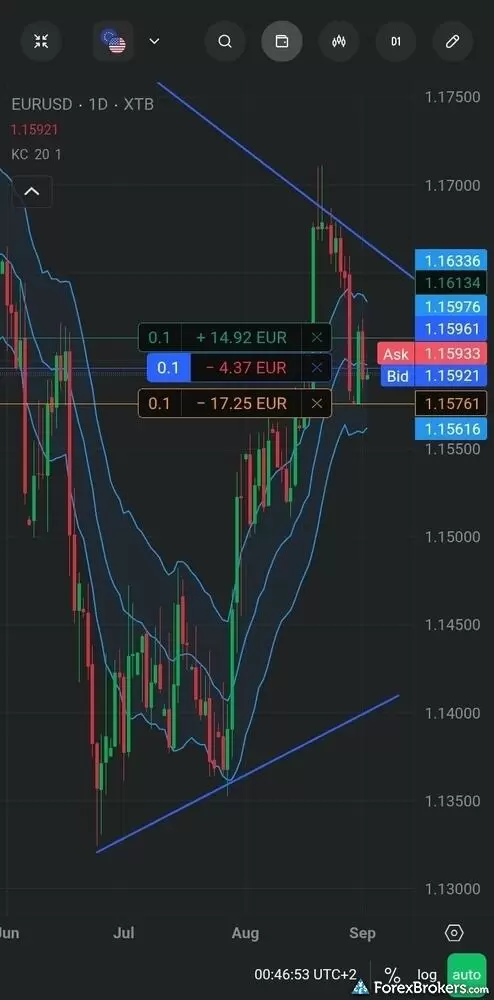
The XTB mobile trading app delivers a technical charting interface that supports direct interaction with open market orders. Displayed on a daily EUR/USD candlestick chart with applied Keltner Channels and custom trend lines, the screen integrates floating position tags directly along the price scale. Traders can view real-time profit and loss calculations in euros, track live bid and ask levels, and manage or close trades directly from the chart viewport.
Order management: Pre-trade drag-to-modify is the highlight, a feature I've seen at only a few brokers, such as Exness. You drag a yellow line on the mini chart to set your entry, then drag your stop-loss and take-profit into place. Beyond expiring pending orders, I found no GSLOs or trailing stops. A "close all" button can target only profitable or only losing trades. Dragging a stop shows its distance in pips and percent, with no IG-style risk/reward ratio. Price alerts cover the basics well. Category leaders offer more sophisticated ones.
Discovery: This is the app's strongest area, in my view. Dynamic watchlists such as Hot, Sentiments, and Popular double as screeners, with filters to scan across asset classes and sort winners or losers from daily to quarterly. Tapping the search bar opens the full product library by category, with an asset count for each.
Special tools: Mobile reporting covers closed positions and cash operations, without the web app's average gain and loss stats. You can switch between live and demo accounts from within the app. I found no AI tools, trading signals, or copy trading. After a recent upgrade, XTB requires you to register through the mobile app and open a live account before you can create a demo or use the full web platform.
Available mobile platforms and tools
In our hands-on testing, we found 104 built-in charting indicators alongside pre-trade drag-to-modify orders, though the app lacks trading signals and copy trading.
| Feature |
XTB
|
|---|---|
| Proprietary Mobile Trading App | Yes |
| Android App | Yes |
| Apple iOS App | Yes |
| Mobile Price Alerts | Yes |
| Mobile Charting - Draw Trendlines | Yes |
| Mobile Charting - Trendlines Autosave | Yes |
| Mobile Charting - Indicators / Studies | 104 |
| Mobile Charting - Indicators Autosave | Yes |
| Mobile Watchlists - Column Filtering | Yes |
| Mobile Watchlists - Column Customization | |
| Mobile Watchlists - Create & Manage | Yes |
| Mobile Watchlists - Syncing | Yes |
Trading platforms
XTB runs everything through its proprietary xStation 5 platform on web and mobile. MetaTrader has been discontinued, and cTrader is not offered. xStation 5 uses TradingView charts, but you cannot connect an XTB account to TradingView itself. I found the modular design rich and uncluttered.
Modular layout: A sidebar switches between Home, Investment Plans, and My Trades, where I spent most of my time. Closing every module leaves a blank canvas for Market Watch, News, Calendar, Market Analysis, Education, or Account History in a one-, two-, or three-container layout. The approach resembles CMC Markets, FOREX.com, and IG. My setup took a few minutes and saved automatically.
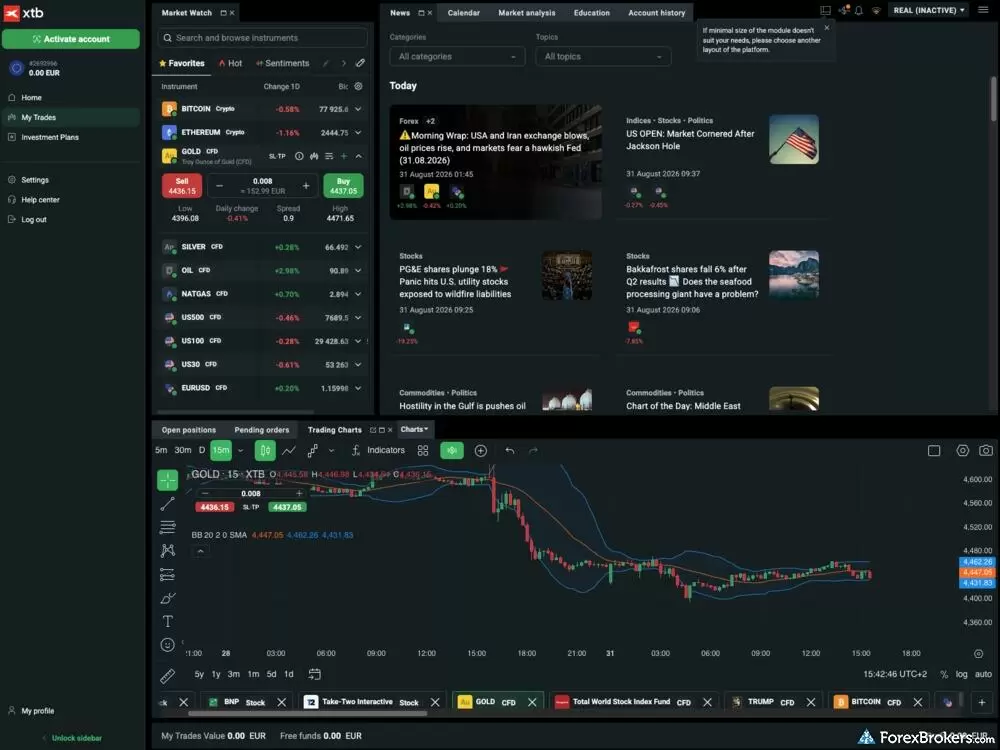
The XTB web platform presents a modular workspace that combines live market monitoring, financial news feeds, and charting capabilities in a unified dark theme. The upper-left panel houses a Market Watch list with an integrated quick execution ticket displaying spread data, volume sizing, and one-click execution buttons. Adjacent modules feature a curated financial news board with daily macroeconomic updates, while the lower segment anchors a full-featured candlestick chart complete with technical overlays and multi-instrument tabs.
Charting with drag-to-modify: I counted 92 indicators and more than 80 drawing tools, both above what most brokers carry. The drawing set includes Elliott Waves, Ghost Feed projections, and anchored VWAP. Charts resize easily, and right-clicking opens order shortcuts. As on mobile, pre-trade drag-to-modify lets you set a pending order's entry, stop-loss, and take-profit on the chart, much like Exness. Timeframes are limited to nine.
Flexible order entry: Orders can go through a simplified ticket in the watchlist, the chart, or the full ticket. The full ticket shows the spread and required margin, sets expiration dates, and adds a trailing stop with a checkbox. I like that the stop-loss and take-profit fields accept pips, base currency, or a percentage without toggling. Market Depth appears once toggled on.
Finding trade ideas: I could filter each watchlist like a scanner, including the Sentiments list of client positioning. The Stocks Scanner screens by country, industry, P/E ratio, dividend yield, return on earnings, beta, and nine other criteria. It covers stocks only. The currency Heatmap color-codes each currency's move against the majors from bearish red to bullish green.
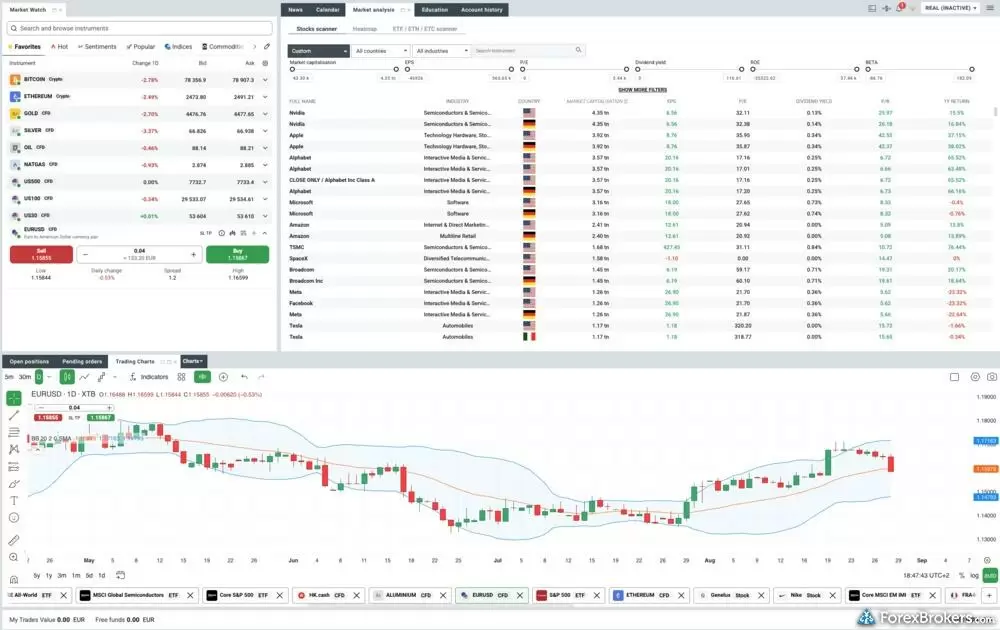
The xStation 5 web interface incorporates a dedicated Stock Scanner module alongside traditional charting and market quote panels. The screener tool enables users to filter equities using fundamental metrics including market capitalization, price-to-earnings ratios, dividend yields, return on equity, and beta across global regions. The bottom panel runs a concurrent daily candlestick chart for technical evaluation, allowing traders to review asset fundamentals and price trends simultaneously.
What's missing: XTB has no backtesting, trading journal, copy trading, or AI tooling beyond a support chatbot. Performance analytics cover only your trade history, though I could plot a closed trade on a chart for review. Algorithmic trading and API access are not supported. Automated traders will do better elsewhere.
Available trading platforms and features
Our platform walkthrough verified 92 charting indicators, trading directly from the chart, and client sentiment data, though XTB doesn't offer MetaTrader, cTrader, or algorithmic trading.
| Feature |
XTB
|
|---|---|
| Desktop Platform (Windows) | No |
| Desktop Platform (Mac) | No |
| MetaTrader 4 (MT4) | No |
| MetaTrader 5 (MT5) | No |
| FX Blue | No |
| Proprietary Desktop Trading Platform | Yes |
| Proprietary Web Trading Platform | Yes |
| TradingView | No |
| cTrader | No |
| Algorithmic trading | No |
| API Access | No |
| Charts can be saved | Yes |
| Client sentiment data | Yes |
| Trading Signals | No |
| Price Alerts | Yes |
| Virtual Private Server (VPS) | No |
| Virtual Trading (Demo) | Yes |
| Charting - Indicators / Studies (Total) | 92 |
| Charting - Trade From Chart | Yes |
| Charting - TradingView | Yes |
Available order types
We verified the availability of market, limit, stop, and trailing stop orders directly within the trade ticket. OCO, OTO, and guaranteed stop-loss orders are not supported.
| Feature |
XTB
|
|---|---|
| Order Type - Market | Yes |
| Order Type - Limit | Yes |
| Order Type - Stop | Yes |
| Order Type - Trailing Stop | Yes |
| Order Type - OCO | No |
| Order Type - OTO | No |
| Order Type - GSLO | No |
Research
XTB's research centers on in-house market briefings, and I spent most of my time in its news feed inside the web and mobile apps. XTB publishes more than half a dozen articles a day across forex, stocks, commodities, crypto, indices, politics, and technology. Icons on each article show the affected assets and their percentage change, such as AU for gold. Analyst pieces pair technical analysis with integrated charts, and the writing was consistently high quality. I still felt something was missing. XTB carries no headlines from Dow Jones, Reuters, or Bloomberg, and third-party tools from Trading Central, Autochartist, TipRanks, and Acuity are absent.
Economic calendar with event history: I found the calendar sleek and easy to navigate. You can filter by date, country, and severity, chart each event's history over a custom date range, and read a short explainer on what the event measures. Event alerts, as CMC Markets offers, would improve it.
Stock fundamentals and macro recaps: Tapping a stock's information icon opens a Financials tab with a good balance of key facts, valuation metrics, and financial strength. XTB has no dedicated earnings calendar. Macro coverage comes mostly as two-paragraph recaps of central bank decisions and other calendar events. These are useful but less detailed than Saxo's fundamental analysis. I'd add a longer-term monthly or quarterly outlook.
Following markets on video: XTB posts videos daily on YouTube, and I found its Market Updates series professionally made. The U.K. channel covers English content and is ramping up production. The XTB International channel holds 26 videos and hasn't been updated in more than five years. XTB TALKS podcasts run almost daily, mostly in languages such as Czech and Portuguese. Livestreams include NFP Live around each payrolls report and nearly a dozen Live Market News events in 2026 as of September.
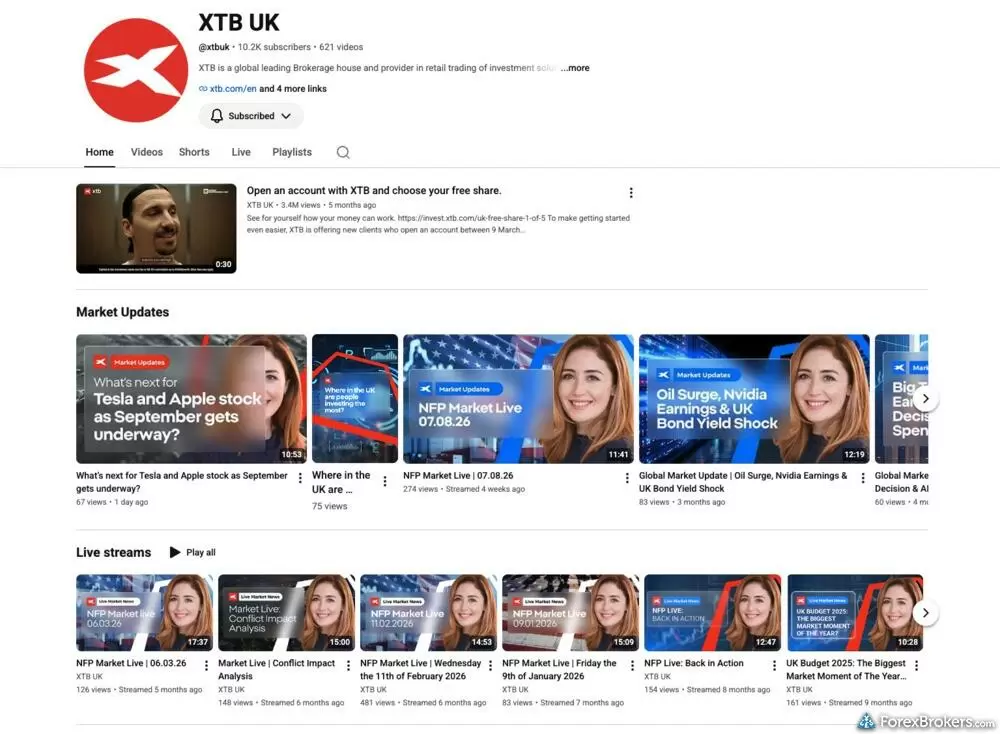
The XTB UK video hub aggregates regular market research updates, live streams, and educational broadcasts produced by internal market analysts. The channel features categorized playlists covering immediate market developments, macroeconomic events such as US Non-Farm Payroll (NFP) releases, central bank rate decisions, and sector-specific equity earnings.
Gauging client sentiment: Client sentiment, once shown beside each asset, now has its own Sentiments watchlist. I'd rather see it on the chart. I was glad to find it, as some brokers don't show it at all. Social sentiment, AI sentiment, and trading signals are not available.
Available research tools
Our analysis highlights XTB's in-house news with integrated charts, daily market videos, and an interactive economic calendar, though the platform lacks Trading Central, Autochartist, and newswire headlines from providers such as Reuters.
| Feature |
XTB
|
|---|---|
| Forex News (Top-Tier Sources) | No |
| Daily Market Commentary (Articles) | Yes |
| Daily Market Commentary (Videos) | Yes |
| Economic Calendar | Yes |
| Research - Earnings Calendar | No |
| Acuity Trading | No |
| Autochartist | No |
| TipRanks | No |
| Trading Central | No |
| Mobile Research - News | Yes |
| Mobile Research - Economic Calendar | Yes |
| Mobile Research - Market Movers | Yes |
Education
XTB's education suits beginners, and I'd start with what's built into the platform. The Education tab holds guides, articles, and several eBooks, alongside a Knowledge Base that mixes support answers with educational topics. In-house analysts and third parties also produce a large video archive, including past webinars and the Find Your Edge playlist on YouTube. The broker lacks a curriculum, with no dedicated courses, university-style learning paths, quizzes, or progress tracking. Interactive Brokers, AvaTrade, and eToro all do better here.

The XTB educational portal features a structured Knowledge Base organized into searchable categories across fundamental and technical analysis, asset classes, and platform tutorials. The directory displays filterable topic tags such as Forex, Commodities, Indices, Technical Analysis, and CFDs. Each article presents estimated reading times alongside introductory summaries, guiding learners through technical indicators like Fibonacci retracements and common chart patterns to foundational market dynamics.
Tutorials built into the platform: Unlike many brokers, XTB integrates tutorials into its web and mobile apps. In the xStation 5 Education tab, I found four videos in the XTB Tutorial playlist and eight in the XTB Trading Academy playlist, with topics including trade placement and pending orders. I liked the roughly six-minute length. The narration was monotone and sounded like an AI voiceover. A "Get to know the trading calculator" walkthrough by a real person was easier for me to follow.
Learning from the watchlist and ticket: Each watchlist item has an asset icon, such as a gold bar for XAU/USD, plus an information icon that opens the contract specifications with a 50- to 100-word explanation of the asset. Beginners will appreciate that context. The order ticket labels each field and shows pip value, commission, daily swap, contract value, and your stop-loss and take-profit in pips, currency, and percent. Enter an invalid take-profit and you get an audio chime and a specific fix: "TP Pips: The value must be between x and y." In my view, a few more information icons would help newer traders.
Quick how-tos and articles: Dedicated YouTube playlists show how to use mobile app tools, including charts and the economic calendar, and the videos are easy to digest at a few minutes each. The Knowledge Base has a Platform tag with guides on setting price alerts and calculating swap charges. Most in-app lessons are tappable and easy to reach. Beyond asset pages for stocks, ETFs, indices, commodities, forex, and CFDs, I'd like to see more educational articles. Crypto education is not available.
Available educational offerings
We found beginner and advanced trading videos, webinars, and education areas on both the website and the mobile app. Structured courses, quizzes, and crypto education are absent.
| Feature |
XTB
|
|---|---|
| Education (Forex) | Yes |
| Education (CFDs) | Yes |
| Education (Crypto) | No |
| Education (Stocks) | Yes |
| Education Area (Website) | Yes |
| Education Area (Mobile App) | Yes |
| Webinars | Yes |
| Videos - Beginner Trading Videos | Yes |
| Videos - Advanced Trading Videos | Yes |
Final thoughts
XTB makes it easy for beginners and multi-asset traders to trade forex and CFDs alongside cash equities and crypto from one well-built proprietary platform. XTB earned Best in Class for Beginners in our 2026 Annual Awards, well-deserved given the contextual explainers and built-in tutorials I tested in xStation 5. Its in-house news and analysis are consistently high quality, too.
Unfortunately, the loss of MetaTrader, the lack of algorithmic trading and volume discounts, and the absence of structured courses and third-party research tools prevent it from reaching the top of the category. For newer traders looking for a clean, tappable platform and a broad market lineup, XTB is a strong choice, but if you're focused on automated strategies or high-volume pricing, I'd recommend exploring other alternatives.
XTB's Star Ratings
| Feature |
XTB
|
|---|---|
| Overall Rating |
|
| Trust Score | 96 |
| Range of Investments |
|
| Trading Fees |
|
| Trading Platforms |
|
| Research |
|
| Mobile Trading |
|
| Education |
|
Our testing
Why you should trust us
Steven Hatzakis is a well-known finance writer, with 25+ years of experience in the foreign exchange and financial markets. He is the Global Director of Online Broker Research for Reink Media Group, leading research efforts for ForexBrokers.com since 2016. Steven is an expert writer and researcher who has published over 1,000 articles covering the foreign exchange markets and cryptocurrency industries. He has served as a registered commodity futures representative for domestic and internationally-regulated brokerages. Steven holds a Series III license in the US as a Commodity Trading Advisor (CTA).
All content on ForexBrokers.com is handwritten by a writer, fact-checked by a member of our research team, and edited and published by an editor. Our ratings, rankings, and opinions are entirely our own, and the result of our extensive research and decades of collective experience covering the forex industry.
Ultimately, our rigorous data validation process yields an error rate of less than .1% each year, providing site visitors with quality data they can trust. Click here to learn more about how we test.
How we tested
At ForexBrokers.com, our online broker reviews are based on our collected quantitative data as well as the observations and qualified opinions of our expert researchers. Each year we publish tens of thousands of words of research on the top forex brokers and monitor dozens of international regulator agencies (read more about how we calculate Trust Score here).
Mobile testing is conducted on modern devices that run the most up-to-date operating systems available:
- For Apple, we use MacBook Pro laptops running the latest, and the iPhone XS running the latest version of iOS.
- For Android, we use the Samsung Galaxy S20 and Samsung Galaxy S23 Ultra devices running the latest Android OS.
All websites and web-based platforms are tested using the latest version of the Google Chrome browser.
Our researchers thoroughly test a wide range of key features, such as the availability and quality of watch lists, mobile charting, real-time and streaming quotes, and educational resources – among other important variables. We also evaluate the overall design of the mobile experience, and look for a fluid user experience moving between mobile and desktop platforms.
Forex Risk Disclaimer
There is a very high degree of risk involved in trading securities. With respect to margin-based foreign exchange trading, off-exchange derivatives, and cryptocurrencies, there is considerable exposure to risk, including but not limited to, leverage, creditworthiness, limited regulatory protection and market volatility that may substantially affect the price, or liquidity of a currency or related instrument. It should not be assumed that the methods, techniques, or indicators presented in these products will be profitable, or that they will not result in losses. Read more on forex trading risks.
Read next
- Best Forex Trading Apps for 2026
- Best MetaTrader 4 (MT4) Brokers for 2026
- International Forex Brokers Search
- Best Forex Brokers for 2026
- Best Brokers for TradingView for 2026
- Best Low Spread Forex Brokers for 2026
- Best Forex Brokers for Beginners of 2026
- Best Copy Trading Platforms for 2026
- Compare Forex Brokers
More Forex Guides
- Best CFD Trading Platforms for 2026
- Best High-Leverage Forex Brokers for 2026
- Best Forex Options Brokers for 2026
- Best Forex Day Trading Platforms for 2026
- Best Free Forex Trading Courses for 2026
- Best Forex Signal Providers for 2026
- Best Crypto Brokers for 2026
- Best Trading Platforms for Mac Users of 2026
- Best Algo Trading Software for 2026
- Best Brokers for TradingView for 2026
- Best High-Frequency Trading Software for 2026
- Best Brokers that Use TipRanks in 2026
- Best Forex Brokers with APIs for 2026
- Best MetaTrader 5 (MT5) Forex Brokers for 2026
- Best PayPal Forex Brokers for 2026
- Best Forex Demo Accounts for 2026
- Best Market Maker Brokers in 2026
- Best MetaTrader 4 (MT4) Brokers for 2026
Popular Forex Broker Reviews
A trusted global brand, OANDA stands out for its reputation and quality market research.
Steven Hatzakis May 04, 2026
Interactive Brokers forex review: I tested IBKR's spreads, commissions, and platforms in 2026. More than 100 pairs, but a $2 minimum commission per order.
Steven Hatzakis September 28, 2026
Formerly named City Index, StoneX Trading is a trusted brand known for its versatile trading platforms, excellent mobile app, and diverse market research.
Steven Hatzakis August 28, 2026
FxPro competes among the top MetaTrader brokers, featuring multiple account options and various execution methods.
Steven Hatzakis October 07, 2026
Plus500 is a trusted global brand that offers an easy-to-use trading platform for online traders, alongside access to share trading and selection of CFDs.
Steven Hatzakis July 22, 2026
Saxo is an exclusive multi-asset broker with brilliant research and a superb trading platform experience, along with an extensive selection of over 71,000 securities.
Steven Hatzakis September 10, 2026
Our expert Tickmill review tests the broker's Raw account pricing, spreads, MetaTrader platforms, and tools to help you decide if it fits your trading in 2026.
Steven Hatzakis May 22, 2026
IG offers the ultimate comprehensive trading package, featuring excellent trading and research tools, and industry-leading education.
Steven Hatzakis August 04, 2026
Best known for its mobile trading app, Trading 212 offers an easy-to-use trading platform suite for CFD and share trading.
Steven Hatzakis May 14, 2026
CMC Markets review 2026: 303 forex pairs (the most we track), 21,000+ CFDs, and top-tier charting. See where its spreads and education fall short.
Steven Hatzakis October 09, 2026
eToro is a winner for its easy-to-use copy-trading platform, where traders can copy the trades of experienced investors – or receive exclusive perks for sharing.
Steven Hatzakis August 04, 2026
ACY Securities is a MetaTrader-only broker with a reasonable range of markets and a balanced account offering.
Steven Hatzakis May 04, 2026
IC Markets is built for algorithmic and cost-sensitive forex traders: 0.72 pips all-in on EUR/USD and free colocated VPS, but no platform of its own.
Steven Hatzakis August 31, 2026
Our 2026 HFM (HF Markets) review covers MT4, MT5, copy trading, the 344-symbol product offering, and 1.8-pip EUR/USD spreads, based on hands-on testing.
Steven Hatzakis September 30, 2026
FP Markets shines as a low-cost broker for trading forex and CFDs – as long as you use the MetaTrader platform.
Steven Hatzakis October 08, 2026
Is Capital.com worth it in 2026? Our expert review covers 450+ crypto CFDs, a 0.7-pip EUR/USD spread, commission-free pricing, and platform quality.
Steven Hatzakis October 15, 2026
For traders who appreciate advanced trading tools and quality market research, FXCM is a winner, especially for algorithmic trading.
Steven Hatzakis October 09, 2026
Traders choose Admiral Markets (Admirals) for its excellent investor education and advanced MetaTrader features.
Steven Hatzakis May 04, 2026
Eightcap review 2026: low-cost forex and CFD trading on TradingView, MetaTrader, and TradeLocker, with a deep crypto CFD lineup. Read our expert verdict.
Steven Hatzakis October 05, 2026
In my 2026 Exness review, I tested the Exness Terminal, MT4, and MT5 across 78 forex pairs. See my verdict on costs, research, and product range.
Steven Hatzakis May 27, 2026
Check out our review of Charles Schwab, a highly trusted, multi-asset broker catering to U.S.-based and international forex traders.
Steven Hatzakis May 04, 2026
FOREX.com is a trusted brand that delivers an excellent trading experience for forex and CFDs traders across the globe.
Steven Hatzakis May 04, 2026
Traders choose Swissquote for its quality research and vast multi-asset offering.
Steven Hatzakis May 04, 2026
AvaTrade is a trusted global brand best known for offering an extensive selection of trading platforms for forex and CFD traders.
Steven Hatzakis May 04, 2026
Pepperstone offers a growing range of tradeable markets, good-quality research, and support for multiple social copy trading platforms.
Steven Hatzakis October 07, 2026
Octa offers a basic, low-cost MetaTrader platform experience alongside its social copy-trading platform.
Steven Hatzakis May 04, 2026About XTB
XTB was founded in Poland in 2002 under the name X-Trade Brokers and was rebranded as XTB in 2004. Since then, it has grown into a global multi-asset broker, expanding beyond forex and CFDs to offer cash equities and more than 10,000 tradable symbols.
As of September 2026, XTB has a market capitalization of over PLN 21.46 billion (approximately $5.79 billion) and is publicly traded on the Warsaw Stock Exchange (WSE: XTB.PL). XTB reported serving over 2.1 million clients globally as of its latest half year (H1) report for 2026, with more than 50 billion Polish Zloty (PLN) or roughly $13.48 billion USD in client assets.
XTB maintains offices in over a dozen countries across Europe and is regulated by multiple authorities, including the U.K.’s FCA, Poland’s KNF, Germany’s BaFin, Spain’s CNMV, France’s AMF, Cyprus’ CySEC, the U.A.E.’s DFSA, South Africa’s FSCA, the FSA of Seychelles, and Belize’s FSC, and the CMF in Chile, and most recently the OJK in Indonesia. XTB also holds indemnity insurance through its Belize entity of up to $1 million per client claim and $5 million in aggregate.
About the Editorial Team
Steven Hatzakis is the Global Director of Online Broker Research for ForexBrokers.com. Steven previously served as an Editor for Finance Magnates, where he authored over 1,000 published articles about the online finance industry. A forex industry expert and an active fintech and crypto researcher, Steven advises blockchain companies at the board level and holds a Series III license in the U.S. as a Commodity Trading Advisor (CTA).
John Bringans is the Managing Editor at ForexBrokers.com. An experienced media professional, John has a decade of editorial experience with a background that includes key leadership roles at global newsroom outlets. He holds a Bachelor’s Degree in English Literature from San Francisco State University, and conducts research on forex and the financial services industry while assisting in the production of content.
Blain Reinkensmeyer has 20 years of trading experience with over 2,500 trades placed during that time. He heads research for all U.S.-based brokerages on StockBrokers.com and is respected by executives as the leading expert covering the online broker industry. Blain’s insights have been featured in the New York Times, Wall Street Journal, Forbes, and the Chicago Tribune, among other media outlets.