 IG
IG FOREX.com
 CMC Markets
 XTB
XTB eToro
eToro Capital.com
 AvaTrade
 Pepperstone
 FP Markets
 Tickmill
Capital.com Review

Written by Steven Hatzakis
Director of Online Broker Research

Edited by Jeff Anberg
Senior Editor

Fact-checked by Blain Reinkensmeyer
Managing Partner
Steven HatzakisDirector of Online Broker Research
Steven Hatzakis is the Global Director of Online Broker Research for ForexBrokers.com. He is a forex industry expert and an active fintech and crypto researcher.


CFDs are complex instruments and come with a high risk of losing money rapidly due to leverage. 65%-89% of retail CFD accounts lose money when trading CFDs with this provider. You should consider whether you understand how CFDs work and whether you can afford to take the high risk of losing your money.
Capital.com is best suited for active retail traders and crypto-focused traders seeking broad market access at competitive pricing. It offers a commission-free structure, a low average spread, and the largest crypto CFD library among any forex broker we review, backed by well-built proprietary web and mobile apps. However, the broker does fall short in a few specific areas. There's no Trading Central or Autochartist integration for research, no native copy trading, and no commission-based account for spread-sensitive strategies.
Overall, traders prioritizing low costs, crypto access, and a capable multi-platform setup will find Capital.com well-equipped. However, if advanced research or a commission-based account is a priority for you, I'd suggest one of the other brokers we review, like Saxo or IG.
-
Minimum Deposit:
$20 -
Trust Score:
89 -
Tradeable Symbols (Total):
5585
| Range of Investments | |
| Trading Fees | |
| Trading Platforms | |
| Research | |
| Mobile Trading | |
| Education |
Check out ForexBrokers.com's picks for the best forex brokers in 2026.
| Most Cryptos Award | Winner |
| 2026 | #12 |
| 2025 | #10 |
| 2024 | #11 |
| 2023 | #14 |
| 2022 | #15 |
 Why you can trust us
Led by Steven Hatzakis, Global Director of Online Broker Research, the ForexBrokers.com research team collects and audits data across more than 100 variables. We analyze key tools and features important to forex and CFD traders and collect data on commissions, spreads, and fees across the industry to help you find the best broker for your needs.
We also review each broker’s regulatory status; this research helps us determine whether you should trust the broker to keep your money safe. As part of this effort, we track 100+ international regulatory agencies to power our proprietary Trust Score rating system.
Our researchers open personal brokerage accounts and test all available platforms on desktop, web, and mobile for each broker reviewed on ForexBrokers.com. Learn more about how we test.
Can I open an account with this broker?
Use our country selector tool to view available brokers in your country.
Table of Contents
Capital.com pros and cons
PROS
- Commission-free pricing with a 0.7-pip EUR/USD typical average spread.
- 450+ crypto CFDs, the most of any forex broker we review.
- Polished proprietary apps with TradingView charts and drag-to-modify order management.
CONS
- No Trading Central or Autochartist integration.
- No native copy trading or proprietary trading signals.
- No commission-based account; all retail accounts are spread-only.
My top takeaways for Capital.com in 2026:
- Average EUR/USD spread of 0.7 pips on the standard account, commission-free across all platforms.
- 5,585 tradeable symbols, including 450 cryptocurrency CFDs, the largest crypto library of any forex broker we review.
- Active trader rebate program returns 5% to 20% of monthly spread costs, capped at $10,000 per month.
- Drag-to-modify stop-loss and take-profit is supported on the web app but not yet on the mobile app.
- MetaTrader 5 now available in select global jurisdictions, but not yet offered to U.K. clients.
- I opened, funded, and placed my first live trade on Capital.com in one session with same-day verification, one of the more straightforward onboarding experiences I've tested. See my full account opening and funding walkthrough for the step-by-step.
Trust Score
Developed by ForexBrokers.com and in use for nearly 10 years, Trust Score is a proprietary rating system powered by a range of unique quantitative and qualitative metrics, including each company’s number of regulatory licenses. Trust Scores range from 1 to 99 (the higher a broker’s rating, the better). Learn more.
Is Capital.com safe?

Capital.com is considered Trusted, with an overall Trust Score of 89 out of 99. Capital.com is not publicly traded and does not operate a bank, but is authorised by three Tier-1 regulators (Highly Trusted), three Tier-2 regulators (Trusted), zero Tier-3 regulators (Average Risk), and two Tier-4 regulators (High Risk). Capital.com is authorised by the following Tier-1 regulators: Australian Securities & Investment Commission (ASIC), Financial Conduct Authority (FCA), and regulated in the European Union via the MiFID passporting system . Traders can review Capital.com's full entity-by-entity regulatory structure on the broker's regulations page.
| Feature |
 Capital.com Capital.com
|
|---|---|
| Year Founded | 2016 |
| Publicly Traded (Listed) | No |
| Bank | No |
| Tier-1 Licenses | 3 |
| Tier-2 Licenses | 3 |
| Tier-3 Licenses | 0 |
| Tier-4 Licenses | 2 |
Range of investments
Capital.com's range of investments is extensive. I tested across its full asset menu and counted 5,585 tradeable symbols: 125 forex pairs, 450 cryptocurrency CFDs available for 24/7 trading, share CFDs across the U.S., U.K., Germany, France, Japan, Australia, and more than a dozen other global exchanges, plus indices, commodities, ETFs, thematic index CFDs, and Knockout options as OTC limited-risk alternatives. However, exchange-traded futures and traditional listed options are not available.
Cryptocurrency: Capital.com offers 450 cryptocurrency CFDs, a large number that won our Annual Award in 2026 for #1 Most Cryptos. Note that crypto CFDs are not available to retail traders from any broker's U.K. entity, per FCA restriction.
Share CFDs and 1X: Direct Market Access (DMA) and exchange-traded equities are not available at Capital.com. Cash equities have been replaced by 1X, the broker's non-leveraged share CFD, which carries no overnight funding cost for long positions but does not convey the rights of underlying share ownership. Position sizes on 1X instruments are capped at £20,000. One minor annoyance worth noting is that the platform does not allow filtering by sub-exchange within a country, making it harder to distinguish NASDAQ from NYSE listings on the U.S. tab.
Leverage: Maximum global leverage is 1:500, though availability depends on jurisdiction, account classification, and asset class. Retail clients under the FCA, CySEC, and ASIC are capped at 1:30 for major forex pairs. Clients regulated by the SCB, SCA, or CMA can access up to 1:500 on forex, but with fewer retail protections than Tier-1-regulated accounts. Leverage limits drop significantly for equities, indices, commodities, and crypto CFDs relative to major forex pairs.
Available investment products
During our audit, we verified access to 5,585 tradeable symbols, including 125 forex pairs and 450 cryptocurrency CFDs, alongside CFDs spanning shares, indices, commodities, ETFs, and Knockout options.
| Feature |
Capital.com
|
|---|---|
| Tradeable Symbols (Total) | 5585 |
| Forex Pairs (Total) | 125 |
| Forex trading (Spot) | No |
| Forex trading (CFDs) | Yes |
| Forex trading (Options) | No |
| Forex trading (Futures) | No |
| Forex trading (Crypto) | Yes |
| Commodities: Agriculturals | Yes |
| Commodities: Oil | Yes |
| Commodities: Gold | Yes |
| Commodities: Silver | Yes |
| U.S. Stocks (Shares) | No |
| U.S. Stocks (CFDs) | Yes |
| U.S. Stocks (Crypto) | No |
| Global Stocks (Non-U.S. Shares) | No |
| Global Stocks (Non-U.S. CFDs) | Yes |
| 24/5 Trading (U.S. Stocks - Shares) | No |
| 24/5 Trading (U.S. Stocks - CFDs) | Yes |
| 24/7 Trading (Crypto) | Yes |
| Prediction markets | No |
| Copy Trading | No |
| Bitcoin (BTC) | Yes |
| Ethereum (ETH) | Yes |
| Cryptocurrencies (Total) | 470 |
| Cryptocurrency (Underlying) | No |
| Cryptocurrency (CFDs) | Yes |
| Cryptocurrency (Futures) | No |
| Disclaimers | Note: Crypto CFDs are not available to retail traders from any broker's U.K. entity, nor to U.K. residents (except to Professional clients). |
Available funding options
Our tests confirm support for bank wire, debit and credit cards, PayPal, Skrill, Neteller, Apple Pay, Google Pay, and cryptocurrency deposits and withdrawals; non-wire bank transfer is not currently available.
| Feature |
Capital.com
|
|---|---|
| Debit card (Deposit/withdraw) | Yes |
| Credit card (Deposit/withdraw) | Yes |
| Bank Wire (Deposit/Withdraw) | Yes |
| Non-wire bank transfer (Deposit/Withdraw) | No |
| Apple Pay (Deposit/Withdraw) | Yes |
| Google Pay (Deposit/Withdraw) | Yes |
| Crypto (Deposit/withdraw) | Yes |
| Cryptocurrency (Wallet transfers) | Yes |
| PayPal (Deposit/Withdraw) | Yes |
| Skrill (Deposit/Withdraw) | Yes |
| Neteller (Deposit/Withdraw) | Yes |
Capital.com fees
Capital.com's pricing is extremely competitive. The broker runs a universal account model with one retail account type and a separate professional designation for qualifying traders. All accounts are commission-free, and during my 2026 testing the average EUR/USD spread came in at about 0.7 pips, well below the industry average. Check out my full explainer to Capital.com's fees and commissions for a more in-depth look.
Active trader rebate: Capital.com recently launched a tiered rebate program that returns a portion of monthly spread costs based on trading volume. Tier 1 (up to $50 million monthly) returns 5%; Tier 2 ($50 million to $150 million) returns 10%; Tier 3 (over $150 million) returns 20%, capped at $10,000 per month. For most retail traders, the 5% tier is the realistic entry point, but the program meaningfully rewards higher-volume activity. Qualifying volume thresholds vary by region, asset class, and instrument type; CFD and spread betting volumes are counted separately from MetaTrader volumes.
Overnight financing: Capital.com applies overnight funding charges to leveraged CFD positions held past the daily close, a standard practice across the industry. The 1X unleveraged share CFD is an exception with no overnight carry cost for long positions, making it more practical for traders who want share exposure without daily financing drag. Rates are listed transparently within each instrument's contract specifications on the platform.
Non-trading fees: No inactivity fee applies, which differentiates Capital.com from brokers that charge annoying account fees after extended inactivity. The broker does not charge international wire fees, though your bank may apply its own transfer costs. The minimum withdrawal is $50 or currency equivalent.
Trading fees
In our live pricing analysis, we confirmed an average EUR/USD spread of 0.7 pips on the standard account alongside a commission-free structure across all platforms, with standard overnight funding applied to leveraged CFD positions and no inactivity fees.
| Feature |
Capital.com
|
|---|---|
| Average spread (EUR/USD) - Spread-only account | 0.7 |
| Average spread (EUR/USD) - Raw spread account | N/A |
| Commission per trade (EUR/USD) - Raw spread account | N/A |
| All-in Cost EUR/USD - Raw spread account | N/A |
| Inactivity Fee | No |
| International Wire Fee | $0 |
| Minimum Deposit | $20 |
Account types
We confirmed a single universal retail account, a professional designation for qualifying traders, and an active trader rebate program with three volume-based tiers; Islamic accounts are not available.
| Feature |
Capital.com
|
|---|---|
| Variable Spreads | Yes |
| Fixed Spreads | No |
| Active Trader Program | Yes |
| VIP/Premium Account | Yes |
| Professional Account | Yes |
| Islamic Account | No |
Mobile trading apps
Capital.com's mobile app runs on a clean 5-tab bottom navigation (Home, Watchlist, Portfolio, Search, and News) that makes it straightforward to move between trade execution, research, and portfolio management without hunting through nested menus. One-click trading is configurable from settings, which means entering a position from the favorites list can take as few as two taps. The broker also makes the MetaTrader and TradingView mobile apps available, giving traders two of the most popular third-party mobile platforms alongside its flagship app.
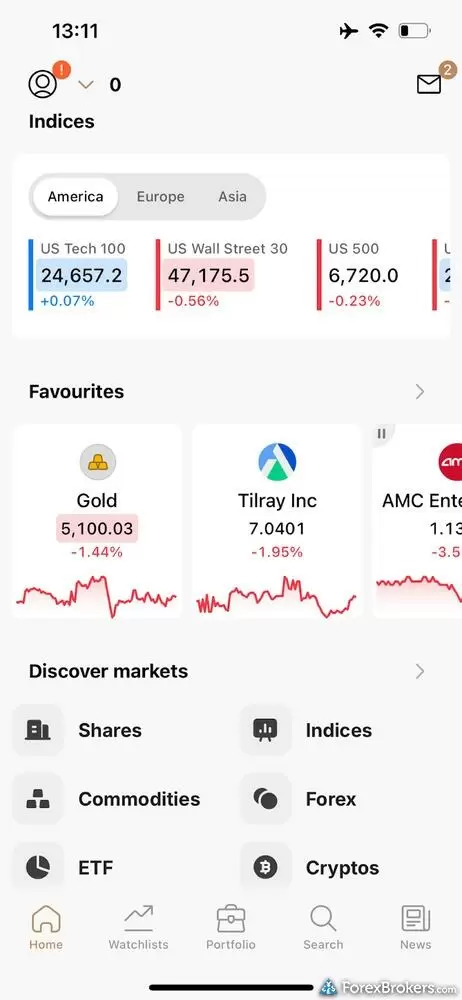
The Capital.com mobile app presents a remarkably clean and intuitive market overview, shown here in its crisp light theme. The Home tab effortlessly organizes the trading day by highlighting major indices like the US Tech 100 alongside a customizable carousel of your favorite assets, complete with quick-glance sparklines for tracking micro-trends. Below, the "Discover markets" section offers seamless navigation into diverse asset classes, from forex to equities, ensuring retail traders can easily build and monitor a diversified portfolio on the go.
Charting: Mobile charts are powered by TradingView, giving you access to 30 built-in indicators, drawing tools including trend lines and Fibonacci tools, and 23 timeframes ranging from 1-second ticks to monthly charts. The 1-second interval is a premium feature rarely offered on mobile. By comparison, on the standalone TradingView platform, it sits behind a paid subscription. There is one notable feature gap, however, since drag-to-modify for stop-loss and take-profit orders are not yet supported on mobile, even though TradingView natively supports it. Chart indicator templates saved on mobile can be loaded on the web platform, though trendlines drawn on the chart do not currently sync cross-device.
Order management: The order ticket supports stop-loss and take-profit placement by price level, dollar amount, or percentage, the same risk-management flexibility I expect from the best mobile platforms. Trailing stops and Guaranteed Stop-Loss Orders (GSLOs) are available, but OCO orders are not. A close-all positions button in the portfolio view is a practical feature for active traders who need to exit quickly, and the portfolio tab supports sorting open positions by P&L, trade size, market type, or alphabetically.
Steven's expert take
"With one-click trading enabled, buying a Gold CFD from the favorites list takes just two taps (select asset, click buy) plus dismissing the confirmation. It's one of the more efficient trade-entry flows I've tested across mobile platforms."
Steven Hatzakis
Director of Online Broker Research
Available mobile platforms and tools
In our hands-on testing, we found 30 built-in charting indicators in the proprietary app alongside TradingView's drawing tools and 23 timeframes, including 1-second intervals, though drag-to-modify order placement on the chart is not yet supported on mobile.
| Feature |
Capital.com
|
|---|---|
| Proprietary Mobile Trading App | Yes |
| Android App | Yes |
| Apple iOS App | Yes |
| Mobile Price Alerts | Yes |
| Mobile Charting - Draw Trendlines | Yes |
| Mobile Charting - Trendlines Autosave | Yes |
| Mobile Charting - Indicators / Studies | 30 |
| Mobile Charting - Indicators Autosave | No |
| Mobile Watchlists - Column Filtering | Yes |
| Mobile Watchlists - Column Customization | No |
| Mobile Watchlists - Create & Manage | No |
| Mobile Watchlists - Syncing | No |
Trading platforms
Capital.com offers four platform options: the proprietary web app, MetaTrader 4, MetaTrader 5, and TradingView as a standalone integration. MT5 is available in select global jurisdictions including the Bahamas, but is not yet offered to U.K. clients. TradingView access uses your existing Capital.com credentials via the broker connection panel.
Charting: Charts are TradingView-powered with 97 indicators, 23 timeframes including 1-second intervals, and a full drawing tools suite. Drag-to-modify is supported on the web app, letting you click and drag stop-loss or take-profit lines directly on the chart to adjust levels. Custom Pine Script imports are not supported within the Capital.com web app itself, but traders can access them via the standalone TradingView connection. The platform layout is not modular and chart windows cannot be detached for multi-monitor setups, though MetaTrader and TradingView both support this for traders who need it.
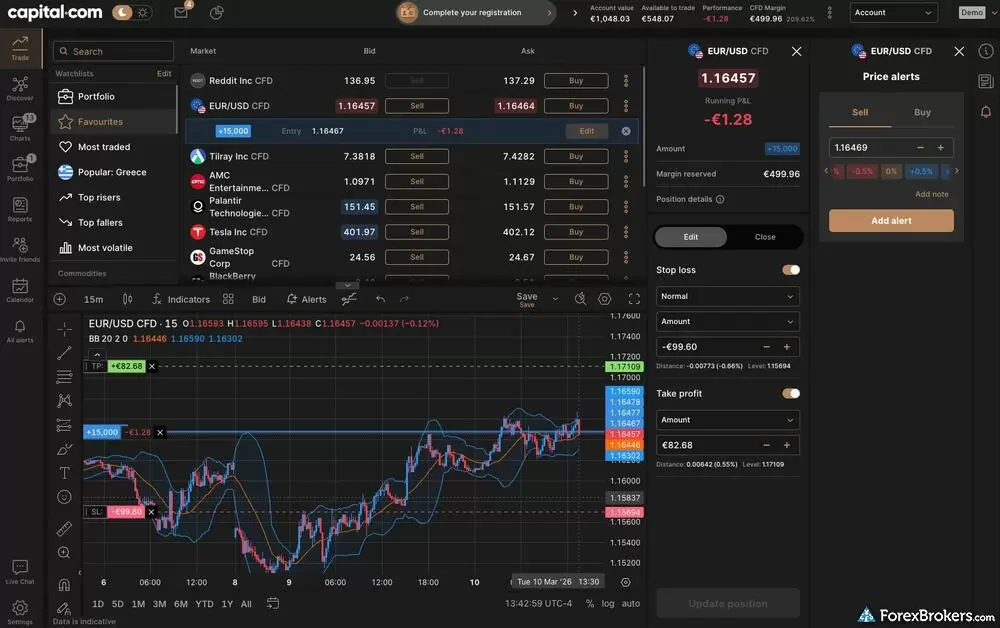
The Capital.com web platform delivers a highly sophisticated yet well-organized trading environment. The interface is built for multitasking, pairing a EUR/USD chart (with integrated Bollinger Bands) with visually adjustable take-profit and stop-loss levels. On the left, a detailed market watchlist includes quick execution buttons, while the right-hand panel supports granular price alerts and streamlined order management. The cohesive, dark-themed layout keeps technical tools and real-time portfolio data balanced on a single screen, which is ideal for active traders.
Order management: The web order ticket allows stop-loss definition by price level, dollar amount, or percentage, with real-time P&L calculations that update as you adjust risk parameters. Trailing stops and GSLOs are supported. OCO and if-then logic orders are absent from the proprietary platform, and there is no risk-reward ratio display pre-trade. A price depth graphic in the right panel shows the top of the order book for reference; active price ladders for trading are not supported. Account settings allow toggling to hedging mode, which permits opposing positions on the same asset to remain open simultaneously.
Algorithmic trading and API: Backtesting and strategy builder tools are not built into the web app. Algorithmic trading is supported via MetaTrader (Expert Advisors in MQL4 and MQL5), TradingView (Pine Script alerts), or Capital.com's REST and WebSocket API. MetaTrader's symbol count on Capital.com is approximately 232 instruments, a fraction of the 5,585 available on the proprietary platform, which is a meaningful limitation for traders who want MT4 or MT5 as their primary interface.
Available trading platforms and features
Our platform walkthrough verified 97 charting indicators within the proprietary web app alongside drag-to-modify order management, a close-all positions button, and predefined screener watchlists, though the layout does not support detachable windows and OCO orders are unavailable on the proprietary platform.
| Feature |
Capital.com
|
|---|---|
| Desktop Platform (Windows) | Yes |
| Desktop Platform (Mac) | Yes |
| MetaTrader 4 (MT4) | Yes |
| MetaTrader 5 (MT5) | Yes |
| FX Blue | No |
| Proprietary Desktop Trading Platform | Yes |
| Proprietary Web Trading Platform | Yes |
| TradingView | Yes |
| cTrader | No |
| Algorithmic trading | Yes |
| API Access | Yes |
| Charts can be saved | Yes |
| Client sentiment data | Yes |
| Trading Signals | No |
| Price Alerts | Yes |
| Virtual Private Server (VPS) | No |
| Virtual Trading (Demo) | Yes |
| Charting - Indicators / Studies (Total) | 97 |
| Charting - Trade From Chart | Yes |
| Charting - TradingView | Yes |
Available order types
We verified market, limit, stop, trailing stop, and Guaranteed Stop-Loss Orders directly within the proprietary trade ticket; OCO orders are not available on the proprietary platform but can be executed via MetaTrader.
| Feature |
Capital.com
|
|---|---|
| Order Type - Market | Yes |
| Order Type - Limit | Yes |
| Order Type - Stop | Yes |
| Order Type - Trailing Stop | Yes |
| Order Type - OCO | No |
| Order Type - OTO | No |
| Order Type - GSLO | Yes |
Research
Capital.com's research offering is more multimedia-driven than many other brokers. The primary channels are a daily video series on YouTube (including the Market Mondays and Market Lens playlists), the Talking Markets Spotify podcast (three episodes published in 2026 at time of review, an inconsistent cadence for an otherwise strong format), and written market analysis on the broker's website.
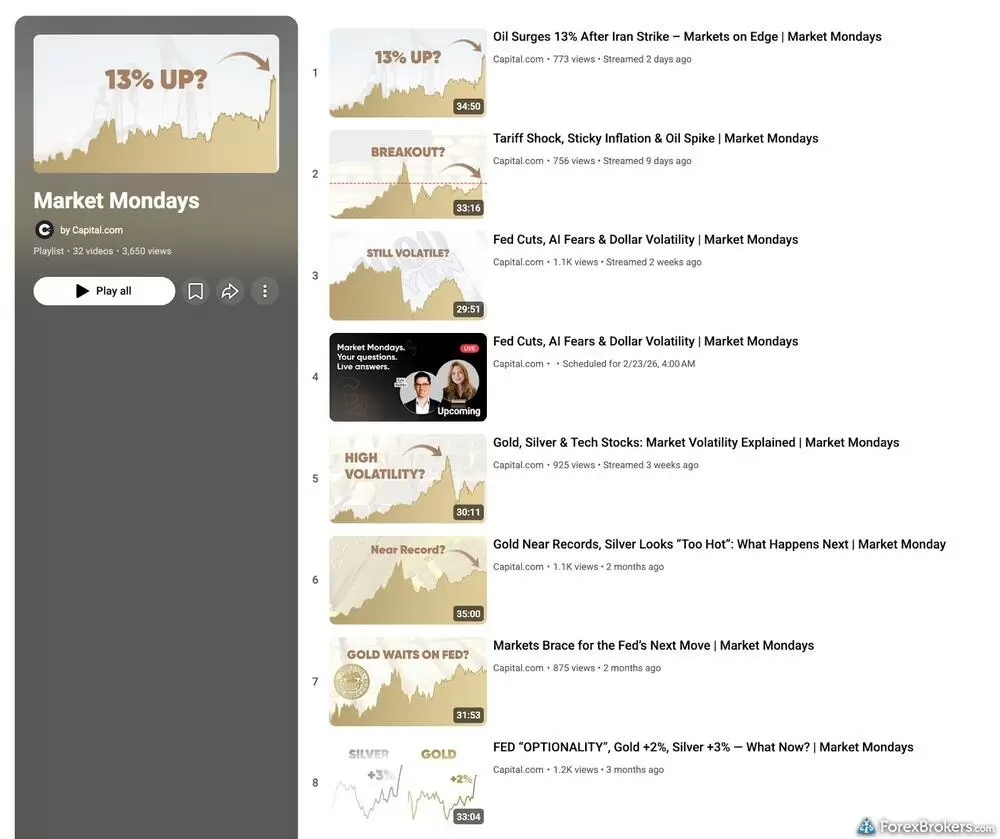
Capital.com’s commitment to ongoing market education is clearly demonstrated through their active "Market Mondays" YouTube playlist. Featuring over 30 deeply relevant, long-form webinars, the series tackles timely macroeconomic events, from unexpected oil surges to Federal Reserve rate cuts and tech volatility. These regular, high-quality streams offer traders valuable, expert-led insights to contextualize weekly market movements, making it an excellent supplementary resource for those looking to stay informed beyond the trading platform itself.
Economic calendar: The implementation of the economic calendar is one of the better ones I've reviewed in this category. It supports dynamic timeframe filters, custom date ranges, and impact severity ratings. A great feature is the Related Markets toggle where clicking a major event such as an SNB announcement instantly surfaces all correlated instruments, such as CHF pairs, which is a very useful tool for event-driven traders. On the other hand, historical trend charts for individual releases and alert subscriptions for specific events are not available.
Written articles: The written research analysis is comparable in quality to newsroom publications with articles being well-sourced, chart-rich, and specific about underlying data. One caveat is that the website mixes current analysis with older evergreen content, and the Latest News tab would benefit from stricter recency filtering.
Research gaps: Capital.com does not integrate Trading Central, Autochartist, or Acuity Trading. There is no dedicated earnings calendar despite the wide share CFD offering, no macro research reports, and no financial statement data for equities. Direct news search is unavailable, with news accessible only as contextual articles tied to individual assets. Client sentiment is a basic long/short percentage split, useful as a directional indicator but less actionable than providers that isolate sentiment from exclusively profitable traders.
Available research tools
Our analysis found daily video market commentary, a YouTube channel, the Talking Markets podcast, top-tier news sources, and an economic calendar with a Related Markets feature, though the platform lacks Autochartist, Trading Central, a dedicated earnings calendar, and macro research reports.
| Feature |
Capital.com
|
|---|---|
| Forex News (Top-Tier Sources) | Yes |
| Daily Market Commentary (Articles) | Yes |
| Daily Market Commentary (Videos) | Yes |
| Economic Calendar | Yes |
| Research - Earnings Calendar | No |
| Acuity Trading | No |
| Autochartist | No |
| TipRanks | No |
| Trading Central | No |
| Mobile Research - News | Yes |
| Mobile Research - Economic Calendar | Yes |
| Mobile Research - Market Movers | No |
Education
Capital.com provides one of the more complete education offerings in this category, particularly for traders new to CFD and forex markets. The combination of the dedicated Investmate app, multi-asset web courses, and a substantial YouTube channel covers beginner to intermediate ground well.
Investmate: The dedicated Investmate mobile app is the standout piece. The app opens with a short questionnaire that personalizes the learning path and assigns a tailored challenge before presenting course content. Over 30 self-guided courses, swipeable study cards, integrated quizzes, progress tracking, and daily notifications make it operate more like a structured learning platform than a typical broker education section. The format is engaging for new traders, although content depth thins for more experienced traders who want advanced strategy and market structure analysis beyond the fundamentals.
Web courses and video content: Capital.com's website offers multi-asset courses covering forex, crypto, stocks, CFDs, and commodities across beginner to advanced levels. Content is produced by credentialed staff, including Kyle Rodda, who holds a Tier 1 General Advice license, and Daniela Hathorn, who holds a CFA Level 1 certification. The courses read more as a reference library than a structured learning path, as they lack progress tracking, quizzes, and embedded video. Platform tutorial playlists on YouTube cover the web app (at least six videos) and mobile app (at least 11 videos), alongside hundreds of archived educational and research videos. Live webinars are not currently offered.
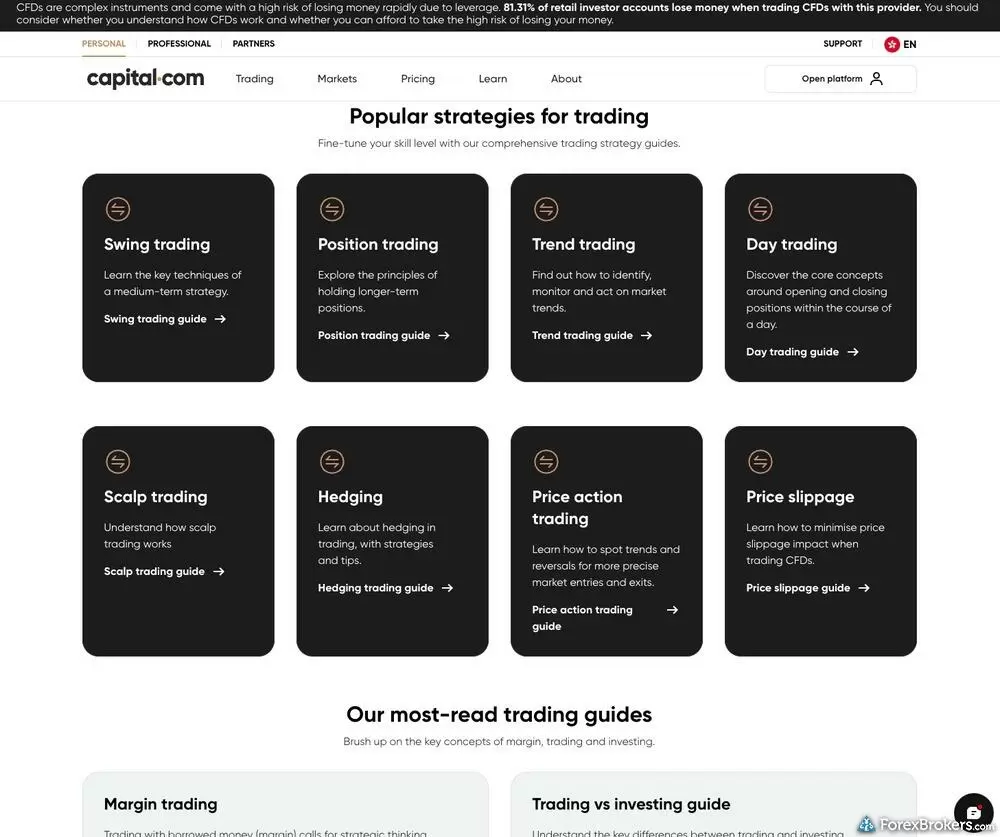
The Capital.com website hosts a comprehensive educational hub, highlighted here by their visually engaging "Popular strategies for trading" section. The grid neatly organizes essential methodologies, ranging from day and swing trading to complex hedging and price action tactics, into digestible, specialized guides. Paired with a prominent risk warning at the top, this extensive library demonstrates the broker's strong focus on equipping newer traders with the foundational knowledge required to navigate leveraged markets responsibly.
Available educational offerings
We found multi-asset courses, the Investmate education app with quizzes and progress tracking, beginner and advanced video content, and platform tutorial playlists; live webinars are not currently offered.
| Feature |
Capital.com
|
|---|---|
| Education (Forex) | Yes |
| Education (CFDs) | Yes |
| Education (Crypto) | Yes |
| Education (Stocks) | Yes |
| Education Area (Website) | Yes |
| Education Area (Mobile App) | Yes |
| Webinars | No |
| Videos - Beginner Trading Videos | Yes |
| Videos - Advanced Trading Videos | Yes |
Final thoughts
Capital.com makes it easy for active retail traders and crypto-focused traders to access a broad market lineup at a competitive cost. Commission-free pricing, a 0.7-pip EUR/USD average, and the 450-plus crypto CFDs that earned Capital.com our 2026 Industry Award for #1 Most Cryptos give the broker a clear edge in those categories.
What holds it back from being among the top brokers in the industry is a combination of specific gaps. There is no Trading Central or Autochartist integration, no native copy trading, and no commission-based account for traders who prefer a flat rate over variable spreads. For traders focused on low-cost CFD and crypto trading across a capable multi-platform setup, Capital.com is a strong choice, but if advanced research or a commission structure is the priority then I'd recommend one of its competitors.
Capital.com's Star Ratings
| Feature |
Capital.com
|
|---|---|
| Overall Rating |
|
| Trust Score | 89 |
| Range of Investments |
|
| Trading Fees |
|
| Trading Platforms |
|
| Research |
|
| Mobile Trading |
|
| Education |
|
Our testing
Why you should trust us
Steven Hatzakis is a well-known finance writer, with 25+ years of experience in the foreign exchange and financial markets. He is the Global Director of Online Broker Research for Reink Media Group, leading research efforts for ForexBrokers.com since 2016. Steven is an expert writer and researcher who has published over 1,000 articles covering the foreign exchange markets and cryptocurrency industries. He has served as a registered commodity futures representative for domestic and internationally-regulated brokerages. Steven holds a Series III license in the US as a Commodity Trading Advisor (CTA).
All content on ForexBrokers.com is handwritten by a writer, fact-checked by a member of our research team, and edited and published by an editor. Our ratings, rankings, and opinions are entirely our own, and the result of our extensive research and decades of collective experience covering the forex industry.
Ultimately, our rigorous data validation process yields an error rate of less than .1% each year, providing site visitors with quality data they can trust. Click here to learn more about how we test.
How we tested
At ForexBrokers.com, our online broker reviews are based on our collected quantitative data as well as the observations and qualified opinions of our expert researchers. Each year we publish tens of thousands of words of research on the top forex brokers and monitor dozens of international regulator agencies (read more about how we calculate Trust Score here).
Mobile testing is conducted on modern devices that run the most up-to-date operating systems available:
- For Apple, we use MacBook Pro laptops running the latest, and the iPhone XS running the latest version of iOS.
- For Android, we use the Samsung Galaxy S20 and Samsung Galaxy S23 Ultra devices running the latest Android OS.
All websites and web-based platforms are tested using the latest version of the Google Chrome browser.
Our researchers thoroughly test a wide range of key features, such as the availability and quality of watch lists, mobile charting, real-time and streaming quotes, and educational resources – among other important variables. We also evaluate the overall design of the mobile experience, and look for a fluid user experience moving between mobile and desktop platforms.
Forex Risk Disclaimer
There is a very high degree of risk involved in trading securities. With respect to margin-based foreign exchange trading, off-exchange derivatives, and cryptocurrencies, there is considerable exposure to risk, including but not limited to, leverage, creditworthiness, limited regulatory protection and market volatility that may substantially affect the price, or liquidity of a currency or related instrument. It should not be assumed that the methods, techniques, or indicators presented in these products will be profitable, or that they will not result in losses. Read more on forex trading risks.
Read next

Pepperstone offers a growing range of tradeable markets, good-quality research, and support for multiple social copy trading platforms.
Steven Hatzakis June 16, 2026
eToro is a winner for its easy-to-use copy-trading platform, where traders can copy the trades of experienced investors – or receive exclusive perks for sharing.
Steven Hatzakis August 04, 2026
Plus500 is a trusted global brand that offers an easy-to-use trading platform for online traders, alongside access to share trading and selection of CFDs.
Steven Hatzakis July 22, 2026
AvaTrade is a trusted global brand best known for offering an extensive selection of trading platforms for forex and CFD traders.
Steven Hatzakis May 04, 2026
As a trusted multi-asset broker, XTB offers outstanding customer service, a wide variety of forex and CFDs, and an excellent overall trading experience.
Steven Hatzakis May 04, 2026Popular Guides
- Best Brokers for TradingView for 2026
- Best Forex Brokers for Beginners of 2026
- Compare Forex Brokers
- Best MetaTrader 4 (MT4) Brokers for 2026
- International Forex Brokers Search
- Best Low Spread Forex Brokers for 2026
- Best Copy Trading Platforms for 2026
- Best Forex Trading Apps for 2026
- Best Forex Brokers for 2026
More Forex Guides
- Best Algo Trading Software for 2026
- Best Forex Demo Accounts for 2026
- Best PayPal Forex Brokers for 2026
- Best Free Forex Trading Courses for 2026
- Best Crypto Brokers for 2026
- Best CFD Trading Platforms for 2026
- Best Forex Signal Providers for 2026
- Best MetaTrader 5 (MT5) Forex Brokers for 2026
- Best MetaTrader 4 (MT4) Brokers for 2026
- Best Forex Options Brokers for 2026
- Best Brokers for TradingView for 2026
- Best High-Leverage Forex Brokers for 2026
- Best Brokers that Use TipRanks in 2026
- Best Forex Day Trading Platforms for 2026
- Best Trading Platforms for Mac Users of 2026
- Best Market Maker Brokers in 2026
- Best High-Frequency Trading Software for 2026
- Best Forex Brokers with APIs for 2026
About Capital.com
Capital.com was founded in 2016 and operates through multiple regulated entities. Capital Com Online Investments Ltd is authorised by the Cyprus Securities and Exchange Commission (CySEC) and serves the European Economic Area. Capital Com UK Ltd is authorised by the Financial Conduct Authority (FCA) for U.K. clients. Capital Com Australia Pty Ltd holds an ASIC licence for Australian clients. Additional entities are regulated by the Securities Commission of the Bahamas (SCB), the Securities and Commodities Authority (SCA) in the UAE, the Capital Markets Authority (CMA) in Kenya, and the Financial Services Authority (FSA) of Seychelles.
About the Editorial Team
Steven Hatzakis is the Global Director of Online Broker Research for ForexBrokers.com. Steven previously served as an Editor for Finance Magnates, where he authored over 1,000 published articles about the online finance industry. A forex industry expert and an active fintech and crypto researcher, Steven advises blockchain companies at the board level and holds a Series III license in the U.S. as a Commodity Trading Advisor (CTA).
Jeff Anberg is a Senior Editor at ForexBrokers.com. Along with years of experience in media distribution at a global newsroom, Jeff has a versatile knowledge base encompassing the technology and financial markets. He is a long-time active investor and engages in research on emerging markets like cryptocurrency. Jeff holds a Bachelor’s Degree in English Literature with a minor in Philosophy from San Francisco State University.
Blain Reinkensmeyer has 20 years of trading experience with over 2,500 trades placed during that time. He heads research for all U.S.-based brokerages on StockBrokers.com and is respected by executives as the leading expert covering the online broker industry. Blain’s insights have been featured in the New York Times, Wall Street Journal, Forbes, and the Chicago Tribune, among other media outlets.