 IG
IG FOREX.com
 CMC Markets
 XTB
XTB eToro
eToro Capital.com
 AvaTrade
 Pepperstone
 FP Markets
 Tickmill
Best Forex Trading Apps for 2026

Written by Steven Hatzakis
Director of Online Broker Research

Edited by John Bringans
Managing Editor

Fact-checked by Joey Shadeck
Research Analyst

Reviewed by Blain Reinkensmeyer
Managing Partner
Steven HatzakisDirector of Online Broker Research
Steven Hatzakis is the Global Director of Online Broker Research for ForexBrokers.com. He is a forex industry expert and an active fintech and crypto researcher.


 Why you can trust us
Led by Steven Hatzakis, Director of Online Broker Research, the ForexBrokers.com research team collects thousands of data points across hundreds of variables. We evaluate features important to every kind of forex trader, including beginners and active traders. We carefully track data on international regulators, commissions, and spreads to rate forex brokers across our proprietary testing categories.
Our researchers open personal brokerage accounts and test all available platforms on desktop, web, and mobile for each broker reviewed on ForexBrokers.com. Learn more about how we test.
The best forex trading apps are IG, FOREX.com, and Saxo. These user-friendly mobile platforms lead the industry by pairing powerful charting and real-time market insights with seamless cross-device syncing to make it easier to trade currencies and CFDs on the go.
Mobile trading has evolved from a convenience to an absolute necessity, yet I still find performance gaps between mediocre apps and professional-grade platforms in 2026. Hundreds of CFD brokers are vying for your attention, so distinguishing between a flashy, simplistic app and a powerful mobile trading tool is crucial.
| Company | Average spread (EUR/USD) - Spread-only account | Minimum Deposit | Overall Rating |
 IG IG
|
0.91 | £1 |
|
 FOREX.com FOREX.com
|
1.00 | $100 |
|
 Saxo Saxo
|
1.0 | $0 |
|
 Interactive Brokers Interactive Brokers
|
N/A | $0 |
|
 CMC Markets CMC Markets
|
1.3 | $0 |
|
 Charles Schwab Charles Schwab
|
1.27 | $0 |
|
 OANDA OANDA
|
1.68 | $0 |
|
Best Forex Trading Apps
How I tested to find the best mobile app for forex trading
To determine the best forex trading apps, I explore the full mobile experience for each broker. I open accounts, place trades, modify orders, and access research and integrated tools. I evaluate the intuitiveness of the layout by performing common tasks: searching for pairs, applying technical indicators, drawing support levels, setting alerts, and executing various order types.
I also test whether charts sync across devices, how seamlessly the app handles multi-asset trading, and the accessibility of advanced features like pattern recognition. Crucially, I consider each broker's Overall rating, derived from our rigorous testing across 130+ and seven primary scoring categories. Keep scrolling to see the best forex trading apps for 2026.
- Minimum Deposit: £1
- Trust Score: 99
- Tradeable Symbols (Total): 19537
IG offers an impressive suite of proprietary mobile apps, led by its flagship IG Trading app (also known as IG Forex), which boasts a well-designed layout teeming with features such as alerts, sentiment readings, and highly advanced charts. Read full review
- #1 Overall Broker in our ForexBrokers.com 2026 Awards.
- Highest Trust Score in 2026; most trusted forex broker.
- tastyfx brings IG access to U.S. forex traders.
- IG’s web platform requires some manual setup.
- MT5 is not available on IG.
- Only ~80 symbols available via MetaTrader.
- IG’s DailyFX news and research site has been discontinued.
- Minimum Deposit: $100
- Trust Score: 99
- Tradeable Symbols (Total): 5500
FOREX.com’s proprietary mobile app offers a fluid user interface and a minimalist design that makes trading and managing positions a breeze, and features a host of powerful tools and useful market research. Read full review
- Trading Academy is great for all experience levels.
- Advanced charting through TradingView with 5,500+ symbols.
- Pro-grade trading tools on web and desktop.
- Spreads are higher than other low-cost brokers.
- Pricing is average unless you qualify for active trader discounts.
- Stock and futures trading require a separate StoneXone account.
- Minimum Deposit: $0
- Trust Score: 99
- Tradeable Symbols (Total): 71000
Saxo's SaxoTrader mobile app boasts an impressive, intelligent design, coupled with an abundance of useful information that makes it easy for traders to make clear-headed decisions when assessing markets and managing trading positions. Read full review
- 70,000+ instruments including forex options.
- SaxoTrader has advanced tools and a clean interface.
- Offers algo orders, risk tools, and execution by order size.
- TradingView implementation supports Pine Script and API trading.
- No progress tracking or quizzes in education content.
- Platinum and VIP accounts have high deposit requirements.
- SaxoTrader lacks quick-start layouts.
- Can’t drag-to-edit orders on SaxoTrader charts in mobile.
- Minimum Deposit: $0
- Trust Score: 99
- Tradeable Symbols (Total): 8500
Interactive Brokers’ innovative IMPACT app is a great choice for stocks and crypto, and its highly rated IBRK mobile app is excellent for trading forex and CFDs. The IBKR app is rich with features, many of which mirror what’s available on the web platform. Read full review
- Access 170 markets in 40 countries; 28 base currencies.
- TradingView launched for both manual and algo traders.
- TWS desktop offers powerful tools for advanced strategies.
- New IBKR InvestMentor app offers beginner-friendly finance courses.
- TWS platform is overwhelming for beginners.
- No MetaTrader suite or copy trading tools available.
- $2 minimum commission can be costly for small trade sizes.
- Minimum Deposit: $0
- Trust Score: 99
- Tradeable Symbols (Total): 21710
CMC Markets' mobile app is cleanly designed and comes packed with research tools, powerful charts, predefined watchlists, integrated news and educational content, and much more. Bottom line: CMC Markets delivers a terrific mobile app experience. Read full review
- 21,710 instruments and 303 forex pairs available.
- Next Gen platform is packed with tools and charts.
- Client sentiment and pattern recognition built into the platform.
- Zero minimum deposit and no fee on international wire transfers.
- MetaTrader 4 has fewer symbols and limited product depth.
- Standard-account EUR/USD spread of 1.3 pips has widened year over year.
- No automated trading on CMC's proprietary platform.
- Education lacks progress tracking or interactive features.
- The quantity of research content produced has slowed.
- Minimum Deposit: $0
- Trust Score: 99
- Tradeable Symbols (Total): 40000
Schwab’s thinkorswim mobile app comes packed with powerful tools nested in an intelligent layout that puts the user in control. There are complex order types for forex trading, over 70 tradeable currency pairs, and advanced charting. Read full review
- thinkorswim supports advanced forex trading.
- Multi-asset access with 40,000+ tradeable symbols.
- Live webinars and strong educational content.
- Forex trading only available on thinkorswim and to U.S. residents.
- No trading signals or copy trading.
- Forex-specific education is limited.
- Minimum Deposit: $0
- Trust Score: 92
- Tradeable Symbols (Total): 4172
A trusted global brand, OANDA stands out for its reputation and quality market research. Its regulatory track record is strong, and its support for third-party features bolsters its overall offering. Read full review
- MarketPulse and Trade Tap Blog offer daily research and analysis.
- OANDA Trade app is user-friendly with solid functionality.
- TradingView and MT4 support with VPS hosting.
- Algo Labs supports API trading (not in Australia).
- Fewer YouTube video updates than peers.
- New Smart videos education series are mostly platform tutorials.
- Spreads are high compared to the best overall brokers.
- OANDA Trade platform trails best-in-class leaders.
CFDs are complex instruments and come with a high risk of losing money rapidly due to leverage. Between 51% and 89% of retail investor accounts lose money when trading CFDs. You should consider whether you understand how CFDs work and whether you can afford to take the high risk of losing your money.
Top picks for trading apps
1. IG – Best forex trading app
| Company | Overall Rating | Minimum Deposit | Average spread (EUR/USD) - Spread-only account | Mobile Charting - Indicators / Studies |
|
IG
|
|
£1 | 0.91 | 33 |
I've been reviewing IG for over ten years, and I continue to be impressed by its powerful suite of mobile applications for everyday forex traders.
An award-winning mobile app: IG’s flagship mobile forex trading app, IG Trading, won our 2026 Annual Award for #1 Mobile App. I find the IG Trading app to be easy to use and jam-packed with powerful features and intuitive trading tools.
Intuitive layout: IG Trading’s intuitive layout makes it a breeze to navigate between features such as alerts, sentiment readings, trading signals, and highly advanced charts. The app delivers dozens of technical indicators and five distinct chart types. Setting up charts is easy, and zooming in and out across time frames feels quick and precise. IG provides my favorite mobile charts in the industry, and IG Trading is a great choice for charting enthusiasts who want to analyze the markets on the go.
Assortment of additional apps: Traders at IG also gain access to IG Academy, the broker’s standalone educational app. IG Academy features eight interactive courses organized by experience level, each containing nearly a dozen chapters. IG also offers traders the popular MetaTrader 4 (MT4) app along with the popular TradingView mobile app.
Steven's take
"IG secured our 2026 Annual Award for #1 Mobile App by striking a perfect balance between ease of use and professional-grade depth. I love IG’s mobile charting experience, which offers seamless syncing with the web platform and useful features like drag-to-modify order management."
Steven Hatzakis
Director of Online Broker Research
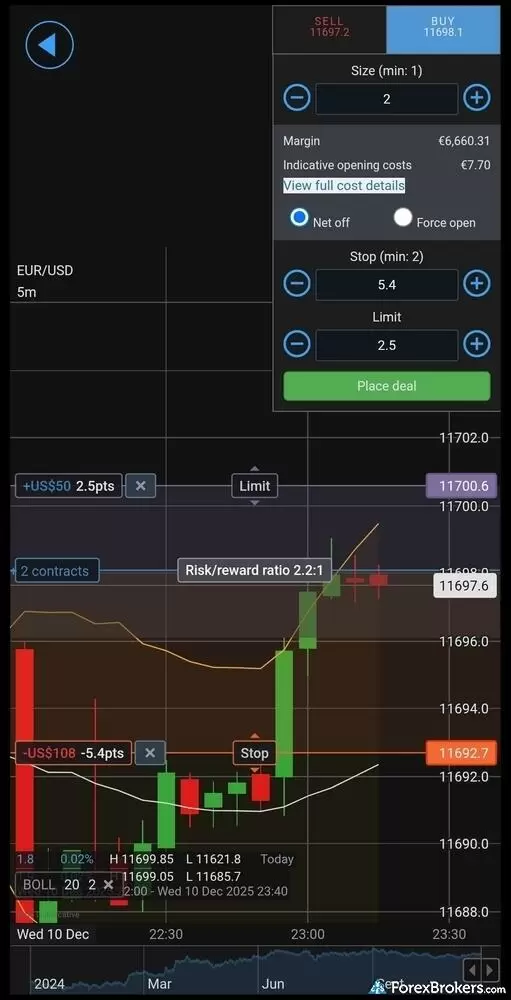
The IG mobile app allows for sophisticated risk management and technical analysis on the go, without ever needing to leave the main viewing area. IG empowers traders to visually manage risk on a pre-trade basis by dragging "Stop" and "Limit" handles directly on the chart, instantly updating the potential profit/loss figures and displaying a dynamic Risk/Reward ratio (shown here as 2.2:1).
2. FOREX.com – Powerful proprietary mobile app
| Company | Overall Rating | Minimum Deposit | Average spread (EUR/USD) - Spread-only account | Mobile Charting - Indicators / Studies |
|
FOREX.com
|
|
$100 | 1.00 | 90 |
FOREX.com's proprietary mobile app offers an intuitive design, robust charting features, and seamless functionality. The app's sophisticated yet user-friendly trading environment makes it a great choice for traders of all experience levels.
Proprietary mobile app excellence: The FOREX.com mobile app has undergone several recent upgrades over the last few years to become a truly modern trading platform. It combines a minimalist interface with advanced trading features, making it easy for users to monitor positions, execute trades, and stay informed with integrated research and market news. The app offers tools such as real-time price alerts, a "close all" button for quick trade exits, and advanced order types like OCOs and trailing stops, among other subtle features.
Mobile charting powered by TradingView: Charting on the FOREX.com mobile app is powered by TradingView, providing traders with over 80 technical indicators, a vast array of drawing tools, and multiple timeframes. Watchlists are synced across devices for a seamless trading experience, and the "load chart layout" feature allows users to apply saved templates effortlessly.
Integrated research and education: The FOREX.com app includes research tools powered by Trading Central, such as Analyst Views and Technical Insight, alongside news from Reuters and an economic calendar. Its Trading Academy offers interactive educational content, making FOREX.com a top choice for traders seeking to improve their skills. Last but not least, I found that in-house content from FOREX.com’s research team is high-quality with insightful market coverage that includes technical and fundamental analysis.
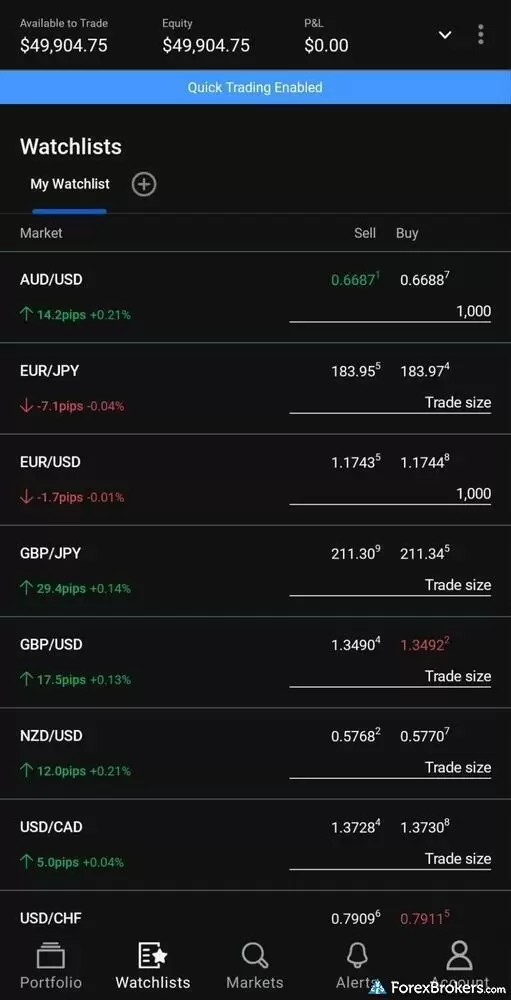
The FOREX.com Android mobile app delivers a streamlined watchlist interface, prominently displaying account balance and live equity metrics at the top. The active screen continuously tracks major currency pairs like AUD/USD and EUR/USD, providing traders with real-time bid and ask pricing alongside daily pip movements and percentage changes at a single glance. Anchored by a clear bottom navigation menu, the platform ensures seamless transitions between custom watchlists, active portfolios, and market alerts.
3. Saxo – Great app for multi-asset traders
| Company | Overall Rating | Minimum Deposit | Average spread (EUR/USD) - Spread-only account | Mobile Charting - Indicators / Studies |
|
Saxo
|
|
$0 | 1.0 | 64 |
Saxo's SaxoTrader is a favorite of mine and includes everything that forex traders might need to navigate the market.
Consistent platform experience: One of the strengths of Saxo’s mobile platform is how closely the mobile app mirrors the performance of the broker’s web-based platform. Nearly all features found in the web version of the platform are available in the SaxoTrader mobile app. Saxo has done a great job unifying the excellent SaxoTrader platform experience across all devices.
Rich charting capabilities: SaxoTrader delivers rich charting capabilities and – touching on a theme here – closely matches the experience of the platform’s web-based charts. Charts in the SaxoTrader mobile app sync with the browser-based version of the platform. For example, if you draw trend lines and add indicators in the web version, they will appear in the mobile app (and vice versa). One drawback is that you cannot yet drag-to-modify orders on the chart in SaxoTrader mobile.
Education and research from the app: The web platform’s economic calendar, educational videos, market news from top-tier sources such as Dow Jones Newswire, and pattern recognition analysis from Autochartist are all accessible on the mobile app. It’s also worth noting that the integrated screener is multi-asset capable and can support screening currencies from the vast list of forex pairs that Saxo offers.
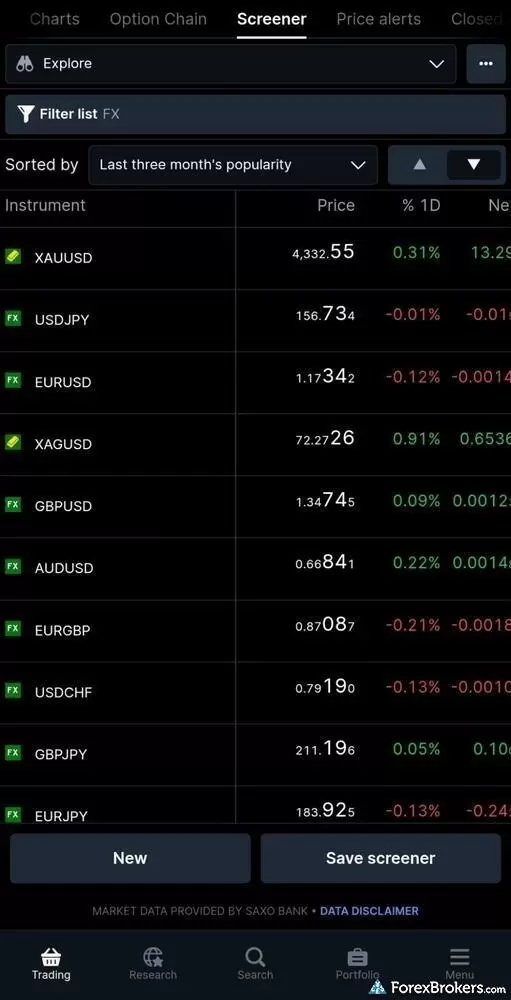
The SaxoTrader mobile app showcases a powerful, highly customizable screener tool within the main Trading tab. Here, a custom filter for forex and precious metals is applied and sorted by the "Last three month's popularity," offering traders a clean, real-time overview of live pricing and daily percentage changes for heavily traded assets like Gold (XAU/USD), USD/JPY, and EUR/USD.
4. Interactive Brokers – Loaded with tools and features
| Company | Overall Rating | Minimum Deposit | All-in Cost EUR/USD - Raw spread account | Mobile Charting - Indicators / Studies |
|
Interactive Brokers
|
|
$0 | 0.626 | 155 |
Interactive Brokers earns its place in this list due to its mobile suite, which serves both beginners and pros. The flagship IBKR Mobile app is packed with professional-grade tools like customizable watchlists, streaming live TV, and an AI-powered "IBot" for voice-command navigation.
Charting: The charts are among the best I've used on mobile, with 107 indicators, more than 64 drawing tools, and ten timeframes running from one minute to monthly. Elliott Wave measurements and Cypher and XABCD patterns are all available. Indicators autosave to your charts, though trendlines don't sync to web or desktop.
In my opinion, IBKR sets the industry pace for innovation, frequently deploying advanced features before its competitors. One example is the "Connections" tab, which contextually surfaces related event contracts, IBKR's prediction markets, while you trade. Viewing a chart might trigger a prompt for a relevant Federal Reserve rate prediction contract, folding macro themes into your workflow. The suite is rounded out by IBKR GlobalTrader for streamlined global stock trading and the IBKR InvestMentor app, which offers dedicated financial education. Custom price alerts deliver by email only, with no push notification support.
5. CMC Markets – Integrated chart patterns and client sentiment
| Company | Overall Rating | Minimum Deposit | Average spread (EUR/USD) - Spread-only account | Mobile Charting - Indicators / Studies |
|
CMC Markets
|
|
$0 | 1.3 | 30 |
CMC Markets secures a spot on my list of the best forex apps with its flagship Next Generation app, a platform that balances sophisticated tools with a clean, modern interface. A pioneer in mobile technology, the app continues to impress with deep feature integration, such as displaying client sentiment data directly within trade tickets. The app carries 30 technical indicators and 17 drawing tools across 19 timeframes, reaching down to 1-second charts.
Finding opportunities is easy thanks to pre-defined screeners like "Biggest Risers" and "Biggest Fallers," alongside Price Movers and trending Mentions tabs, which filter through the broker's 21,710 tradeable assets. While the app excels in navigation and depth, it currently lacks visual order management, meaning you can't see or drag-to-modify open positions directly on charts. For traders seeking alternative interfaces, CMC Markets also supports MetaTrader and TradingView mobile apps, though MetaTrader 5 is limited to select regions including the U.K., Australia, and Canada.
Other forex trading apps I tested
6. Charles Schwab – Best for charting
| Company | Overall Rating | Minimum Deposit | Average spread (EUR/USD) - Spread-only account | Mobile Charting - Indicators / Studies |
|
Charles Schwab
|
|
$0 | 1.27 | 374 |
Charles Schwab's thinkorswim mobile app is a great option for technical analysis. Unlike the standard Schwab app, thinkorswim delivers a professional-grade experience featuring rare mobile capabilities like tick charts and over 370 technical indicators.
You can overlay multiple studies, sync drawings across devices, and execute complex strategies like "blast all" orders directly from the app. Just remember: you must use thinkorswim, as the standard Schwab app doesn’t support forex.
7. OANDA – Tight spreads and MetaTrader integration
| Company | Overall Rating | Minimum Deposit | Average spread (EUR/USD) - Spread-only account | Mobile Charting - Indicators / Studies |
|
OANDA
|
|
$0 | 1.68 | 30 |
The OANDA Trade app strikes a good balance between simplicity for beginners and depth for veterans. The app’s standout feature is its usability; you can execute trades directly from the chart and modify open orders, such as stop-losses and take-profits, with a simple, intuitive drag-and-drop gesture.
For fundamental traders, the app integrates high-quality research, including streaming Dow Jones news and Autochartist signals. OANDA’s flexible lot sizing allows you to trade specific "units" (e.g., 1 unit of EUR/USD) rather than standard lots. This offers a level of precision for risk management that few other apps can match.
8. XTB – Modern app design and integrated heatmap
| Company | Overall Rating | Minimum Deposit | Average spread (EUR/USD) - Spread-only account | Mobile Charting - Indicators / Studies |
 XTB XTB
|
|
$0 | 1.06 | 104 |
XTB earns its spot on this list with xStation 5, a proprietary mobile app that successfully mirrors the power of its desktop counterpart. The app stands out for its intuitive design and rich feature set, including streaming news, an economic calendar, and a "Top Movers" tab that helps identify volatility at a glance.
XTB integrates educational content directly into the app, featuring webinar-style videos that allow beginners to learn without leaving the platform. Charting is solid, but I noted that it doesn’t offer cross-device watchlist syncing. For traders who prioritize a modern, clutter-free interface over third-party platforms like MetaTrader, XTB is a solid choice.
9. City Index – Powerful in-house app and third-party platforms
| Company | Overall Rating | Minimum Deposit | Average spread (EUR/USD) - Spread-only account | Mobile Charting - Indicators / Studies |
 StoneX Trading StoneX Trading
|
|
£100.00 | 1.4 | 88 |
City Index offers advanced TradingView charts with over 80 indicators and seamless syncing with the Web Trader platform.
The standout feature is the Performance Analytics suite, specifically the PlayMaker tool. Acting as a digital mentor, PlayMaker monitors your trading behavior in real-time to help prevent emotional decision-making. Comprehensive research is also baked directly into the interface, including Trading Central modules and streaming Reuters news, ensuring you never have to leave the app to find your next trade.
10. eToro – Excellent app for copy trading
| Company | Overall Rating | Minimum Deposit | Average spread (EUR/USD) - Spread-only account | Mobile Charting - Indicators / Studies |
 eToro eToro
|
|
$50-$10,000 | 1 | 104 |
The eToro mobile app cleanly mirrors the web platform’s design to provide a seamless transition between devices. A pioneer in the copy trading space, eToro’s CopyTrader allows you to automatically replicate the moves of other investors and traders in real-time.
Beyond forex, the app offers access to over 7,000 symbols, including a massive library of cryptocurrencies. While the mobile charts are powered by TradingView, they currently lack drawing tools, a minor trade-off.
Best forex trading apps comparison
Compare the brokers that offer the best forex trading apps, side-by-side.
| Company | Mobile Trading | Apple iOS App | Android App | Mobile Charting - Indicators / Studies |
|
IG
|
|
Yes | Yes | 33 |
|
Interactive Brokers
|
|
Yes | Yes | 155 |
|
Saxo
|
|
Yes | Yes | 64 |
|
FOREX.com
|
|
Yes | Yes | 90 |
|
CMC Markets
|
|
Yes | Yes | 30 |
Comparison Tool: Compare over 30 of the best forex brokers in the industry. See how they stack up with Compare 50+ features side-by-side
How to compare the best forex trading apps
When choosing a new forex broker account for online trading, consider these five areas of the trading experience:
- Trust (regulatory status): You want a broker that you can trust, above all else. Your broker will preferably be regulated in multiple top-tier jurisdictions, such as the U.S., U.K., Australia, Singapore, Canada, Hong Kong, Japan, or Switzerland. At ForexBrokers.com, we track over 250 regulatory licenses for 60+ forex brokers; learn more by checking out our Trust Score page.
- Trading platforms: Our research finds that most proprietary platforms are superior to third-party software like MetaTrader. Either way, be sure to select the trading platform that meets your needs across devices, whether that's on the web, your desktop, or with a mobile trading app.
- Trading tools: When I evaluate the research content, trading tools, and educational materials available from brokers, I expect them to be rich with features and easy to use. The more comprehensive each category is within the mobile app you choose, the better off you will be in maximizing trading opportunities.
- Tradeable markets: Consider the total available markets and the number of instruments that are available for you to trade at a given broker. For example, one broker may offer a small selection of currency pairs but a vast array of CFDs on other markets like stocks, commodities, ETFs, futures, cryptocurrency, and other asset classes. Conversely, maybe you want to trade some exotic currencies and want a broker with a larger selection of forex pairs.
- Demo accounts: Opening a free demo account allows you to learn the ins and outs of a trading app, like test-driving a car before you buy it. You get to use the virtual account across all supported devices, such as web, desktop, and mobile. If the platform meets your needs, then you can fund a live account. Some traders also use demo accounts to test various trading strategies before trying them out with real funds.
ForexBrokers.com Overall Rankings
Now that you've seen our picks for the best brokers on this guide, check out ForexBrokers.com's overall broker rankings. We've evaluated 36 forex brokers, using a testing methodology that's based on 100+ data-driven variables and thousands of data points. Also take a look at our full-length, in-depth forex broker reviews.
Popular Forex Trading Tools and Platform Guides
- Best MetaTrader 4 (MT4) Brokers for 2026
- Best MetaTrader 5 (MT5) Forex Brokers for 2026
- Best Forex Signal Providers for 2026
- Best Brokers for TradingView for 2026
- Best Trading Central Forex Brokers for 2026
- Best Forex Brokers with Trading APIs
Popular Forex Guides
- International Forex Brokers Search
- Best Copy Trading Platforms for 2026
- Best Forex Brokers for Beginners of 2026
- Best Low Spread Forex Brokers for 2026
- Compare Forex Brokers
- Best Forex Brokers for 2026
- Best MetaTrader 4 (MT4) Brokers for 2026
- Best Brokers for TradingView for 2026
More Forex Guides
- Best Forex Signal Providers for 2026
- Best Free Forex Trading Courses for 2026
- Best Algo Trading Software for 2026
- Best MetaTrader 5 (MT5) Forex Brokers for 2026
- Best Market Maker Brokers in 2026
- Best PayPal Forex Brokers for 2026
- Best High-Leverage Forex Brokers for 2026
- Best Crypto Brokers for 2026
- Best MetaTrader 4 (MT4) Brokers for 2026
- Best Forex Brokers with APIs for 2026
- Best Brokers that Use TipRanks in 2026
- Best Forex Options Brokers for 2026
- Best CFD Trading Platforms for 2026
- Best Brokers for TradingView for 2026
- Best High-Frequency Trading Software for 2026
- Best Trading Platforms for Mac Users of 2026
- Best Forex Demo Accounts for 2026
- Best Forex Day Trading Platforms for 2026
Popular Forex Broker Reviews
Check out our review of Charles Schwab, a highly trusted, multi-asset broker catering to U.S.-based and international forex traders.
Steven Hatzakis May 04, 2026
CMC Markets review 2026: 303 forex pairs (the most we track), 21,000+ CFDs, and top-tier charting. See where its spreads and education fall short.
Steven Hatzakis September 15, 2026
FP Markets shines as a low-cost broker for trading forex and CFDs – as long as you use the MetaTrader platform.
Steven Hatzakis September 15, 2026
Pepperstone offers a growing range of tradeable markets, good-quality research, and support for multiple social copy trading platforms.
Steven Hatzakis June 16, 2026
As a trusted multi-asset broker, XTB offers outstanding customer service, a wide variety of forex and CFDs, and an excellent overall trading experience.
Steven Hatzakis May 04, 2026
Interactive Brokers forex review: I tested IBKR's spreads, commissions, and platforms in 2026. More than 100 pairs, but a $2 minimum commission per order.
Steven Hatzakis September 28, 2026
Our 2026 HFM (HF Markets) review covers MT4, MT5, copy trading, the 344-symbol product offering, and 1.8-pip EUR/USD spreads, based on hands-on testing.
Steven Hatzakis August 13, 2026
Octa offers a basic, low-cost MetaTrader platform experience alongside its social copy-trading platform.
Steven Hatzakis May 04, 2026
A trusted global brand, OANDA stands out for its reputation and quality market research.
Steven Hatzakis May 04, 2026
Our expert Tickmill review tests the broker's Raw account pricing, spreads, MetaTrader platforms, and tools to help you decide if it fits your trading in 2026.
Steven Hatzakis May 22, 2026
Eightcap review 2026: low-cost forex and CFD trading on TradingView, MetaTrader, and TradeLocker, with a deep crypto CFD lineup. Read our expert verdict.
Steven Hatzakis August 31, 2026
Traders choose Admiral Markets (Admirals) for its excellent investor education and advanced MetaTrader features.
Steven Hatzakis May 04, 2026
ACY Securities is a MetaTrader-only broker with a reasonable range of markets and a balanced account offering.
Steven Hatzakis May 04, 2026
eToro is a winner for its easy-to-use copy-trading platform, where traders can copy the trades of experienced investors – or receive exclusive perks for sharing.
Steven Hatzakis August 04, 2026
Traders choose Swissquote for its quality research and vast multi-asset offering.
Steven Hatzakis May 04, 2026
Saxo is an exclusive multi-asset broker with brilliant research and a superb trading platform experience, along with an extensive selection of over 71,000 securities.
Steven Hatzakis September 10, 2026
FOREX.com is a trusted brand that delivers an excellent trading experience for forex and CFDs traders across the globe.
Steven Hatzakis May 04, 2026
Best known for its mobile trading app, Trading 212 offers an easy-to-use trading platform suite for CFD and share trading.
Steven Hatzakis May 14, 2026
IC Markets is built for algorithmic and cost-sensitive forex traders: 0.72 pips all-in on EUR/USD and free colocated VPS, but no platform of its own.
Steven Hatzakis August 31, 2026
IG offers the ultimate comprehensive trading package, featuring excellent trading and research tools, and industry-leading education.
Steven Hatzakis August 04, 2026
Formerly named City Index, StoneX Trading is a trusted brand known for its versatile trading platforms, excellent mobile app, and diverse market research.
Steven Hatzakis August 28, 2026
In my 2026 Exness review, I tested the Exness Terminal, MT4, and MT5 across 78 forex pairs. See my verdict on costs, research, and product range.
Steven Hatzakis May 27, 2026
FxPro competes among the top MetaTrader brokers, featuring multiple account options and various execution methods.
Steven Hatzakis May 15, 2026
For traders who appreciate advanced trading tools and quality market research, FXCM is a winner, especially for algorithmic trading.
Steven Hatzakis May 04, 2026
AvaTrade is a trusted global brand best known for offering an extensive selection of trading platforms for forex and CFD traders.
Steven Hatzakis May 04, 2026
Plus500 is a trusted global brand that offers an easy-to-use trading platform for online traders, alongside access to share trading and selection of CFDs.
Steven Hatzakis July 22, 2026
Is Capital.com worth it in 2026? Our expert review covers 450+ crypto CFDs, a 0.7-pip EUR/USD spread, commission-free pricing, and platform quality.
Steven Hatzakis July 21, 2026Forex Risk Disclaimer
There is a very high degree of risk involved in trading securities. With respect to margin-based foreign exchange trading, off-exchange derivatives, and cryptocurrencies, there is considerable exposure to risk, including but not limited to, leverage, creditworthiness, limited regulatory protection and market volatility that may substantially affect the price, or liquidity of a currency or related instrument. It should not be assumed that the methods, techniques, or indicators presented in these products will be profitable, or that they will not result in losses. Read more on forex trading risks.
About the Editorial Team
Steven Hatzakis is the Global Director of Online Broker Research for ForexBrokers.com. Steven previously served as an Editor for Finance Magnates, where he authored over 1,000 published articles about the online finance industry. A forex industry expert and an active fintech and crypto researcher, Steven advises blockchain companies at the board level and holds a Series III license in the U.S. as a Commodity Trading Advisor (CTA).
John Bringans is the Managing Editor at ForexBrokers.com. An experienced media professional, John has a decade of editorial experience with a background that includes key leadership roles at global newsroom outlets. He holds a Bachelor’s Degree in English Literature from San Francisco State University, and conducts research on forex and the financial services industry while assisting in the production of content.
Joey Shadeck is a Content Strategist and Research Analyst for ForexBrokers.com. He holds dual degrees in Finance and Marketing from Oakland University, and has been an active trader and investor for close to ten years. An industry veteran, Joey obtains and verifies data, conducts research, and analyzes and validates our content.
Blain Reinkensmeyer has 20 years of trading experience with over 2,500 trades placed during that time. He heads research for all U.S.-based brokerages on StockBrokers.com and is respected by executives as the leading expert covering the online broker industry. Blain’s insights have been featured in the New York Times, Wall Street Journal, Forbes, and the Chicago Tribune, among other media outlets.