 IG
IG FOREX.com
 CMC Markets
 XTB
XTB eToro
eToro Capital.com
 AvaTrade
 XM
XM Pepperstone
 FP Markets
 Tickmill
 HFM Markets
How to Open and Fund a Capital.com Account

Written by Steven Hatzakis
Director of Online Broker Research

Edited by Jeff Anberg
Senior Editor

Fact-checked by Joey Shadeck
Research Analyst
Steven HatzakisDirector of Online Broker Research
Steven Hatzakis is the Global Director of Online Broker Research for ForexBrokers.com. He is a forex industry expert and an active fintech and crypto researcher.


Capital.com makes it straightforward to open and fund a trading account. In this guide, I walk through my own experience, from signing up and clearing the identity checks to making a deposit and placing my first live trade.
The process was fast. Opening the account took under 10 minutes, my verification came through the same day, and my SEPA deposit landed within the hour. Below I cover each step in order: how to register, what you need for KYC verification, the minimum deposit and accepted payment methods, how withdrawals work, and how to place your first trade. I opened my account as an EU resident, so your steps, timing, and available options may differ by country and by the entity that holds your account. Since September 2026, EU account holders can also add real stock and ETF investing.
- Minimum Deposit: $20
- Trust Score: 89
- Tradeable Symbols (Total): 5585
Capital.com stands out for its quality research, strong educational content, and innovative web platform. Capital.com holds fewer regulatory licenses and offers a narrower range of markets than some of the best brokers, but still significantly outperforms the industry average. Read full review
- Drag-to-modify charts & ability to close all positions quickly.
- Excellent education and research.
- Competitive spreads.
- MetaTrader 5 is not available.
- Price alerts only available within mobile.
- Doesn't offer trading signals and copy trading.
 Why you can trust us
Led by Steven Hatzakis, Global Director of Online Broker Research, the ForexBrokers.com research team collects and audits data across more than 100 variables. We analyze key tools and features important to forex and CFD traders and collect data on commissions, spreads, and fees across the industry to help you find the best broker for your needs.
We also review each broker’s regulatory status; this research helps us determine whether you should trust the broker to keep your money safe. As part of this effort, we track 100+ international regulatory agencies to power our proprietary Trust Score rating system.
Our researchers open personal brokerage accounts and test all available platforms on desktop, web, and mobile for each broker reviewed on ForexBrokers.com. Learn more about how we test.
Account opening process
Overview
You can open a Capital.com account through the mobile app or the web platform, and the application runs start to finish in one sitting. Before you begin, have three things ready: a valid email address, a government-issued photo ID such as a passport, driver's license, or national ID card, and a smartphone or a computer with a webcam for the identity check.
I ran the application on my desktop and switched to my phone for the ID step by scanning a QR code, then the session was handed back to my computer once the check passed. Capital.com confirmed each stage by email as I went, from account verified, first deposit received, to the first trade placed. How long your deposit takes to clear depends on the method you choose, which I cover in the deposit section below.
Account opening: Step-by-step
Here is the full sequence I followed, from creating a login to placing my first live trade. At a glance:
- Create your login
- Answer the trading experience questions
- Take the CFD knowledge test
- Enter your personal details
- Review the terms and conditions
- Choose your account base currency
- Verify your identity (KYC)
- Fund your account
- Place your first trade
Create your login
Go to Capital.com and register a new account, or sign in if you already have one. You can also register with Google, which is the option I used so I didn't have to save another password.
Answer the trading experience questions
After choosing whether to opt into the newsletter and company updates, you answer a short set of questions about your trading background, such as how many years you have been investing. These help the broker assess suitability.
Take the CFD knowledge test
Next is a brief multiple-choice test on how CFDs work, including a few hypothetical trading scenarios. This is standard across CFD brokers, and regulators require it to gauge how familiar you are with the product before you trade.
Enter your personal details
Here you provide your name, address, date of birth, tax ID, and phone number, which is used for SMS verification. The exact fields can vary depending on your country of residence. Capital.com also offers to set up a call with a personal account manager at this stage, which is a useful way to get questions answered up front, even if you are an experienced trader.
Review the terms and conditions
This step presents the legal documents that govern your account, such as the privacy policy, risk disclosures, terms and conditions, leverage and margin policy, and conflict-of-interest policy. It is worth reading these and saving a local copy, since they differ from broker to broker and can affect your trading. The order execution policy is the one I would pay closest attention to.
Choose your account base currency
You then set the currency your account is denominated in. Opening as an EU resident, I could choose from four base currencies: EUR, GBP, USD, and PLN. The options you see depend on your country of residence and the Capital.com entity you sign up under, and residents of some countries can open in a local currency such as NOK or SEK. The choice should keep in mind the currency you plan to fund with and the markets you plan to trade most. A mismatch adds conversion costs over time. If your account is in GBP but you mostly trade EUR-denominated markets such as Germany's DAX index, every CFD position pays a small conversion each way. Real stock and ETF investing in the EU works differently, because Capital.com lets you hold portfolios in multiple currencies.
Verify your identity (KYC)
This has two parts. First you upload a valid government-issued ID. Then you complete a live check using a webcam or your phone's front camera, which scans your face and compares it to your document. On my application this took under a minute, and the session returned to my desktop once it passed. From here you are logged into the live platform, where you can look around and review deposit options while verification finishes, usually the same day.
Fund your account
Once you are in the platform, you can review the deposit methods and add funds. It is good practice to wait until your account is verified before depositing, in the rare case the application is not approved. I funded mine by SEPA transfer after verification, and Capital.com emailed to confirm once the money was credited. The full list of methods and timing is in the deposit section below.
Place your first trade
Before risking real money, get familiar with the platform. Capital.com lets you add a demo account alongside your live one and switch between them inside the same web platform, so you can practice orders, position sizing, and margin at no risk. Once you are comfortable setting trade size and attaching stop-loss and take-profit orders, you are ready to trade live. Start small, and reach out to support if anything is unclear.
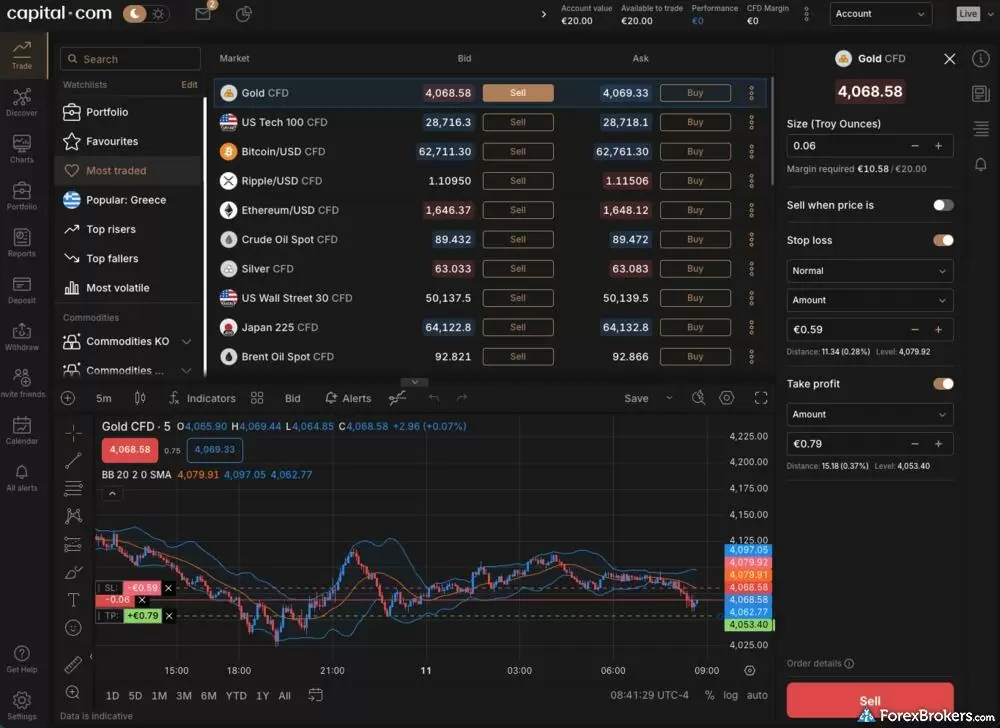
The desktop trading view on Capital.com displays a pre-trade configuration panel adjacent to an asset price chart. The layout includes interactive fields for adjusting trade size, setting specific stop loss triggers, and defining take profit levels, allowing for precise risk management parameters to be set before an order is sent to the market.
Overall, the process from sign-up to first trade was quick and uncomplicated. My first live position was gold (XAU/USD), which stopped out for a 59-cent EUR loss. What I appreciated while placing it was being able to drag my stop-loss and take-profit to specific levels directly on the chart, rather than typing them in. That helps when you are setting exits around support and resistance you have identified on the chart.
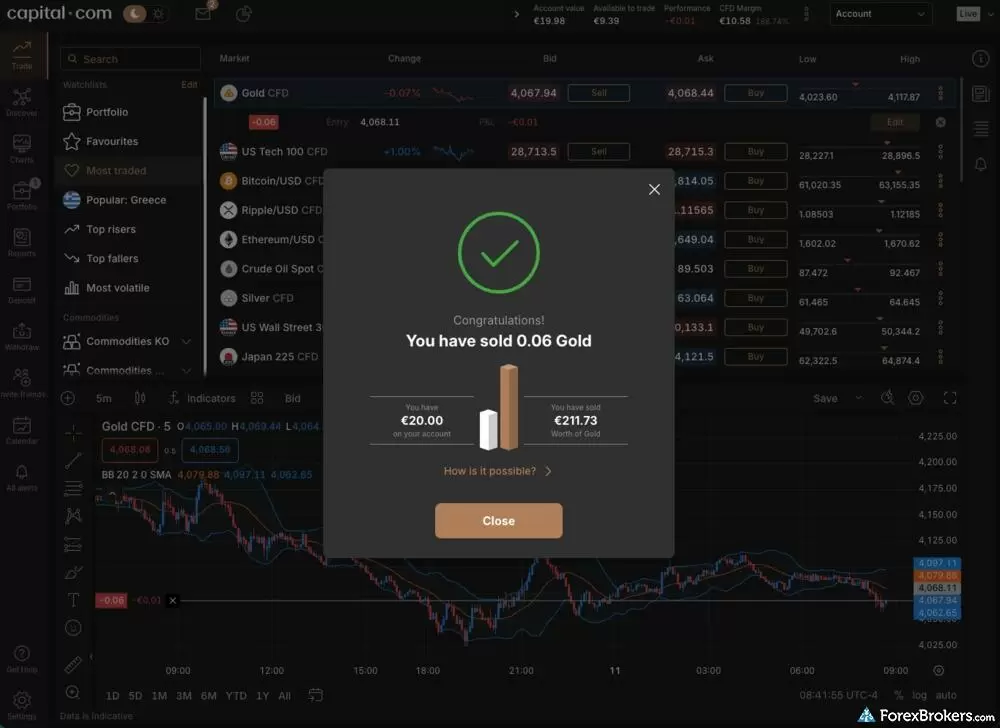
My first live trade on Capital.com was a gold position (XAU/USD), which was stopped out for a 59-cent euro loss.
Account opening FAQs
What documents do I need to open an account?
You need a valid, unexpired government-issued photo ID such as a passport, driver's license, or national ID card. You upload it through Capital.com's portal during the application, and the platform then matches it against a live face scan. Depending on your country of residence, Capital.com may also ask for proof of address, which in my case was requested before my first withdrawal rather than at sign-up.
How long does it take to verify my account?
Verification usually takes anywhere from the same day to 24 to 48 hours. The exact timing depends on your country of residence, the Capital.com entity holding your account, and the details you submit. In my case, it was same-day. Once my ID was accepted, my account was verified, and I funded it and traded within the same session.
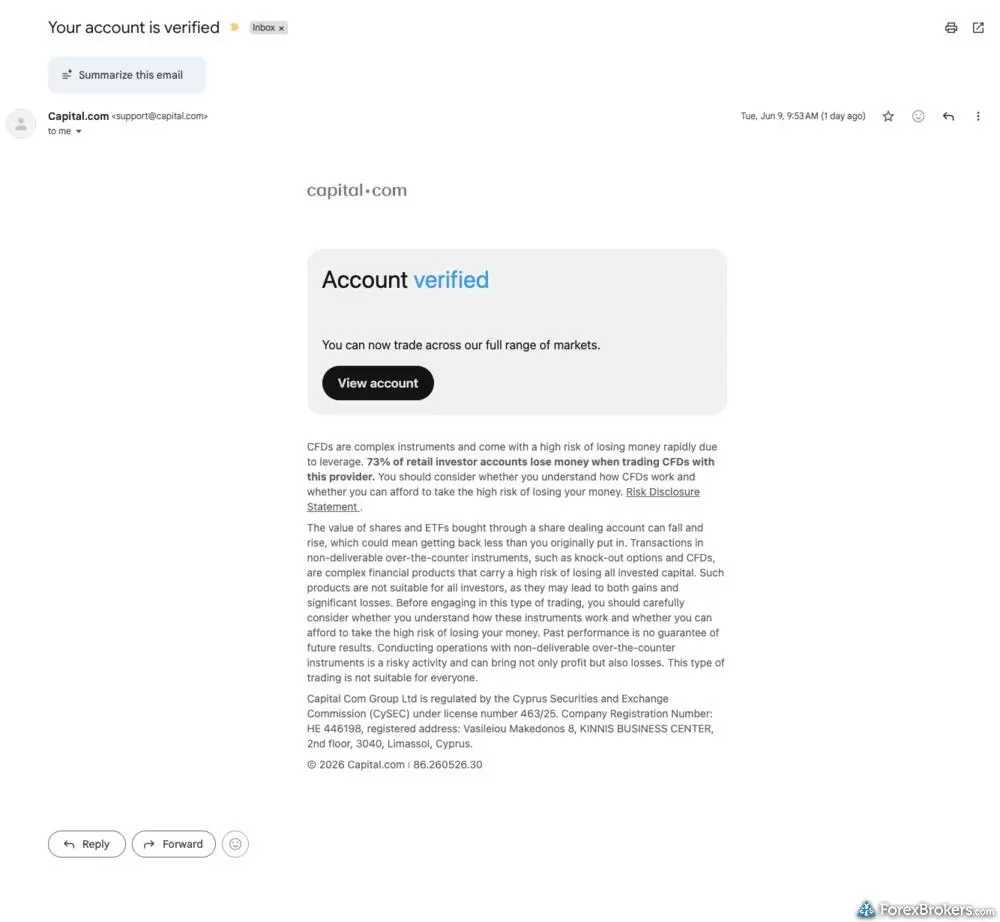
I received my verification e-mail the same day that I opened my account, unlocking Capital.com's full range of markets.
What happens if my verification is under review or fails?
During review, the information you entered is checked against your uploaded ID, and the account is approved when everything matches. A review can fail if there is a mismatch, like if a name or date of birth does not line up with your document. If that happens, Capital.com generally tells you the reason and gives you a chance to resubmit corrected details.
How long does it take to open an account at Capital.com?
Opening an account usually takes about 5 to 15 minutes, depending on how quickly you move through the steps. Mine took under 10. The steps are standard for a regulated CFD broker and involve answering questions about your investing experience, taking a short CFD knowledge test, entering your personal details, and verifying your identity with your phone or webcam.
Deposit methods
Overview
Capital.com covers the payment methods most traders will want, such as bank transfers, bank cards, and the major payment apps. Bank transfers include domestic and international wires as well as SEPA for transfers within the EU. Bank cards cover Visa, Mastercard, and Maestro. The supported apps are Apple Pay, Google Pay, PayPal, Skrill, and Neteller. Availability varies by country and by the entity you sign up under, and some regions add local apps such as Trustly, TrueLayer, Przelewy, or Lean.
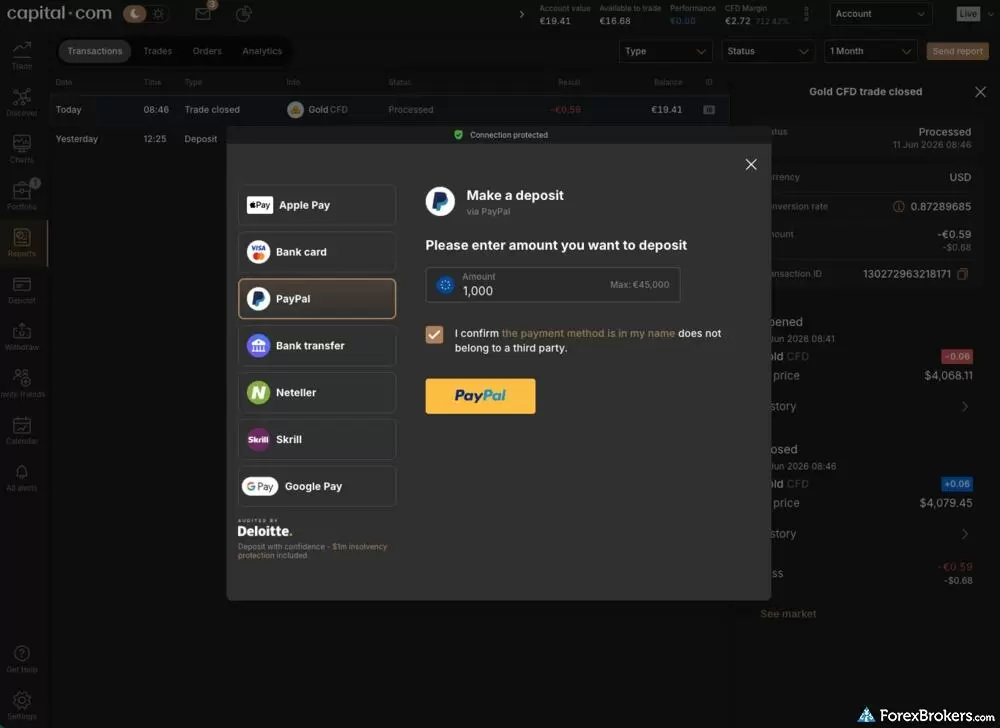
The Capital.com deposit interface presents multiple options for funding a live trading account. Users can choose between standard payment methods, including credit or debit cards, bank wire transfers, and alternative digital payment processors, with clearly stated processing times and minimum limits for each method.
Capital.com minimum deposit
Capital.com's minimum deposit is 20 EUR, USD, or GBP, or 100 PLN, for cards and payment apps, and 50 EUR (or the equivalent in your account currency) for bank wires. That is among the lowest in the industry, but the advertised figure and a workable starting balance are two different things.
The gap shows up the moment you place a trade. The smallest forex position is 1,000 units, one micro-lot, and €20 does not leave enough margin cushion to hold one comfortably. A small move against you can trigger a margin call and close the position. A €20 balance is fine for confirming that deposits, orders, and withdrawals work with real money once you have practiced in the demo, but it is not enough to trade with real flexibility.
This is less about the deposit itself than about position sizing relative to your available margin. Overtrading, meaning opening a position too large for your balance, is possible at any deposit size. A few hundred euros or more simply gives you room to size trades sensibly and absorb normal price swings.
One point works in Capital.com's favor here. It runs a single account type for CFD trading, so your deposit size does not change your pricing. Many brokers reserve their tightest spreads for higher-minimum account tiers and put wider spreads on entry-level accounts. Capital.com charges the same spreads whether you fund with the minimum or with a much larger balance. Learn more about the costs you can expect at my deep dive into the fees at Capital.com.
Capital.com deposit methods
Capital.com supports several deposit methods, but it is usually best to pick one and stay with it. Withdrawals generally have to return to the method you funded with, so your choice at the start also decides how you take money out later.
This matters more than it first appears. Say you deposit 5,000 EUR by card, make a profit, and then try to withdraw the full balance by bank wire. The wire will likely be refused, because the original 5,000 has to return to the card first, and only profit above that amount can leave by another route. Picking one method up front avoids that friction.
Two other things are worth knowing. "Instant" card and e-wallet funding means the money shows in your account quickly, but give verification time to clear before you count on it for margin. And while Capital.com does not charge deposit fees, an international bank wire can still pick up intermediary bank charges along the way, often in the range of 15 to 50 EUR. Those come from the correspondent banks handling the transfer, not from the broker.
Crypto deposits in USDT are available in some regions through Capital.com's offshore entity, but not to clients under its EU or UK licences.
Capital.com base currencies
Capital.com lets you set the currency your account is held in when you open it. Your balance and your profit and loss are denominated in that currency, and deposits made in another currency are converted to it.
Opening as an EU resident, I could choose from four base currencies: EUR, GBP, USD, and PLN. The options depend on your country of residence and the entity you sign up under. Residents of certain countries can open in a local currency instead, for example NOK in Norway, SEK in Sweden, DKK in Denmark, CZK in Czechia, or HUF in Hungary. Capital.com's offshore entity extends the list further with currencies such as AUD, CHF, HKD, and AED for the relevant regions.
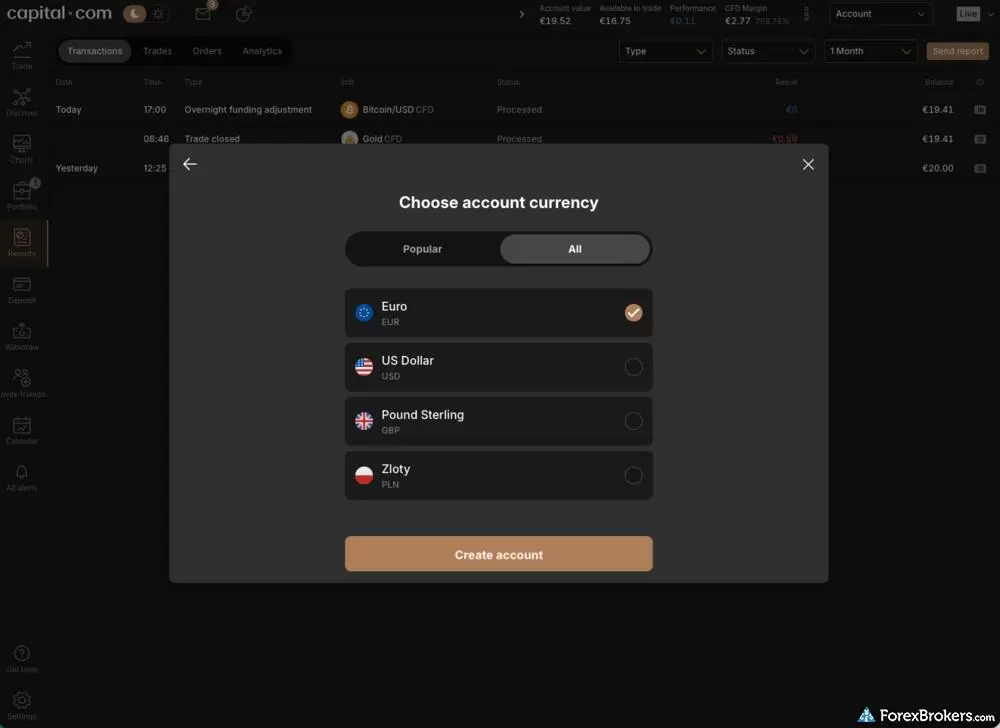
The account settings panel allows users to view and select their primary account denomination. The interface displays options for major currencies like USD, EUR, and GBP, establishing the base currency that will be used for account balancing, deposits, and trade reporting.
Selecting the appropriate base currency comes down to the currency you will fund with, so you avoid an unnecessary conversion on the way in, and the markets you plan to trade most. On CFDs, if your account is in one currency but you mostly trade assets priced in another, each position carries a small conversion cost that adds up over time. For real stocks and ETFs, EU traders can hold portfolios in multiple currencies. Buying from a portfolio in the asset's currency avoids the 0.4% FX markup.
Deposit methods FAQs
How long do deposits take to appear?
Card and e-wallet deposits are usually credited quickly, ranging from near-instant up to a couple of days depending on the method, while bank wires typically take one to three business days. When I tested a SEPA transfer, the funds landed in under 30 minutes, and I received an email confirming the deposit was credited.
Why might a deposit be declined?
A declined deposit is most often an issue on the payment provider's side, so check there first. Confirm that the card or account has available funds, is not blocked for online or international transactions, and that the details match. If everything looks fine, contact Capital.com. Other common causes are depositing above the maximum or below the minimum for that method, or using a currency the method does not support.
Does Capital.com accept PayPal, Apple Pay, and Google Pay?
Yes. Capital.com supports PayPal, Apple Pay, and Google Pay for deposits, subject to availability in your country, and you can withdraw back to the same method.
Withdrawal methods
Overview
Withdrawing from Capital.com is straightforward, with the general rule that money returns to the method you funded with, and only profit above your deposited amount can leave by a different route. Capital.com does not charge a withdrawal fee. The available methods, minimums, and timing all depend on how you deposited and where you live.
Capital.com withdrawal methods
You withdraw using the same methods Capital.com supports for deposits, which include bank transfers, bank cards, and e-wallets such as PayPal, Skrill, Neteller, Apple Pay, and Google Pay. Which ones are open to you comes down to how you funded the account, because withdrawals return to their original source. Card deposits go back to the card, and PayPal, Skrill, or Neteller balances have to return to that same wallet.
Capital.com does not charge withdrawal fees. Even so, "free" is not always the whole picture with a bank wire, where a correspondent bank in the chain can still deduct a handling fee before the money reaches you. Cards and e-wallets avoid that particular cost.
Keep an eye on per-method minimums if you are running a small balance. Some brokers set low deposit minimums to get you in the door, then set higher withdrawal minimums that can strand a small balance. Capital.com's minimums are modest, roughly 20 EUR for cards and most wallets and 10 EUR for Neteller, and there is a helpful safeguard where if your balance falls below the minimum for your method, you can still withdraw the full remaining amount rather than being stuck above the threshold.
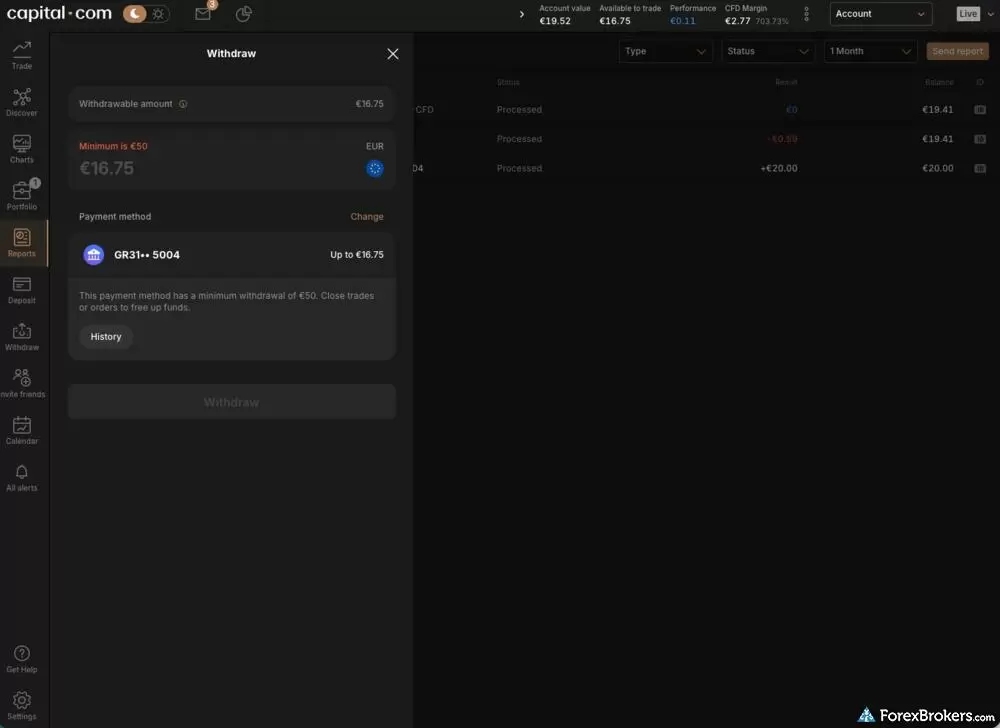
The withdrawal management screen at Capital.com displays available methods for transferring funds out of the account. The layout features input fields for specifying the withdrawal amount alongside listed options for linked bank accounts or payment cards, adhering to standard regulatory funding policies.
Withdrawal methods FAQs
Does Capital.com charge withdrawal fees?
No, Capital.com does not charge a fee to withdraw. You can still pick up costs on the payment side, though. An international bank wire may be reduced by a correspondent or receiving bank's fee, and currency conversion applies if your withdrawal currency differs from your bank account's currency.
How long does a Capital.com withdrawal take?
Capital.com typically processes withdrawal requests the same day or within 24 hours. How long the money then takes to reach you depends on the chosen method. E-wallets are quickest, card withdrawals usually take up to a few business days, and bank wires can take up to five. Regulatory checks or a high volume of requests can add time.
What is the minimum withdrawal amount?
The minimum depends on your payment method and country. For most EU users it is 20 EUR, USD, or GBP for bank cards, Apple Pay, PayPal, and Skrill, and 10 for Neteller. Some local methods, such as Trustly, are higher at 50. If your balance is below the minimum for your method, Capital.com lets you withdraw your full remaining balance.
Can I withdraw to a different account than I deposited from?
Generally no. Withdrawals have to return to your original funding source, and the name on the account has to match yours, which is standard anti-money-laundering practice. The main exception is a closed or invalid account: if you can no longer receive funds where you deposited from, Capital.com can send them elsewhere, but you will need to provide the new account details and documentation to support the change.
Why might a withdrawal be denied?
Common reasons are trying to withdraw to a different method or account than you deposited from, a mismatch between your account details and your verification, or a closed or invalid destination account. In most cases Capital.com will tell you the reason and give you a chance to correct it, for example by supplying updated bank details and any supporting documents.
Our testing
Why you should trust us
Steven Hatzakis is a well-known finance writer, with 25+ years of experience in the foreign exchange and financial markets. He is the Global Director of Online Broker Research for Reink Media Group, leading research efforts for ForexBrokers.com since 2016. Steven is an expert writer and researcher who has published over 1,000 articles covering the foreign exchange markets and cryptocurrency industries. He has served as a registered commodity futures representative for domestic and internationally-regulated brokerages. Steven holds a Series III license in the US as a Commodity Trading Advisor (CTA).
All content on ForexBrokers.com is handwritten by a writer, fact-checked by a member of our research team, and edited and published by an editor. Our ratings, rankings, and opinions are entirely our own, and the result of our extensive research and decades of collective experience covering the forex industry.
Ultimately, our rigorous data validation process yields an error rate of less than .1% each year, providing site visitors with quality data they can trust. Click here to learn more about how we test.
How we tested
At ForexBrokers.com, our online broker reviews are based on our collected quantitative data as well as the observations and qualified opinions of our expert researchers. Each year we publish tens of thousands of words of research on the top forex brokers and monitor dozens of international regulator agencies (read more about how we calculate Trust Score here).
Mobile testing is conducted on modern devices that run the most up-to-date operating systems available:
- For Apple, we use MacBook Pro laptops running the latest, and the iPhone XS running the latest version of iOS.
- For Android, we use the Samsung Galaxy S20 and Samsung Galaxy S23 Ultra devices running the latest Android OS.
All websites and web-based platforms are tested using the latest version of the Google Chrome browser.
Our researchers thoroughly test a wide range of key features, such as the availability and quality of watch lists, mobile charting, real-time and streaming quotes, and educational resources – among other important variables. We also evaluate the overall design of the mobile experience, and look for a fluid user experience moving between mobile and desktop platforms.
Forex Risk Disclaimer
There is a very high degree of risk involved in trading securities. With respect to margin-based foreign exchange trading, off-exchange derivatives, and cryptocurrencies, there is considerable exposure to risk, including but not limited to, leverage, creditworthiness, limited regulatory protection and market volatility that may substantially affect the price, or liquidity of a currency or related instrument. It should not be assumed that the methods, techniques, or indicators presented in these products will be profitable, or that they will not result in losses. Read more on forex trading risks.
Read next

eToro is a winner for its easy-to-use copy-trading platform, where traders can copy the trades of experienced investors – or receive exclusive perks for sharing.
Steven Hatzakis August 04, 2026
Pepperstone offers a growing range of tradeable markets, good-quality research, and support for multiple social copy trading platforms.
Steven Hatzakis October 07, 2026
AvaTrade is a trusted global brand best known for offering an extensive selection of trading platforms for forex and CFD traders.
Steven Hatzakis May 04, 2026
Plus500 is a trusted global brand that offers an easy-to-use trading platform for online traders, alongside access to share trading and selection of CFDs.
Steven Hatzakis July 22, 2026
As a trusted multi-asset broker, XTB offers outstanding customer service, a wide variety of forex and CFDs, and an excellent overall trading experience.
Steven Hatzakis October 07, 2026Popular Guides
- Compare Forex Brokers
- Best Brokers for TradingView for 2026
- Best Forex Brokers for Beginners of 2026
- Best Forex Trading Apps for 2026
- Best Copy Trading Platforms for 2026
- Best Forex Brokers for 2026
- Best Low Spread Forex Brokers for 2026
- International Forex Brokers Search
- Best MetaTrader 4 (MT4) Brokers for 2026
More Forex Guides
- Best High-Leverage Forex Brokers for 2026
- Best Free Forex Trading Courses for 2026
- Best Trading Platforms for Mac Users of 2026
- Best CFD Trading Platforms for 2026
- Best Forex Brokers with APIs for 2026
- Best Brokers that Use TipRanks in 2026
- Best Forex Demo Accounts for 2026
- Best Brokers for TradingView for 2026
- Best MetaTrader 4 (MT4) Brokers for 2026
- Best High-Frequency Trading Software for 2026
- Best PayPal Forex Brokers for 2026
- Best Forex Signal Providers for 2026
- Best Crypto Brokers for 2026
- Best Forex Day Trading Platforms for 2026
- Best MetaTrader 5 (MT5) Forex Brokers for 2026
- Best Algo Trading Software for 2026
- Best Market Maker Brokers in 2026
- Best Forex Options Brokers for 2026
About the Editorial Team
Steven Hatzakis is the Global Director of Online Broker Research for ForexBrokers.com. Steven previously served as an Editor for Finance Magnates, where he authored over 1,000 published articles about the online finance industry. A forex industry expert and an active fintech and crypto researcher, Steven advises blockchain companies at the board level and holds a Series III license in the U.S. as a Commodity Trading Advisor (CTA).
Jeff Anberg is a Senior Editor at ForexBrokers.com. Along with years of experience in media distribution at a global newsroom, Jeff has a versatile knowledge base encompassing the technology and financial markets. He is a long-time active investor and engages in research on emerging markets like cryptocurrency. Jeff holds a Bachelor’s Degree in English Literature with a minor in Philosophy from San Francisco State University.
Joey Shadeck is a Content Strategist and Research Analyst for ForexBrokers.com. He holds dual degrees in Finance and Marketing from Oakland University, and has been an active trader and investor for close to ten years. An industry veteran, Joey obtains and verifies data, conducts research, and analyzes and validates our content.