 IG
IG FOREX.com
 CMC Markets
 XTB
XTB eToro
eToro Capital.com
 AvaTrade
 XM
XM Pepperstone
 FP Markets
 Tickmill
 HFM Markets
Capital.com Fees and Commissions Explained

Written by Steven Hatzakis
Director of Online Broker Research

Edited by Jeff Anberg
Senior Editor

Fact-checked by Joey Shadeck
Research Analyst
Steven HatzakisDirector of Online Broker Research
Steven Hatzakis is the Global Director of Online Broker Research for ForexBrokers.com. He is a forex industry expert and an active fintech and crypto researcher.


Capital.com keeps trading costs low and its fee structure simple. There are no commissions on any product, so what you pay to trade is mostly the spread, and on popular pairs like EUR/USD that spread is among the tightest I've tested. Whether you trade actively with leverage or hold longer-term positions at 1X to skip overnight charges, the cost structure works for both. In the EU, traders can also buy real stocks and ETFs, which carry no overnight funding.
This guide breaks down every fee, based on my own testing. I cover spreads and the active trader rebate that can lower them, overnight funding and how to avoid it, the currency conversion fee and when it applies, the guaranteed stop-loss premium, and deposit and withdrawal costs. I also cover the fees on real stock and ETF investments for EU traders, taken from Capital.com's published fee schedule. Where a cost is worth showing in numbers, I've included a worked example so you can see what it comes to on a real position.
- Minimum Deposit: $20
- Trust Score: 89
- Tradeable Symbols (Total): 5585
Capital.com stands out for its quality research, strong educational content, and innovative web platform. Capital.com holds fewer regulatory licenses and offers a narrower range of markets than some of the best brokers, but still significantly outperforms the industry average. Read full review
- Drag-to-modify charts & ability to close all positions quickly.
- Excellent education and research.
- Competitive spreads.
- MetaTrader 5 is not available.
- Price alerts only available within mobile.
- Doesn't offer trading signals and copy trading.
 Why you can trust us
Led by Steven Hatzakis, Global Director of Online Broker Research, the ForexBrokers.com research team collects and audits data across more than 100 variables. We analyze key tools and features important to forex and CFD traders and collect data on commissions, spreads, and fees across the industry to help you find the best broker for your needs.
We also review each broker’s regulatory status; this research helps us determine whether you should trust the broker to keep your money safe. As part of this effort, we track 100+ international regulatory agencies to power our proprietary Trust Score rating system.
Our researchers open personal brokerage accounts and test all available platforms on desktop, web, and mobile for each broker reviewed on ForexBrokers.com. Learn more about how we test.
Capital.com spreads
Capital.com's pricing is competitive. With one universal account and no commissions, your cost on most positions is simply the spread. On EUR/USD, one of the most liquid pairs, that spread is low. On the test trade I opened, EUR/USD was quoting a 0.64-pip spread, which on a 10,000-unit position works out to about 64 cents. Spreads move through the day, though, so the figure that actually matters is the average. Capital.com's typical EUR/USD spread is around 0.7 pips, close to 70 cents at that same position size. Either way, it sits well below what many brokers charge once you combine their spread and any commission.
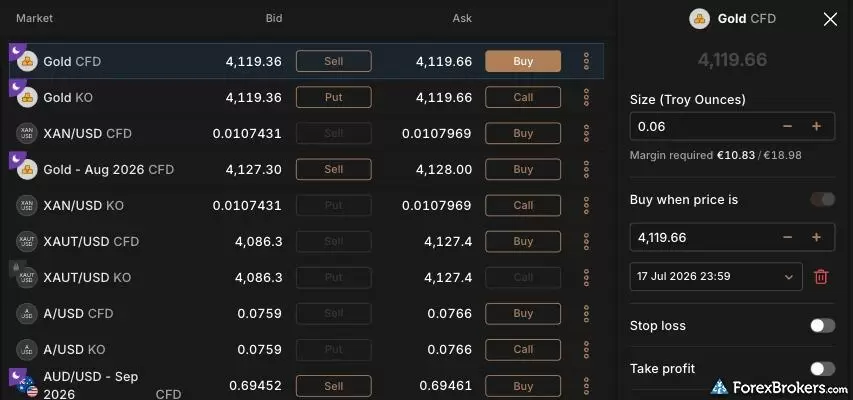
The Capital.com web platform layout provides transparent market pricing by displaying both the Bid and Ask prices directly within the asset list. Traders can observe the quoted spread before executing a trade, such as the 0.30 difference visible between the 4,119.36 Bid and 4,119.66 Ask prices for the Gold CFD, while adjusting their position size in the Capital.com order ticket panel.
Why average spreads matter
A single reading, like the 0.64 pips I happened to catch, only tells you what the market looked like at that moment. Many brokers advertise low minimum or "zero pip" spreads that show up for a fleeting instant and sit much higher the rest of the day. That is why our rankings use the average spread measured across a full month rather than a best-case snapshot. On that basis, Capital.com's roughly 0.7-pip EUR/USD average is among the tightest available, and it is the number to judge the broker on.
What low spreads save you
Small per-trade differences compound fast for active traders. Say you save half a pip per trade against another broker. On a 100,000-unit position, one standard lot, half a pip is about $5. That looks trivial on a single trade, but across 100 trades in a month it adds up to roughly $500. For a $10,000 account, that is 5% of your balance kept rather than paid away in spread, before you have made or lost anything on the trades themselves. Consistently low average spreads are a large part of why Capital.com scores well on cost.
Active trader rebates
Capital.com also runs a tiered rebate that refunds part of the spread you pay each month, lowering your effective cost further. It starts at 5% of the spread at the entry tier, which begins from zero monthly volume, and scales up to 20% at the top tier, around $150 million in monthly notional volume. The rebate is worth having if you trade in size, but it is not available to everyone. Eligibility depends on your country of residence and the entity that holds your account, and in the UK and EU, regulatory rules mean it is offered only to Professional clients.
Capital.com currency conversion fee
On CFD trades, a currency conversion fee applies when a trade settles in a currency other than your account's base currency. Say your account is in USD and you trade an asset priced in euros, such as France's CAC 40 index. Capital.com converts between USD and EUR when you open and again when you close, and a small conversion fee applies each way. The fee is not a separate line item. It is built into the exchange rate as a markup, so it is easy to miss unless you know to look for it.
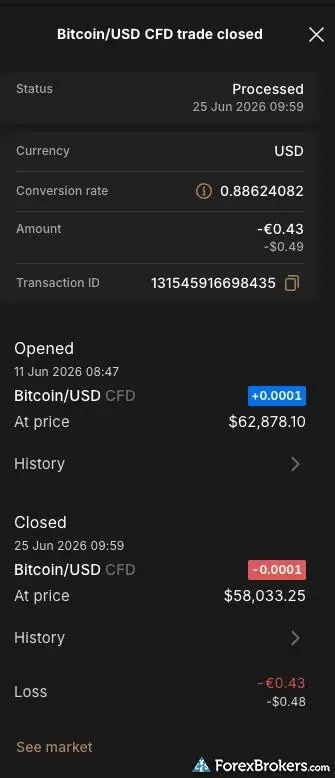
The Capital.com trade confirmation receipt for a closed Bitcoin/USD CFD position details the full execution metrics of the transaction. For accounts denominated in a base currency different from the traded asset, the Capital.com ticket outlines the exact foreign exchange conversion rate applied to the final settlement, ensuring clarity regarding conversion costs.
How much the conversion fee is
The fee is a 0.7% markup for retail clients, reduced to 0.5% for Professional clients. It applies whenever profit, loss, overnight funding, dividends, or guaranteed stop-loss fees settle in a currency other than your base currency. When the instrument is priced in your base currency, there is no conversion fee at all. Real stock and ETF investments for EU traders carry a separate 0.4% FX markup, covered in the stock and ETF section below.
Conversion fee example
Say a USD-denominated account closes a CAC 40 trade with a 10 EUR profit. At an EUR/USD rate of 1.1300, that profit is worth $11.30 before fees. Applying the 0.7% conversion markup brings the effective rate to about 1.1221, so the profit lands as $11.22, with the conversion fee coming to roughly $0.08 on this trade. Had the account been denominated in euros, there would have been no conversion and no fee.
How to avoid the conversion fee
The way to avoid it is to match your trading to your base currency. Where you can, trade instruments priced in your account currency, and fund and withdraw in that same currency so your bank does not add its own conversion on top. If you consistently trade a market priced in a different currency, it can be worth opening a second account denominated in that currency, since Capital.com does not let you change the base currency of an existing account. Weigh this against the opportunity, though. A strong setup in a foreign-currency market can easily be worth more than the small conversion cost of taking it.
Capital.com guaranteed stop-loss fee
A guaranteed stop-loss order, or GSLO, closes your position at exactly the price you set, even if the market gaps straight through that level. That removes the slippage risk a standard stop cannot protect against in fast or volatile conditions, and it matters most exactly when you are most exposed, such as to overnight gaps, news shocks, and thin liquidity moments. Capital.com charges a premium for this protection, but only if the GSLO is actually triggered.
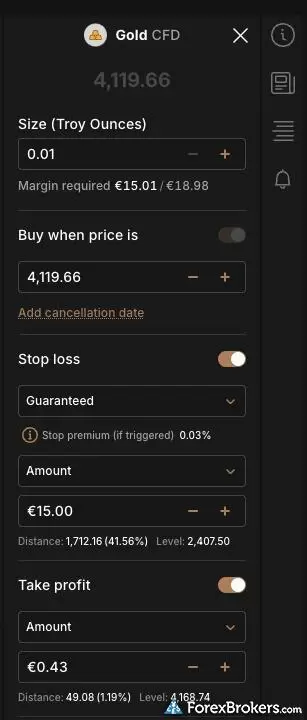
The Capital.com order ticket for a Gold CFD includes an option to configure a Guaranteed Stop Loss Order. When the guaranteed stop loss is activated from the dropdown menu, the Capital.com interface displays the associated stop premium, shown here as a 0.03% charge that applies only if the protective stop level is triggered.
Why a guaranteed stop is different
A standard stop-loss becomes a market order once your level is reached, so it fills at the next available price. If the market gaps past your level and there is not enough liquidity to fill in between, that price can be well beyond where you intended to exit. Say you are long 10,000 EUR/USD at 1.1500 with a stop at 1.1450. A news shock drops the price from 1.1500 to 1.1300 in seconds. Your stop triggers at 1.1450, but the order may not fill until closer to 1.1300. You meant to risk 50 pips and instead lose 200 or more. Large gaps like that are rare, but smaller slippage during volatile periods is common. A GSLO removes that risk entirely by guaranteeing your exit price.
What a GSLO costs
Capital.com calculates the premium as the position's open price multiplied by the quantity and the premium rate, and it only charges you if the guaranteed stop is triggered. Say you open one gold contract at $2,000.30 with a guaranteed stop at $1,980 and a premium rate of 0.03%. If that stop is hit, you pay 0.03% times $2,000.30 times 1, which is about $0.60. That is 60 cents to guarantee your exit on a position a gap could otherwise blow through. The premium is always shown on the deal ticket before you commit, so you see the cost up front, and if the stop never triggers, you pay nothing.
Steven's take
"In my own trading, I would use a GSLO around news events, but only on a relatively large position where a gap could do real damage. On a small position, the protection has to be weighed against the premium."
Steven Hatzakis
Director of Online Broker Research
Our testing
Why you should trust us
Steven Hatzakis is a well-known finance writer, with 25+ years of experience in the foreign exchange and financial markets. He is the Global Director of Online Broker Research for Reink Media Group, leading research efforts for ForexBrokers.com since 2016. Steven is an expert writer and researcher who has published over 1,000 articles covering the foreign exchange markets and cryptocurrency industries. He has served as a registered commodity futures representative for domestic and internationally-regulated brokerages. Steven holds a Series III license in the US as a Commodity Trading Advisor (CTA).
All content on ForexBrokers.com is handwritten by a writer, fact-checked by a member of our research team, and edited and published by an editor. Our ratings, rankings, and opinions are entirely our own, and the result of our extensive research and decades of collective experience covering the forex industry.
Ultimately, our rigorous data validation process yields an error rate of less than .1% each year, providing site visitors with quality data they can trust. Click here to learn more about how we test.
How we tested
At ForexBrokers.com, our online broker reviews are based on our collected quantitative data as well as the observations and qualified opinions of our expert researchers. Each year we publish tens of thousands of words of research on the top forex brokers and monitor dozens of international regulator agencies (read more about how we calculate Trust Score here).
Mobile testing is conducted on modern devices that run the most up-to-date operating systems available:
- For Apple, we use MacBook Pro laptops running the latest, and the iPhone XS running the latest version of iOS.
- For Android, we use the Samsung Galaxy S20 and Samsung Galaxy S23 Ultra devices running the latest Android OS.
All websites and web-based platforms are tested using the latest version of the Google Chrome browser.
Our researchers thoroughly test a wide range of key features, such as the availability and quality of watch lists, mobile charting, real-time and streaming quotes, and educational resources – among other important variables. We also evaluate the overall design of the mobile experience, and look for a fluid user experience moving between mobile and desktop platforms.
Forex Risk Disclaimer
There is a very high degree of risk involved in trading securities. With respect to margin-based foreign exchange trading, off-exchange derivatives, and cryptocurrencies, there is considerable exposure to risk, including but not limited to, leverage, creditworthiness, limited regulatory protection and market volatility that may substantially affect the price, or liquidity of a currency or related instrument. It should not be assumed that the methods, techniques, or indicators presented in these products will be profitable, or that they will not result in losses. Read more on forex trading risks.
Read next
Plus500 is a trusted global brand that offers an easy-to-use trading platform for online traders, alongside access to share trading and selection of CFDs.
Steven Hatzakis July 22, 2026
AvaTrade is a trusted global brand best known for offering an extensive selection of trading platforms for forex and CFD traders.
Steven Hatzakis May 04, 2026
As a trusted multi-asset broker, XTB offers outstanding customer service, a wide variety of forex and CFDs, and an excellent overall trading experience.
Steven Hatzakis October 07, 2026
Pepperstone offers a growing range of tradeable markets, good-quality research, and support for multiple social copy trading platforms.
Steven Hatzakis October 07, 2026
eToro is a winner for its easy-to-use copy-trading platform, where traders can copy the trades of experienced investors – or receive exclusive perks for sharing.
Steven Hatzakis August 04, 2026Popular Guides
- Best Forex Trading Apps for 2026
- Best Copy Trading Platforms for 2026
- Best Brokers for TradingView for 2026
- International Forex Brokers Search
- Best MetaTrader 4 (MT4) Brokers for 2026
- Best Forex Brokers for 2026
- Best Forex Brokers for Beginners of 2026
- Compare Forex Brokers
- Best Low Spread Forex Brokers for 2026
More Forex Guides
- Best Algo Trading Software for 2026
- Best Brokers that Use TipRanks in 2026
- Best Market Maker Brokers in 2026
- Best Forex Day Trading Platforms for 2026
- Best Trading Platforms for Mac Users of 2026
- Best Forex Demo Accounts for 2026
- Best MetaTrader 4 (MT4) Brokers for 2026
- Best Forex Options Brokers for 2026
- Best Brokers for TradingView for 2026
- Best High-Frequency Trading Software for 2026
- Best High-Leverage Forex Brokers for 2026
- Best MetaTrader 5 (MT5) Forex Brokers for 2026
- Best Crypto Brokers for 2026
- Best CFD Trading Platforms for 2026
- Best Free Forex Trading Courses for 2026
- Best Forex Signal Providers for 2026
- Best Forex Brokers with APIs for 2026
- Best PayPal Forex Brokers for 2026
About the Editorial Team
Steven Hatzakis is the Global Director of Online Broker Research for ForexBrokers.com. Steven previously served as an Editor for Finance Magnates, where he authored over 1,000 published articles about the online finance industry. A forex industry expert and an active fintech and crypto researcher, Steven advises blockchain companies at the board level and holds a Series III license in the U.S. as a Commodity Trading Advisor (CTA).
Jeff Anberg is a Senior Editor at ForexBrokers.com. Along with years of experience in media distribution at a global newsroom, Jeff has a versatile knowledge base encompassing the technology and financial markets. He is a long-time active investor and engages in research on emerging markets like cryptocurrency. Jeff holds a Bachelor’s Degree in English Literature with a minor in Philosophy from San Francisco State University.
Joey Shadeck is a Content Strategist and Research Analyst for ForexBrokers.com. He holds dual degrees in Finance and Marketing from Oakland University, and has been an active trader and investor for close to ten years. An industry veteran, Joey obtains and verifies data, conducts research, and analyzes and validates our content.