 IG
IG FOREX.com
 CMC Markets
 XTB
XTB eToro
eToro Capital.com
 AvaTrade
 XM
XM Pepperstone
 FP Markets
 Tickmill
 HFM Markets
Questrade Review

Written by Colin Graves
Financial Writer

Edited by Jeff Anberg
Senior Editor

Fact-checked by Joey Shadeck
Research Analyst
Colin GravesFinancial Writer
Colin Graves is a Winnipeg-based financial writer and former banker with more than seven years of experience covering investments, online brokerages, and the forex markets.

CFDs are complex instruments and come with a high risk of losing money rapidly due to leverage. You should consider whether you understand how CFDs work and whether you can afford to take the high risk of losing your money.
As a Canadian investor and longtime reviewer of online brokers, I’ve spent a significant amount of time testing Questrade Global, Questrade’s dedicated forex and CFD trading platform. I’ve placed trades on both its mobile and web platforms, analyzed spreads, explored its research tools, and measured its forex pricing against competitors like Interactive Brokers. While Questrade’s self-directed investing platform is well-established, its forex and CFD offering is an entirely different product, so it warrants a closer look, especially when it comes to costs and usability.
In my view, Questrade Global is best suited for beginner and everyday Canadian forex traders looking for a simple, all-in-one platform that’s backed by a reputable domestic brokerage. You’ll find a solid range of tradeable instruments and a fairly intuitive trading experience, but it falls short on pricing competitiveness and advanced research tools. I’m also not a big fan of its mobile trading app, which could use a major refresh.
Overall, casual forex traders will find plenty to like about Questrade Global, but more experienced or cost-conscious users may find better value elsewhere.
-
Minimum Deposit:
$0 -
Trust Score:
85 -
Tradeable Symbols (Total):
675
| Range of Investments | |
| Trading Fees | |
| Trading Platforms | |
| Research | |
| Mobile Trading | |
| Education |
Check out ForexBrokers.com's picks for the best forex brokers in 2026.
| 2026 | #29 |
| 2025 | #32 |
 Why you can trust us
Led by Steven Hatzakis, Global Director of Online Broker Research, the ForexBrokers.com research team collects and audits data across more than 100 variables. We analyze key tools and features important to forex and CFD traders and collect data on commissions, spreads, and fees across the industry to help you find the best broker for your needs.
We also review each broker’s regulatory status; this research helps us determine whether you should trust the broker to keep your money safe. As part of this effort, we track 100+ international regulatory agencies to power our proprietary Trust Score rating system.
Our researchers open personal brokerage accounts and test all available platforms on desktop, web, and mobile for each broker reviewed on ForexBrokers.com. Learn more about how we test.
Can I open an account with this broker?
Use our country selector tool to view available brokers in your country.
Table of Contents
Questrade pros and cons
PROS
- Trade stocks, ETFs, options, and forex in the same account
- Questrade is a reputable Canadian brokerage regulated by CIRO
- Supports REST and low-level APIs
- Try out Questrade Global with a free practice account for 30 days
CONS
- Spreads aren’t as tight as some lower-cost competitors
- Research tools unlikely to impress advanced technical traders
- No MetaTrader (MT4/MT5)
- Mobile trading app feels a bit clunky and out of date
My top takeaways for Questrade in 2026:
- Questrade Global is a solid forex and CFD trading platform for beginner and everyday Canadian forex traders.
- Keep a close eye on your trading costs, as Questrade Global’s spreads are not as tight as those of many lower-priced competitors.
- Questrade primarily relies on third-party providers for its research tools, such as Trade Signals from Autochartist.
- Questrade’s educational resources, including articles and webinars, are limited, with almost no forex or CFD content.
- Questrade Global offers a free practice account for 30 days, where you can test out its platform with $100,000 CAD in practice cash.
Questrade for stock trading
More interested in trading stocks with Questrade? Check out my Questrade review over at StockBrokers.com to learn more about the broker's stock trading offering for Canadian residents.
Trust Score
Developed by ForexBrokers.com and in use for nearly 10 years, Trust Score is a proprietary rating system powered by a range of unique quantitative and qualitative metrics, including each company’s number of regulatory licenses. Trust Scores range from 1 to 99 (the higher a broker’s rating, the better). Learn more.
Is Questrade safe?

Questrade is considered Trusted, with an overall Trust Score of 85 out of 99. Questrade is not publicly traded and does not operate a bank, but is authorised by one Tier-1 regulators (Highly Trusted), zero Tier-2 regulators (Trusted), zero Tier-3 regulator (Average Risk), and zero Tier-4 regulators (High Risk). Questrade is authorised by the following Tier-1 regulators: Canadian Investment Regulatory Organization (CIRO).
| Feature |
 Questrade Questrade
|
|---|---|
| Year Founded | 2000 |
| Publicly Traded (Listed) | No |
| Bank | No |
| Tier-1 Licenses | 1 |
| Tier-2 Licenses | 0 |
| Tier-3 Licenses | 0 |
| Tier-4 Licenses | 0 |
Range of investments
Questrade Global offers a solid, though far from best-in-class, selection of forex pairs and CFD instruments. With over 675 tradable symbols, Questrade covers the basics well, but it lacks the depth and breadth of top global forex brokers. For example, you cannot access crypto CFDs or actual stock shares. But if you’re looking for a Canadian-based platform that you can use to speculate across currencies, indices, commodities, and international stocks, Questrade can get the job done.
Forex & CFDs: Questrade Global offers over 110 currency pairs (I counted 113). In addition, it offers over 250 stock CFDs, 250+ EFT CFDs, and 13 index CFDs, including the US 30 (Wall Street, Dow Jones), US 500 (S&P 500), Germany 40 (DAX), Hong Kong 50 (Hang Sang Index), and more. You can also access 48 commodity CFDs across agriculture, energy, and metals.
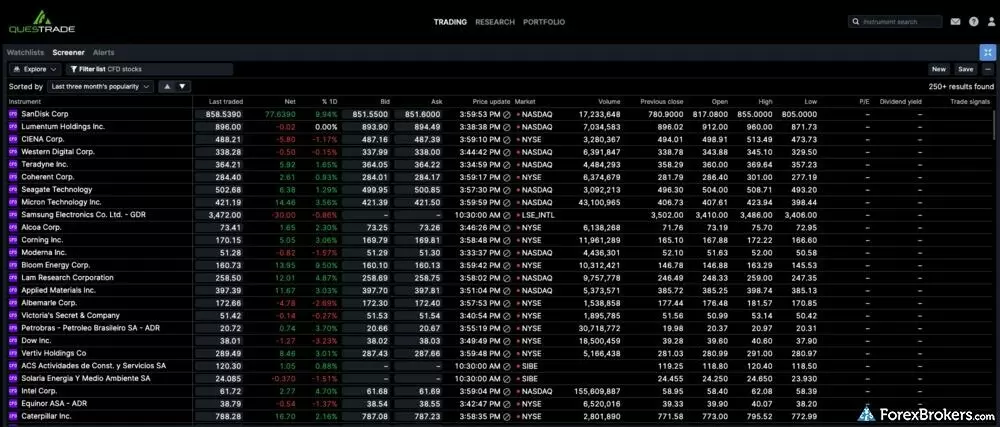
This screenshot shows Questrade Global’s built-in screener, which allows traders to filter and explore a wide range of forex pairs and CFD instruments. In addition to over 250 stock CFDs, users can browse and sort opportunities across currencies, indices, ETFs, and commodities, including metals, energy, and agriculture. In total, Questrade has over 675 instruments available to trade.
You can’t trade actual individual stock shares, but Questrade has a separate self-directed brokerage. This means you could open a stock trading account and keep everything under the same roof, which is very convenient. Finally, I spoke with a Questrade representative who confirmed that there are no crypto offerings, but that Questrade plans to add them in the future.
Available investment products
While Questrade offers an impressive self-directed stock trading account, its forex and CFD catalog on Questrade Global is narrower than international competitors. During our audit, we verified access to 110 forex pairs, alongside over 250 CFDs spanning indices, commodities, and U.S. stocks.
| Feature |
Questrade
|
|---|---|
| Tradeable Symbols (Total) | 675 |
| Forex Pairs (Total) | 110 |
| Forex trading (Spot) | Yes |
| Forex trading (CFDs) | No |
| Forex trading (Options) | No |
| Forex trading (Futures) | No |
| Forex trading (Crypto) | No |
| Commodities: Agriculturals | No |
| Commodities: Oil | Yes |
| Commodities: Gold | Yes |
| Commodities: Silver | Yes |
| U.S. Stocks (Shares) | No |
| U.S. Stocks (CFDs) | Yes |
| U.S. Stocks (Crypto) | No |
| Global Stocks (Non-U.S. Shares) | No |
| Global Stocks (Non-U.S. CFDs) | No |
| 24/5 Trading (U.S. Stocks - Shares) | No |
| 24/5 Trading (U.S. Stocks - CFDs) | No |
| 24/7 Trading (Crypto) | No |
| Prediction markets | No |
| Copy Trading | No |
| Bitcoin (BTC) | No |
| Ethereum (ETH) | No |
| Cryptocurrencies (Total) | 0 |
| Cryptocurrency (Underlying) | No |
| Cryptocurrency (CFDs) | No |
| Cryptocurrency (Futures) | No |
| Disclaimers |
Available funding options
Funding a Questrade account is straightforward for Canadian residents, though options are somewhat limited compared to global brokers. Our tests confirm support for standard debit cards and bank wire transfers, but modern e-wallets like PayPal and Skrill are currently unavailable.
| Feature |
Questrade
|
|---|---|
| Debit card (Deposit/withdraw) | Yes |
| Credit card (Deposit/withdraw) | No |
| Bank Wire (Deposit/Withdraw) | Yes |
| Non-wire bank transfer (Deposit/Withdraw) | No |
| Apple Pay (Deposit/Withdraw) | No |
| Google Pay (Deposit/Withdraw) | No |
| Crypto (Deposit/withdraw) | No |
| Cryptocurrency (Wallet transfers) | No |
| PayPal (Deposit/Withdraw) | No |
| Skrill (Deposit/Withdraw) | No |
| Neteller (Deposit/Withdraw) | No |
Questrade fees
Questrade Global is a spread broker, which means that your trading costs are built into the price you see on the screen. Instead of charging a separate trading commission, Questrade earns its revenue solely through a marked-up bid-ask spread, the small difference between the buy and sell price of a currency pair or CFD.
Forex pricing summary: According to Questrade, spreads can be as low as 0.8 pips under “normal market conditions”. And that’s likely the case, but upon review at the time of writing, I found the average spreads for major pairs to be closer to 2.1 – 2.5 pips. Interactive Brokers (IBKR), by comparison, offers much tighter spreads along with a separate commission. To put this into perspective, let’s consider a trade of one standard lot (100,000 units). With Questrade Global, a typical spread of around 2 pips results in an all-in cost of roughly $20 per trade. IBKR, on the other hand, might charge a spread of about 0.2 pips (approx $2), plus a small commission of $4 to $7 per trade. In this case, your total cost with IBKR would be around $6 to $9, less than half the price of Questrade Global.
CFD pricing: Questrade charges a small spread on CFDs, but adds a $9.95 USD trading fee per unit, so you really need to understand your costs before you trade, as it can get expensive.
For example, as shown in the screenshot below, if you were to purchase one Tesla CFD unit, you would pay a tiny spread of $ 0.05 (0.015%), but you would be subject to a $9.95 USD trading fee when you open and close the position, for a total transaction cost of $19.95 USD, or 5.813%. This doesn’t include the overnight financing costs (swap fees), which for one month would be an additional $2.23 USD (0.65%). In other words, you would need a return of over 6% on the CFD just to break even.
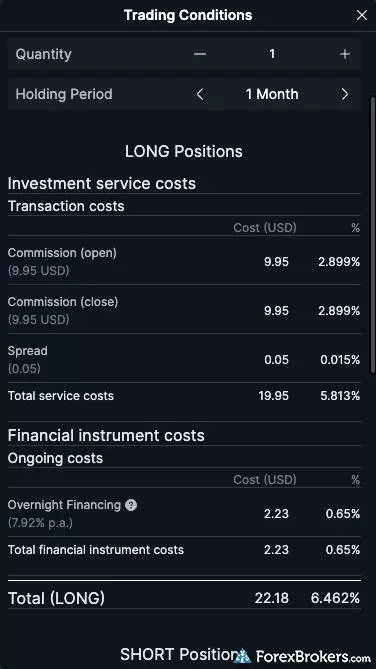
The trading costs page, accessible from the trade ticket, provides traders with a clear view of the total cost before placing a trade. It itemizes the spread, commissions on entry and exit, and estimated overnight financing, and highlights Questrade Global’s pricing transparency.
Other fees: Depending on your account activity, you may incur additional costs when dealing with Questrade. For example, the broker charges a rollover cost for any position that stays open after 5 PM ET. These costs will vary depending on the instrument you are trading. In addition, a carrying cost is charged on the overnight positions in Expiring CFDs. Like the rollover cost, this fee will vary by CFD. Non-expiring CFDs are subject to an overnight credit/debt charge (if held overnight).
Trading fees
Questrade Global operates as a spread-only broker for forex, but CFD traders should be aware of additional transaction costs. In our live pricing analysis, despite advertised minimum spreads of 0.8 pips on the EUR/USD, we observed real-time spreads of 2 pips alongside a $9.95 USD trading fee per unit on CFD positions.
| Feature |
Questrade
|
|---|---|
| Average spread (EUR/USD) - Spread-only account | 0.8 or higher |
| Average spread (EUR/USD) - Raw spread account | N/A |
| Commission per trade (EUR/USD) - Raw spread account | N/A |
| All-in Cost EUR/USD - Raw spread account | N/A |
| Inactivity Fee | No |
| International Wire Fee | $30 |
| Minimum Deposit | $0 |
Account types
Questrade keeps its account structure simple by focusing strictly on variable spreads without an Active Trader rebate program or VIP tiers. We confirmed the absence of fixed spreads, professional accounts, and Islamic (swap-free) options during our evaluation.
| Feature |
Questrade
|
|---|---|
| Variable Spreads | Yes |
| Fixed Spreads | No |
| Active Trader Program | No |
| VIP/Premium Account | No |
| Professional Account | No |
| Islamic Account | No |
Mobile trading apps
Questrade Global offers a mobile trading app that is available for download on iOS and Android devices. I spent a lot of time in the app, creating watchlists, monitoring trades, and using the charts and research tools. My overall impression is that the app is pretty mediocre. For starters, the iOS app is designed for the iPad, so I found myself constantly having to scroll sideways to view menus and content that didn’t fit on my iPhone screen. And while you can add indicators and trendlines to charts in the mobile app, it’s pretty cumbersome.
I also found it annoying that the app doesn’t yet support facial recognition (Face ID). I had to retrieve a new code from my authenticator app every time I logged in. It didn’t help that the session times out after 15 minutes. Only the Windows desktop platform allows you to set your session timeout to “never”. I wasn’t surprised to see that the most recent update on The App Store (iOS) was from January 2023 — over three years ago! And the iOS version of the app has a 2.1-star rating (out of 5). The Android version of the app has a similar rating of 3/5 stars.
All that said, the product overview screen, which includes charts and market news, is well laid out, and placing trades is a breeze, making the mobile app sufficient for the average trader. Furthermore, most of the functions on the web platform are also available in the app, and the two systems are integrated. You can create and edit watchlists in the app, set price alerts, and edit charts, and your changes will appear in the web and desktop applications.
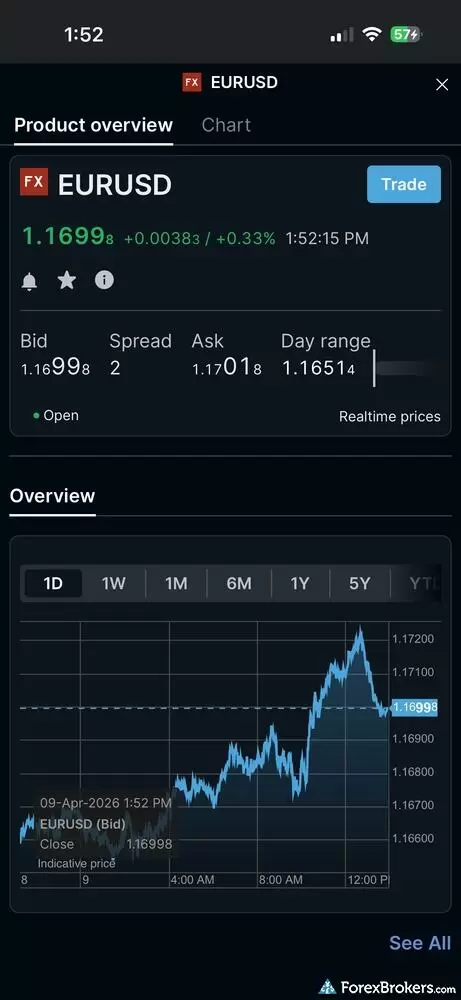
This screen shows the product overview for the EUR/USD currency pair in the Questrade Global mobile app, including real-time pricing and key market data. Traders can view the current bid and ask prices, spread, and intraday chart, while also accessing the trade ticket directly from this page using the “Trade” button.
Available mobile platforms and tools
The Questrade Global mobile app provides the essential tools needed to monitor markets and execute trades on iOS and Android devices. In our hands-on testing, we found 64 built-in charting indicators and watchlist syncing, though the app currently lacks advanced biometric login features like Face ID.
| Feature |
Questrade
|
|---|---|
| Proprietary Mobile Trading App | Yes |
| Android App | Yes |
| Apple iOS App | Yes |
| Mobile Price Alerts | Yes |
| Mobile Charting - Draw Trendlines | Yes |
| Mobile Charting - Trendlines Autosave | Yes |
| Mobile Charting - Indicators / Studies | 64 |
| Mobile Charting - Indicators Autosave | Yes |
| Mobile Watchlists - Column Filtering | Yes |
| Mobile Watchlists - Column Customization | Yes |
| Mobile Watchlists - Create & Manage | Yes |
| Mobile Watchlists - Syncing | Yes |
Trading platforms
Questrade Global offers a single trading platform available via web, a downloadable desktop version (Windows only), and the aforementioned mobile app. You can also open a free practice account for 30 days.
Platform overview: Questrade Global’s trading platform is well-developed and uses a white-labeled version of Saxo’s platform. Questrade considers itself a 24/6 trading platform, meaning you can trade around the clock throughout the week, except for the period from Friday evenings until Sunday afternoons.
While it lacks the depth of top platforms, it offers more than enough functionality and tools to appeal to the everyday Canadian forex trader. The trade ticket includes five order types: Market, Limit, Stop, Trailing Stop, Stop Limit, and One Cancels the Other (OCO). There is even a Quick Trade option for fast trading. By clicking the information icon in the trade ticket, you can bring up a cost calculator, trading rates, and instrument details for the currency pair or CFD you are trading. You can easily set price alerts, create and edit watchlists, or access Questrade’s preset watchlists.
Charting: Questrade offers 9 different chart types, including Bid/Ask, Line, three Candlestick charts, Bar OHLC, and Bar HLC, and I counted 64 available indicators and studies. You can customize your chart configuration and open a trade ticket by right-clicking on the forex pair or CFD displayed on the chart or on the chart itself.
Screener: Questrade’s forex and CFD screener is a helpful feature that makes it easy to sort through the hundreds of available instruments. You can filter by FX and CFD indices, stocks, futures, and ETFs. You can also sort by % price change, popularity, and alphabetically. As with the trade signals tool, clicking on an instrument in the screener brings up a trade ticket, so you can place an order directly from the screener.
Demo account: If you want to give Questrade Global a test run, you can open a free web-based practice account that's available for 30 days. You’ll be able to trade with $100,000 in practice cash, switch between web and mobile platforms, and try out all of Questrade Global’s charting and research tools.
Available trading platforms and features
Powered by a white-labeled version of Saxo's technology, the Questrade Global platform delivers a solid, web-based trading experience alongside a downloadable Windows desktop app. Our platform walkthrough verified 64 charting indicators, built-in trading signals, and full API access, though it notably excludes MetaTrader 4 (MT4) and MetaTrader 5 (MT5).
| Feature |
Questrade
|
|---|---|
| Desktop Platform (Windows) | Yes |
| Desktop Platform (Mac) | No |
| MetaTrader 4 (MT4) | No |
| MetaTrader 5 (MT5) | No |
| FX Blue | No |
| Proprietary Desktop Trading Platform | Yes |
| Proprietary Web Trading Platform | Yes |
| TradingView | No |
| cTrader | No |
| Algorithmic trading | |
| API Access | Yes |
| Charts can be saved | Yes |
| Client sentiment data | No |
| Trading Signals | Yes |
| Price Alerts | Yes |
| Virtual Private Server (VPS) | No |
| Virtual Trading (Demo) | Yes |
| Charting - Indicators / Studies (Total) | 64 |
| Charting - Trade From Chart | Yes |
| Charting - TradingView | No |
Available order types
Questrade Global provides a standard suite of order types sufficient for most everyday forex and CFD traders. We verified the availability of market, limit, stop, trailing stop, and OCO (One Cancels the Other) orders directly within the trade ticket.
| Feature |
Questrade
|
|---|---|
| Order Type - Market | Yes |
| Order Type - Limit | Yes |
| Order Type - Stop | Yes |
| Order Type - Trailing Stop | Yes |
| Order Type - OCO | Yes |
| Order Type - OTO | No |
| Order Type - GSLO | No |
Research
Questrade Global lacks the in-depth research capabilities of more advanced trading platforms and relies on a few third-party research tools from companies such as NewsEdge and Autochartist, with market data provided by Saxo.
Trading signals: If you want to filter structured trade ideas without leaving the trading platform, Questrade has a built-in trade signals feature. It’s a third-party tool from Autochartist, and is very easy to navigate. At a glance, it tells you the signal’s direction, the price forecast, interval, pattern name, when the signal was identified, the signal type, expiry, the percentage probability, and the quality of the signal. When you click on a specific pairing or CFD, it displays a detailed snapshot of the signal along with a trade ticket, so you can place your order without leaving the tool.
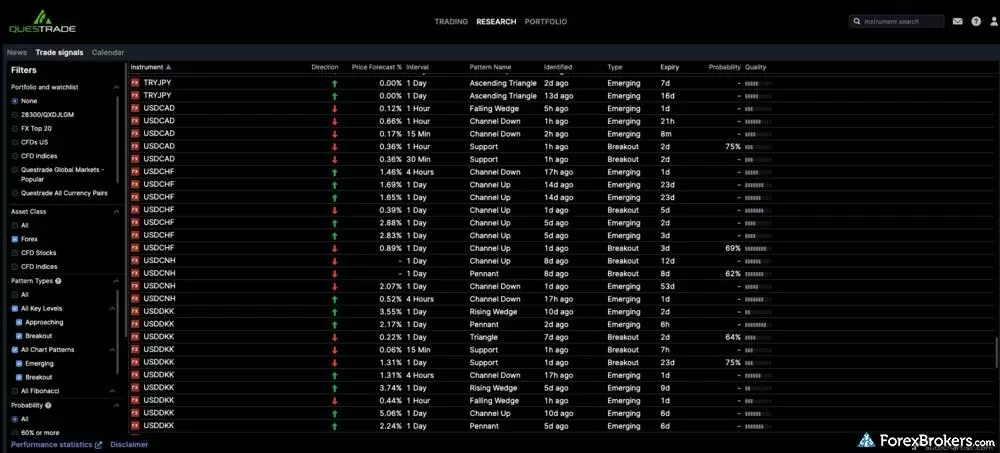
The above screenshot is from Questrade Global’s Trade Signals tool, which is powered by Autochartist. It scans the market for potential trading opportunities based on technical patterns. Traders can filter by asset class and view identified setups, such as channel patterns, along with directional bias, recent performance, and pattern stage (e.g., emerging or breakout).
Market news and calendar: In addition to Trade Signals by Autochartist, Questrade offers the latest economic and market news, as well as a calendar of economic events, which you can filter by event type (macro, earnings, dividends), importance, time frame, and country.
Available research tools
Questrade relies heavily on third-party integrations to deliver market research and trading ideas. Our analysis highlights the inclusion of Autochartist for technical trading signals, TipRanks, and Trading Central, though the platform lacks daily in-house market commentary.
| Feature |
Questrade
|
|---|---|
| Forex News (Top-Tier Sources) | No |
| Daily Market Commentary (Articles) | No |
| Daily Market Commentary (Videos) | No |
| Economic Calendar | No |
| Research - Earnings Calendar | Yes |
| Acuity Trading | No |
| Autochartist | Yes |
| TipRanks | Yes |
| Trading Central | Yes |
| Mobile Research - News | No |
| Mobile Research - Economic Calendar | Yes |
| Mobile Research - Market Movers | No |
Education
Questrade’s educational tools are limited. There is a learning centre on its website, where you can access articles and webinars on a wide range of investing topics. Unfortunately, I found very little educational content pertaining to forex and CFD trading. And while the webinars are very high quality, I only counted 13 in total, so they don’t seem to publish them regularly. If you want to learn the finer points of forex trading, you’re better off relying on outside resources.
I will point out one small caveat here. When you open an account with Questrade, you can book a free training session with a Questrade representative via Google Meet. In fact, they may reach out to you to book one. Shortly after opening my account, I spent 45 minutes with a very knowledgeable representative who brought me up to speed on the platform.
Available educational offerings
Questrade’s educational resources are primarily geared toward traditional stock and ETF investing rather than advanced currency trading. While the website features a dedicated learning center with general investing content, we found a distinct lack of beginner or advanced videos and webinars focused specifically on forex and CFDs.
| Feature |
Questrade
|
|---|---|
| Education (Forex) | No |
| Education (CFDs) | No |
| Education (Crypto) | No |
| Education (Stocks) | Yes |
| Education Area (Website) | Yes |
| Education Area (Mobile App) | No |
| Webinars | No |
| Videos - Beginner Trading Videos | No |
| Videos - Advanced Trading Videos | No |
Final thoughts
Questrade Global makes it easy for Canadians to trade forex and CFDs, especially if you’re already immersed in the Questrade ecosystem. Unfortunately, its higher trading costs, lack of in-depth research tools, and an underwhelming mobile trading experience prevent it from being a top-tier platform. For beginners looking to dip their toes into the world of forex trading, the free practice account and ease of use are definite positives, but for traders focused on securing the tightest possible spreads and more advanced tools, I recommend checking out other alternatives before you commit.
Questrade's Star Ratings
| Feature |
Questrade
|
|---|---|
| Overall Rating |
|
| Trust Score | 85 |
| Range of Investments |
|
| Trading Fees |
|
| Trading Platforms |
|
| Research |
|
| Mobile Trading |
|
| Education |
|
Our testing
Why you should trust us
Colin Graves is a Winnipeg-based financial writer and editor with more than seven years of experience covering investments and online brokerage platforms, including the forex markets. Before becoming a full-time writer, Colin spent over two decades in the banking industry, including 15 years as a people manager with a Top 10 North American financial institution. During that time, he managed books of business exceeding $1 billion and completed both the Canadian Securities (CSC) and the Professional Financial Planning (PFPC) courses. Colin’s work has appeared in leading personal finance publications, including MoneySense, Money.ca, MapleMoney, The College Investor, and more. Alongside his published work, Colin ghostwrites thought leadership content for founders and CEOs in the financial space.
All content on ForexBrokers.com is handwritten by a writer, fact-checked by a member of our research team, and edited and published by an editor. Our ratings, rankings, and opinions are entirely our own, and the result of our extensive research and decades of collective experience covering the forex industry.
Ultimately, our rigorous data validation process yields an error rate of less than .1% each year, providing site visitors with quality data they can trust. Click here to learn more about how we test.
How we tested
At ForexBrokers.com, our online broker reviews are based on our collected quantitative data as well as the observations and qualified opinions of our expert researchers. Each year we publish tens of thousands of words of research on the top forex brokers and monitor dozens of international regulator agencies (read more about how we calculate Trust Score here).
Mobile testing is conducted on modern devices that run the most up-to-date operating systems available:
- For Apple, we use MacBook Pro laptops running the latest macOS, and the iPhone XS running the latest iOS.
- For Android, we use the Samsung Galaxy S20 and Samsung Galaxy S23 Ultra devices running the latest Android OS.
All websites and web-based platforms are tested using the latest version of the Google Chrome browser.
Our researchers thoroughly test a wide range of key features, such as the availability and quality of watch lists, mobile charting, real-time and streaming quotes, and educational resources – among other important variables. We also evaluate the overall design of the mobile experience and look for a fluid user experience moving between mobile and desktop platforms.
Forex Risk Disclaimer
There is a very high degree of risk involved in trading securities. With respect to margin-based foreign exchange trading, off-exchange derivatives, and cryptocurrencies, there is considerable exposure to risk, including but not limited to, leverage, creditworthiness, limited regulatory protection and market volatility that may substantially affect the price, or liquidity of a currency or related instrument. It should not be assumed that the methods, techniques, or indicators presented in these products will be profitable, or that they will not result in losses. Read more on forex trading risks.
Read next
As a trusted multi-asset broker, XTB offers outstanding customer service, a wide variety of forex and CFDs, and an excellent overall trading experience.
Steven Hatzakis October 07, 2026
Interactive Brokers forex review: I tested IBKR's spreads, commissions, and platforms in 2026. More than 100 pairs, but a $2 minimum commission per order.
Steven Hatzakis September 28, 2026
Traders choose Swissquote for its quality research and vast multi-asset offering.
Steven Hatzakis May 04, 2026
IG offers the ultimate comprehensive trading package, featuring excellent trading and research tools, and industry-leading education.
Steven Hatzakis August 04, 2026
CMC Markets review 2026: 303 forex pairs (the most we track), 21,000+ CFDs, and top-tier charting. See where its spreads and education fall short.
Steven Hatzakis October 09, 2026Popular Guides
- Best Copy Trading Platforms for 2026
- Best MetaTrader 4 (MT4) Brokers for 2026
- Best Brokers for TradingView for 2026
- Best Low Spread Forex Brokers for 2026
- International Forex Brokers Search
- Compare Forex Brokers
- Best Forex Trading Apps for 2026
- Best Forex Brokers for 2026
- Best Forex Brokers for Beginners of 2026
More Forex Guides
- Best PayPal Forex Brokers for 2026
- Best Forex Options Brokers for 2026
- Best CFD Trading Platforms for 2026
- Best Brokers that Use TipRanks in 2026
- Best High-Frequency Trading Software for 2026
- Best MetaTrader 4 (MT4) Brokers for 2026
- Best Brokers for TradingView for 2026
- Best Forex Signal Providers for 2026
- Best Market Maker Brokers in 2026
- Best Forex Brokers with APIs for 2026
- Best Trading Platforms for Mac Users of 2026
- Best Forex Day Trading Platforms for 2026
- Best Crypto Brokers for 2026
- Best MetaTrader 5 (MT5) Forex Brokers for 2026
- Best High-Leverage Forex Brokers for 2026
- Best Free Forex Trading Courses for 2026
- Best Algo Trading Software for 2026
- Best Forex Demo Accounts for 2026
About the Editorial Team
Colin Graves is a Winnipeg-based financial writer with more than seven years of experience covering investments, online brokerages, and the forex markets. A former banking exec who managed over $1B in assets, he holds CSC and PFPC credentials. His work appears in MoneySense, Money.ca, MapleMoney, and more.
Jeff Anberg is a Senior Editor at ForexBrokers.com. Along with years of experience in media distribution at a global newsroom, Jeff has a versatile knowledge base encompassing the technology and financial markets. He is a long-time active investor and engages in research on emerging markets like cryptocurrency. Jeff holds a Bachelor’s Degree in English Literature with a minor in Philosophy from San Francisco State University.
Joey Shadeck is a Content Strategist and Research Analyst for ForexBrokers.com. He holds dual degrees in Finance and Marketing from Oakland University, and has been an active trader and investor for close to ten years. An industry veteran, Joey obtains and verifies data, conducts research, and analyzes and validates our content.