 IG
IG FOREX.com
 CMC Markets
 XTB
XTB eToro
eToro Capital.com
 AvaTrade
 XM
XM Pepperstone
 FP Markets
 Tickmill
 HFM Markets
PU Prime Review

Written by Colin Graves
Financial Writer

Edited by Hannah Smith
Staff Editor

Fact-checked by Joey Shadeck
Research Analyst
Colin GravesFinancial Writer
Colin Graves is a Winnipeg-based financial writer and former banker with more than seven years of experience covering investments, online brokerages, and the forex markets.

CFDs are complex instruments and come with a high risk of losing money rapidly due to leverage. Trading Contracts for Difference (CFDs) involves a high level of risk and may not be suitable for all traders. You should consider whether you understand how CFDs work and whether you can afford to take the high risk of losing your money.
I spend a lot of time testing different forex broker platforms, and recently had a chance to dive into PU Prime. I tested PU Prime's mobile app, web platform, account options, and copy trading tools. Its proprietary platforms impressed me most. They feel modern, offer strong charting and flexible trade execution, and integrate PU Prime's well-developed copy trading functions.
PU Prime is a strong fit for dedicated forex and CFD traders looking for competitive fees, a broad range of tradable instruments, and copy trading built into the experience. Beyond Autochartist, its research tools are underwhelming. You also need a larger account deposit to get the lowest advertised trading costs. I'd recommend PU Prime most to traders who already have their own market news and analysis.
-
Minimum Deposit:
$50.00 -
Trust Score:
79 -
Tradeable Symbols (Total):
1000
| Range of Investments | |
| Trading Fees | |
| Trading Platforms | |
| Research | |
| Mobile Trading | |
| Education |
Check out ForexBrokers.com's picks for the best forex brokers in 2026.
 Why you can trust us
Led by Steven Hatzakis, Global Director of Online Broker Research, the ForexBrokers.com research team collects and audits data across more than 100 variables. We analyze key tools and features important to forex and CFD traders and collect data on commissions, spreads, and fees across the industry to help you find the best broker for your needs.
We also review each broker’s regulatory status; this research helps us determine whether you should trust the broker to keep your money safe. As part of this effort, we track 100+ international regulatory agencies to power our proprietary Trust Score rating system.
Our researchers open personal brokerage accounts and test all available platforms on desktop, web, and mobile for each broker reviewed on ForexBrokers.com. Learn more about how we test.
Can I open an account with this broker?
Use our country selector tool to view available brokers in your country.
Table of Contents
PU Prime pros and cons
PROS
- Sleek and modern proprietary web and mobile trading app.
- Flexible account options with low pricing.
- Solid copy trading controls on both web and mobile.
CONS
- Higher deposit required for lower-cost accounts.
- Regulatory protection may vary.
- Limited research tools.
My top takeaways for PU Prime in 2026:
- PU Prime's proprietary trading platforms provide a less fragmented experience than other brokers who rely solely on third-party platforms.
- You can choose from four different account types, with Prime and ECN offering lower starting spreads with separate commissions.
- Copy trading is built into the mobile and web trading platforms
- Research is less impressive than the trading tools. Autochartist helps you identify potential setups, but the newsfeed is thin, and it lacks a dedicated sentiment tool.
Trust Score
Developed by ForexBrokers.com and in use for nearly 10 years, Trust Score is a proprietary rating system powered by a range of unique quantitative and qualitative metrics, including each company’s number of regulatory licenses. Trust Scores range from 1 to 99 (the higher a broker’s rating, the better). Learn more.
Is PU Prime safe?

PU Prime is considered Average Risk, with an overall Trust Score of 79 out of 99. PU Prime is not publicly traded and does not operate a bank, and is authorised by one Tier-1 regulator (Highly Trusted), two Tier-2 regulators (Trusted), zero Tier-3 regulators (Average Risk), and two Tier-4 regulators (High Risk). PU Prime is authorised by the following Tier-1 regulator: Australian Securities and Investments Commission (ASIC).
| Feature |
 PU Prime PU Prime
|
|---|---|
| Year Founded | 2015 |
| Publicly Traded (Listed) | No |
| Bank | No |
| Tier-1 Licenses | 1 |
| Tier-2 Licenses | 2 |
| Tier-3 Licenses | 0 |
| Tier-4 Licenses | 2 |
Range of investments
PU Prime is a forex and CFD trading platform with over 1,000 tradable instruments. In addition to forex pairs, you can trade CFDs tied to global stocks, stock indices, metals, commodities, ETFs, bonds, and cryptocurrencies. Access to global stocks is a nice feature, since some platforms are limited to U.S. stocks. You cannot buy the underlying stock shares or cryptocurrencies.
I found PU Prime's trading hours a bit confusing and hard to follow. They offer plenty of extended hours, with 24/5 trading for most forex pairs and 23-hour trading for many indices, though there are exceptions. Most share CFDs are limited to standard trading hours, but a few can be traded 24 hours a day. You can identify them by the symbol. For example, you can trade Amazon or Amazon.24H. I also noticed that spreads were much higher for some 24-hour stock CFDs, which you'll want to keep in mind. I asked a PU Prime representative about this, but they only said their spreads are variable and can change at any time. Fair enough. Wider spreads outside regular hours are not unique to PU Prime. Liquidity is usually thinner in extended sessions, so spreads tend to widen no matter which broker you use.
Overall, market access isn't an issue, but with trading hours varying so much across instrument categories, you really need to double-check before you trade.
Available investment products
During our audit we verified access to 55 forex pairs and 1,000 total tradable symbols, spanning share CFDs, stock indices, metals, commodities, ETFs, bonds, and cryptocurrencies. We confirmed that forex and cryptocurrency are offered as CFDs only, with no access to the underlying asset, and that forex options and futures are not available. A small number of share CFDs trade 24 hours a day under a separate symbol.
| Feature |
PU Prime
|
|---|---|
| Tradeable Symbols (Total) | 1000 |
| Forex Pairs (Total) | 55 |
| Forex trading (Spot) | No |
| Forex trading (CFDs) | Yes |
| Forex trading (Options) | No |
| Forex trading (Futures) | No |
| Forex trading (Crypto) | No |
| Commodities: Agriculturals | Yes |
| Commodities: Oil | Yes |
| Commodities: Gold | Yes |
| Commodities: Silver | Yes |
| U.S. Stocks (Shares) | No |
| U.S. Stocks (CFDs) | Yes |
| U.S. Stocks (Crypto) | No |
| Global Stocks (Non-U.S. Shares) | No |
| Global Stocks (Non-U.S. CFDs) | Yes |
| 24/5 Trading (U.S. Stocks - Shares) | No |
| 24/5 Trading (U.S. Stocks - CFDs) | Yes |
| 24/7 Trading (Crypto) | Yes |
| Prediction markets | No |
| Copy Trading | Yes |
| Bitcoin (BTC) | Yes |
| Ethereum (ETH) | Yes |
| Cryptocurrencies (Total) | 200 |
| Cryptocurrency (Underlying) | No |
| Cryptocurrency (CFDs) | Yes |
| Cryptocurrency (Futures) | No |
| Disclaimers | Note: Crypto CFDs are not available to retail traders from any broker's U.K. entity, nor to U.K. residents (except to Professional clients). |
Available funding options
Our tests confirm support for bank wire, non-wire bank transfer, debit card, credit card, Apple Pay, Google Pay, Skrill, and crypto for both deposits and withdrawals, with no fee charged on international wires. PayPal is not supported.
| Feature |
PU Prime
|
|---|---|
| Debit card (Deposit/withdraw) | Yes |
| Credit card (Deposit/withdraw) | Yes |
| Bank Wire (Deposit/Withdraw) | Yes |
| Non-wire bank transfer (Deposit/Withdraw) | Yes |
| Apple Pay (Deposit/Withdraw) | Yes |
| Google Pay (Deposit/Withdraw) | Yes |
| Crypto (Deposit/withdraw) | Yes |
| Cryptocurrency (Wallet transfers) | Yes |
| PayPal (Deposit/Withdraw) | No |
| Skrill (Deposit/Withdraw) | Yes |
| Neteller (Deposit/Withdraw) | Yes |
PU Prime fees
PU Prime offers four account types: Standard, Prime, ECN, and Cent. The Standard and Cent plans build your trading costs into the spread, and don't charge a separate commission. Prime and ECN, on the other hand, offer spreads starting at 0.0 pips, but charge a commission on each trade. All accounts include compatibility with MetaTrader's Expert Advisors, free access to Autochartist technical analysis, copy trading and, with the exception of ECN, an Islamic account option. All accounts also run on all of PU Prime's available trading platforms.
The best plan will depend on how often you trade, how much you plan to deposit, and whether you'd rather see commission separate from the spread or keep it simple by paying through the spread. Keep in mind that the spreads PU Prime advertises are starting points, so the amount you actually pay may change with market conditions. Here's a closer look at each account option:
Standard: PU Prime's Standard account has a low minimum deposit requirement of $50. Spreads start at 1.3 pips, with no separate commission. It's best for beginners who want simplicity or long-term traders who don't trade frequently, since higher spreads can eat into profits for short-term traders.
Prime: The Prime account requires a $1,000 minimum deposit. Spreads start at 0.0 pips, and the commission is $3.50 per side, per standard lot, or $7 for a round-trip trade. The structure is designed for active traders, but keep in mind not every trade will have a 0.0 spread. Data PU Prime shared with ForexBrokers.com during my testing put the average spread at about 0.2 pips. Combined with the round-turn commission, this makes the all-in cost 0.9 pips for a standard lot. If the $7 commission seems high, you can reduce your costs further with the ECN plan, as long as you're willing to carry a larger account balance.
ECN: The ECN account has the highest minimum deposit requirement, at $10,000. However, it also has the lowest commission, at only $1 per side per standard lot, or $2 round trip. This is impressive, and even beats another low-cost platform I recently tested, Fusion Markets. As with Prime, advertised spreads start at 0.0 pips, but if you're looking to stretch your opening deposit just to secure the lower commission, you might want to compare the spreads you actually see on the pairs you plan to trade.
Cent: Cent is a unique account offering that lets you trade real money in much smaller amounts. It has a small $20 opening deposit, with spreads starting at 1.3 pips, and no separate commission. Your balance is displayed in U.S. cents, so a $20 deposit will appear as 2,000 USC. Unlike a standard forex lot, which is 100,000 units, a Cent account lot is only 1,000 currency units. This makes the minimum trade size of 0.01 lots very small, ideal for beginner traders who want to gain experience while minimizing their risk. You can also test new strategies or run an Expert Advisor 24/5 in a Cent account, while exposing a tiny amount of capital.
Account types
We verified four live account types: the spread-only Standard and Cent accounts, and the commission-based Prime and ECN accounts. Our checks confirm minimum deposits of $20 for Cent, $50 for Standard, $1,000 for Prime, and $10,000 for ECN. An Islamic swap-free option is available on every account except ECN, and PU Prime charges no inactivity fee.
| Feature |
PU Prime
|
|---|---|
| Average spread (EUR/USD) - Spread-only account | 1.3 |
| Average spread (EUR/USD) - Raw spread account | 0.2 |
| Commission per trade (EUR/USD) - Raw spread account | $7.00 |
| All-in Cost EUR/USD - Raw spread account | 0.9 |
| Inactivity Fee | No |
| International Wire Fee | $0.00 |
| Minimum Deposit | $50.00 |
Mobile trading apps
PU Prime offers three mobile trading options: two third-party apps, MetaTrader 4 and MetaTrader 5, and its own proprietary mobile platform, PU Prime. I was pleasantly surprised at how capable the PU Prime app was. It has a sleek and modern user interface, with access to a basic watchlist and the ability to create price alerts. Its charting features are more than sufficient for most traders. I counted seven drawing tools and 14 technical indicators, and you can easily switch the screen to landscape mode for better viewing on your mobile device.
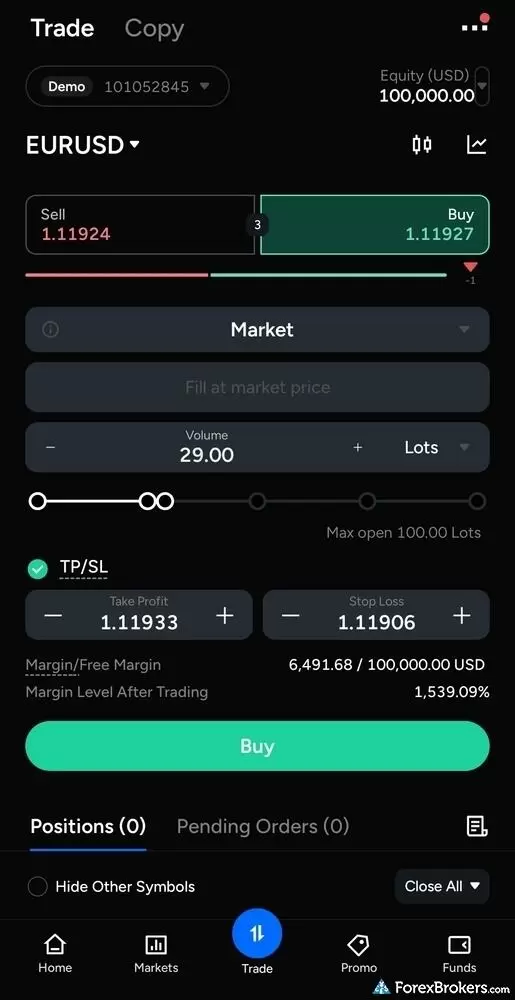
PU Prime’s mobile order ticket shows your required margin and post-trade margin level before you place a trade, with take profit and stop loss controls built in.
Another highlight of the PU Prime app is the built-in copy trading. You can browse signal providers, compare their performance and risk scores, and choose traders to follow. Before copying, you can set an investment amount, adjust the size of copied positions, and add controls such as a stop loss or take profit. PU Prime actually added copy trading to its mobile platform before it was available on the web platform. You can also find traders to copy from within a specific instrument, not only from the copy trading tab. PU Prime has also added a Close All button to the positions list, so you can exit your open trades at once.
PU Prime ranks signal providers into lists such as most copied strategies, highest annual return, and low risk with stable returns, which makes it easier to narrow down the field. You can start copying with a $50 deposit, and there are no subscription or management fees. Signal providers can take up to 50% of the profits they generate for you, settled every Saturday on a high-water-mark basis, so you only pay on new gains.
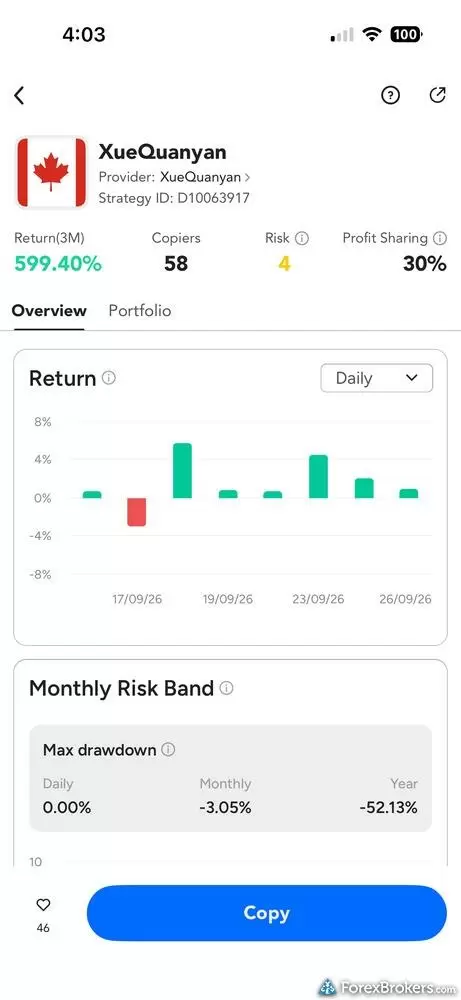
The copy trading feature on PU Prime’s mobile app shows a signal provider’s recent returns, risk score, profit-sharing rate, and drawdown history. This example illustrates why it’s worth looking beyond the headline return: the provider’s displayed yearly maximum drawdown is 52.13%.
PU Prime does have drawbacks when it comes to research. Its newsfeed is limited and doesn't include any major forex news sources, like Reuters, Bloomberg, or Dow Jones. You can access an economic calendar, TradingView AI-based reports, and Autochartist trade signal analysis, but that's about it for third-party tools. They don't offer a sentiment analysis tool showing the ratio of client long/short positions across a given asset.
Available mobile platforms and tools
In our hands-on testing of the PU Prime app, available on Android and iOS, we counted 14 technical indicators and seven drawing tools, with trendlines and indicators saved automatically. The app also includes price alerts, a basic watchlist, an economic calendar, a newsfeed, and landscape charting, though watchlists do not support column filtering or customization. Copy trading is built into the app, with stop loss and take profit controls on copied positions.
| Feature |
PU Prime
|
|---|---|
| Proprietary Mobile Trading App | Yes |
| Android App | Yes |
| Apple iOS App | Yes |
| Mobile Price Alerts | Yes |
| Mobile Charting - Draw Trendlines | Yes |
| Mobile Charting - Trendlines Autosave | Yes |
| Mobile Charting - Indicators / Studies | 14 |
| Mobile Charting - Indicators Autosave | Yes |
| Mobile Watchlists - Column Filtering | No |
| Mobile Watchlists - Column Customization | No |
| Mobile Watchlists - Create & Manage | No |
| Mobile Watchlists - Syncing | No |
Trading Platforms
PU Web Trader is PU Prime's web-based trading platform. It was my favorite option for trading on a larger screen. You can enable one-click trading and execute trades directly from the chart. It offers strong charting with more than 100 technical indicators, drawing tools, and several chart styles. It's also accessible right from the client portal, making it easy to manage your accounts and set up copy trading.
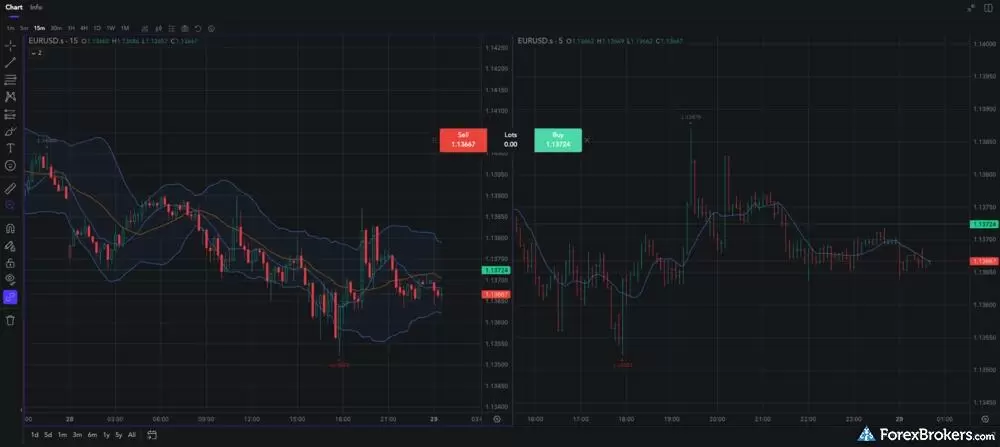
This PU Web Trader chart shows two charts side by side, allowing you to compare different timeframes. The buy and sell buttons sit directly over the charts, so you can move from analysis to an order without leaving the screen.
Copy trading is a new feature on PU Web Trader. In fact, it's so new that the PU Prime AI chatbot told me that copy trading could only be done on the mobile app, and the website support documentation says the same thing. I mentioned this to PU Prime, and they said their support resources weren't updated yet.
In addition to PU Web Trader, PU Prime also supports the MT4 and MT5 trading platforms. Both are great options if you prefer a MetaTrader setup. The MetaTrader mobile app works well for me, but I encountered issues with the desktop version I downloaded for my Mac. But that's an MT5 issue, not PU Prime. I'm told the PC version of the desktop platform is more reliable.
Available trading platforms and features
Our platform walkthrough of PU Web Trader verified more than 100 technical indicators, drawing tools, and several chart styles, alongside one-click trading and trading directly from the chart. We confirmed MetaTrader 4 and MetaTrader 5 support, including desktop versions for Windows and Mac, and built-in copy trading on the web platform. PU Prime does not offer a desktop version of its own platform, and neither TradingView nor cTrader is available.
| Feature |
PU Prime
|
|---|---|
| Desktop Platform (Windows) | Yes |
| Desktop Platform (Mac) | Yes |
| MetaTrader 4 (MT4) | Yes |
| MetaTrader 5 (MT5) | Yes |
| FX Blue | No |
| Proprietary Desktop Trading Platform | No |
| Proprietary Web Trading Platform | Yes |
| TradingView | No |
| cTrader | No |
| Algorithmic trading | Yes |
| API Access | No |
| Charts can be saved | Yes |
| Client sentiment data | No |
| Trading Signals | Yes |
| Price Alerts | Yes |
| Virtual Private Server (VPS) | Yes |
| Virtual Trading (Demo) | Yes |
| Charting - Indicators / Studies (Total) | 87 |
| Charting - Trade From Chart | Yes |
| Charting - TradingView | No |
Available order types
We verified market, limit, stop, and trailing stop orders, along with stop loss and take profit controls. Our testing found no support for OCO, OTO, or guaranteed stop-loss orders.
| Feature |
PU Prime
|
|---|---|
| Order Type - Market | Yes |
| Order Type - Limit | Yes |
| Order Type - Stop | Yes |
| Order Type - Trailing Stop | Yes |
| Order Type - OCO | No |
| Order Type - OTO | No |
| Order Type - GSLO | No |
Research
PU Prime's strongest research feature is Autochartist, which scans markets for chart patterns and potential trading opportunities. You can check out different setups and see the price levels and timeframes behind each idea. You can also download Autochartist to your mobile app and use it alongside PU Prime.
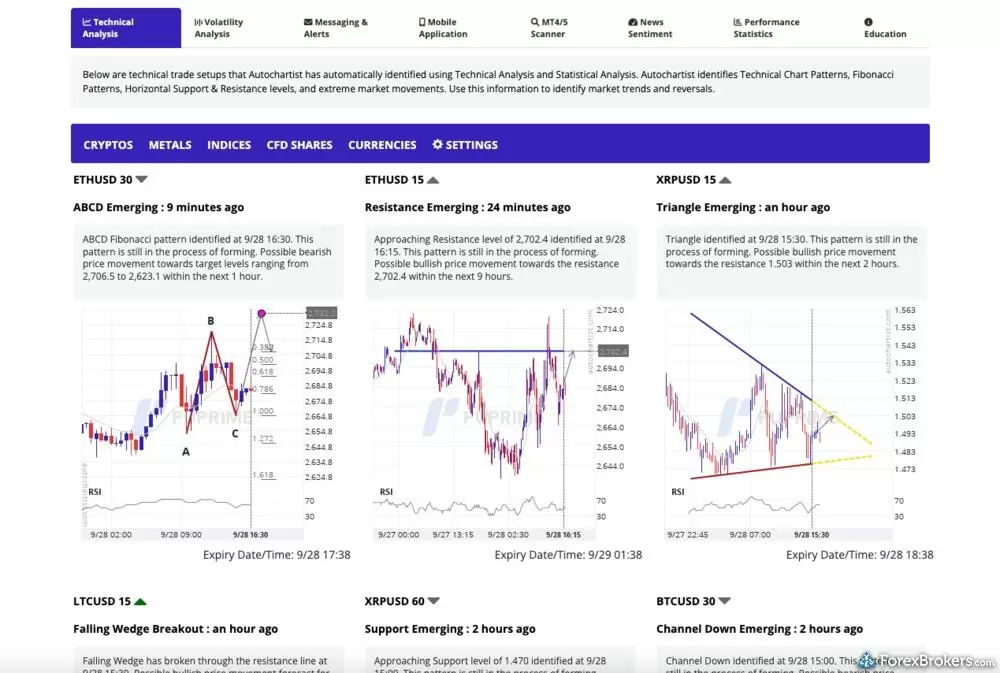
PU Prime’s Autochartist feed displays technical trade setups it has identified across markets, with charts and brief explanations of each pattern. Here, the feed shows emerging patterns and support or resistance levels for several cryptocurrency CFDs.
The rest of the research offering feels thin. PU Prime doesn't offer a dedicated sentiment tool, and the newsfeed didn't include any major forex news sources. PU Prime does publish its own analysis on its Market Insights page, including daily posts and a Weekly Outlook series, but that doesn't replace a live feed from established news providers. When I asked PU Prime's support team about this, they apologized and said that they hope to add more features down the road. This was an informal support exchange, not an on-record statement from PU Prime. Autochartist is great for trade signals, but I'd like more access to tools that help me understand what's moving the markets.
Available research tools
Our analysis highlights Autochartist and Trading Central, daily market commentary in both article and video form, an economic calendar, and TradingView AI-based reports. Our review found no top-tier forex news sources, no earnings calendar, and no research from Acuity Trading or TipRanks.
| Feature |
PU Prime
|
|---|---|
| Forex News (Top-Tier Sources) | No |
| Daily Market Commentary (Articles) | Yes |
| Daily Market Commentary (Videos) | Yes |
| Economic Calendar | Yes |
| Research - Earnings Calendar | No |
| Acuity Trading | No |
| Autochartist | Yes |
| TipRanks | No |
| Trading Central | Yes |
| Mobile Research - News | Yes |
| Mobile Research - Economic Calendar | Yes |
| Mobile Research - Market Movers | No |
Education
PU Prime has a growing selection of educational resources for traders. This includes regular webinars covering live market analysis and trading education. You can also take quizzes, download e-books, watch video tutorials covering everything from technical analysis and trading strategies to copy trading and prop trading, and join the PU Prime Community to participate in challenges and share your learning with others. PU Prime also runs a Trading Academy, with articles sorted into beginner, intermediate, and advanced levels and grouped into how-to guides, technical analysis, and trading strategies.
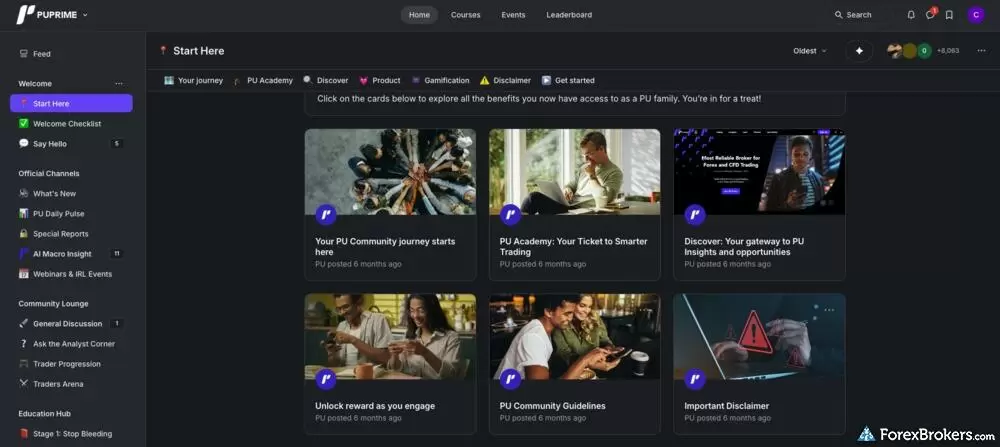
PU Prime’s community has links to its Academy, market insights, and guidance for new members. The sidebar also points to daily updates, webinars, analyst discussions, and an education hub, showing how much learning material sits outside the main trading platform.
I like that there are several ways to learn, whether you'd rather read an explanation, listen to PU Prime experts, or challenge your knowledge through an online quiz. One limitation I noticed was a lack of depth in educational content on relevant topics, with only a small number of videos covering forex, CFDs, crypto, and stocks. That said, PU Prime clearly emphasizes investor education, which is a positive.
Available educational offerings
We found a dedicated education area on PU Prime's website with webinars, beginner and advanced trading videos, e-books, quizzes, and the PU Prime Community. Our testing found no education area inside the mobile app.
| Feature |
PU Prime
|
|---|---|
| Education (Forex) | No |
| Education (CFDs) | No |
| Education (Crypto) | No |
| Education (Stocks) | No |
| Education Area (Website) | Yes |
| Education Area (Mobile App) | No |
| Webinars | Yes |
| Videos - Beginner Trading Videos | Yes |
| Videos - Advanced Trading Videos | Yes |
Final thoughts
PU Prime impressed me most with its proprietary web and mobile platforms. Whether you're analyzing charts, placing trades, or copy trading, it feels like a fully cohesive experience. The pricing is attractive, too. ECN commissions fall to $1 per side, per standard lot, though that requires a $10,000 deposit. PU Prime doesn't have an active trader program, which weighs on its offering for high-volume traders. I'd recommend PU Prime to active forex and CFD traders who value that integrated experience. The biggest opportunity for improvement is its research. Adding a stronger newsfeed and a useful client sentiment analysis tool would make PU Prime an even more compelling broker.
PU Prime Star Ratings
| Feature |
PU Prime
|
|---|---|
| Overall Rating |
|
| Trust Score | 79 |
| Range of Investments |
|
| Trading Fees |
|
| Trading Platforms |
|
| Research |
|
| Mobile Trading |
|
| Education |
|
Our testing
Why you should trust us
Colin Graves is a Winnipeg-based financial writer and editor with more than seven years of experience covering investments and online brokerage platforms, including the forex markets. Before becoming a full-time writer, Colin spent over two decades in the banking industry, including 15 years as a people manager with a Top 10 North American financial institution. During that time, he managed books of business exceeding $1 billion and completed both the Canadian Securities (CSC) and the Professional Financial Planning (PFPC) courses. Colin’s work has appeared in leading personal finance publications, including MoneySense, Money.ca, MapleMoney, The College Investor, and more. Alongside his published work, Colin ghostwrites thought leadership content for founders and CEOs in the financial space.
All content on ForexBrokers.com is handwritten by a writer, fact-checked by a member of our research team, and edited and published by an editor. Our ratings, rankings, and opinions are entirely our own, and the result of our extensive research and decades of collective experience covering the forex industry.
Ultimately, our rigorous data validation process yields an error rate of less than .1% each year, providing site visitors with quality data they can trust. Click here to learn more about how we test.
How we tested
At ForexBrokers.com, our online broker reviews are based on our collected quantitative data as well as the observations and qualified opinions of our expert researchers. Each year we publish tens of thousands of words of research on the top forex brokers and monitor dozens of international regulator agencies (read more about how we calculate Trust Score here).
Mobile testing is conducted on modern devices that run the most up-to-date operating systems available:
- For Apple, we use MacBook Pro laptops running the latest macOS, and the iPhone XS running the latest iOS.
- For Android, we use the Samsung Galaxy S20 and Samsung Galaxy S23 Ultra devices running the latest Android OS.
All websites and web-based platforms are tested using the latest version of the Google Chrome browser.
Our researchers thoroughly test a wide range of key features, such as the availability and quality of watch lists, mobile charting, real-time and streaming quotes, and educational resources – among other important variables. We also evaluate the overall design of the mobile experience and look for a fluid user experience moving between mobile and desktop platforms.
Forex Risk Disclaimer
There is a very high degree of risk involved in trading securities. With respect to margin-based foreign exchange trading, off-exchange derivatives, and cryptocurrencies, there is considerable exposure to risk, including but not limited to, leverage, creditworthiness, limited regulatory protection and market volatility that may substantially affect the price, or liquidity of a currency or related instrument. It should not be assumed that the methods, techniques, or indicators presented in these products will be profitable, or that they will not result in losses. Read more on forex trading risks.
Read next
- Best Copy Trading Platforms for 2026
- Best Forex Brokers for 2026
- International Forex Brokers Search
- Best Brokers for TradingView for 2026
- Best Forex Brokers for Beginners of 2026
- Compare Forex Brokers
- Best Forex Trading Apps for 2026
- Best Low Spread Forex Brokers for 2026
- Best MetaTrader 4 (MT4) Brokers for 2026
More Forex Guides
- Best High-Leverage Forex Brokers for 2026
- Best Market Maker Brokers in 2026
- Best Brokers for TradingView for 2026
- Best Forex Day Trading Platforms for 2026
- Best Brokers that Use TipRanks in 2026
- Best Algo Trading Software for 2026
- Best MetaTrader 4 (MT4) Brokers for 2026
- Best Forex Options Brokers for 2026
- Best High-Frequency Trading Software for 2026
- Best CFD Trading Platforms for 2026
- Best PayPal Forex Brokers for 2026
- Best Trading Platforms for Mac Users of 2026
- Best Forex Signal Providers for 2026
- Best Forex Demo Accounts for 2026
- Best MetaTrader 5 (MT5) Forex Brokers for 2026
- Best Free Forex Trading Courses for 2026
- Best Forex Brokers with APIs for 2026
- Best Crypto Brokers for 2026
Popular Forex Broker Reviews
Check out our review of Charles Schwab, a highly trusted, multi-asset broker catering to U.S.-based and international forex traders.
Steven Hatzakis May 04, 2026
A trusted global brand, OANDA stands out for its reputation and quality market research.
Steven Hatzakis May 04, 2026
Plus500 is a trusted global brand that offers an easy-to-use trading platform for online traders, alongside access to share trading and selection of CFDs.
Steven Hatzakis July 22, 2026
FP Markets shines as a low-cost broker for trading forex and CFDs – as long as you use the MetaTrader platform.
Steven Hatzakis October 08, 2026
Our expert Tickmill review tests the broker's Raw account pricing, spreads, MetaTrader platforms, and tools to help you decide if it fits your trading in 2026.
Steven Hatzakis May 22, 2026
IC Markets is built for algorithmic and cost-sensitive forex traders: 0.72 pips all-in on EUR/USD and free colocated VPS, but no platform of its own.
Steven Hatzakis August 31, 2026
Octa offers a basic, low-cost MetaTrader platform experience alongside its social copy-trading platform.
Steven Hatzakis May 04, 2026
ACY Securities is a MetaTrader-only broker with a reasonable range of markets and a balanced account offering.
Steven Hatzakis May 04, 2026
Eightcap review 2026: low-cost forex and CFD trading on TradingView, MetaTrader, and TradeLocker, with a deep crypto CFD lineup. Read our expert verdict.
Steven Hatzakis October 05, 2026
IG offers the ultimate comprehensive trading package, featuring excellent trading and research tools, and industry-leading education.
Steven Hatzakis August 04, 2026
As a trusted multi-asset broker, XTB offers outstanding customer service, a wide variety of forex and CFDs, and an excellent overall trading experience.
Steven Hatzakis October 07, 2026
FOREX.com is a trusted brand that delivers an excellent trading experience for forex and CFDs traders across the globe.
Steven Hatzakis May 04, 2026
In my 2026 Exness review, I tested the Exness Terminal, MT4, and MT5 across 78 forex pairs. See my verdict on costs, research, and product range.
Steven Hatzakis May 27, 2026
AvaTrade is a trusted global brand best known for offering an extensive selection of trading platforms for forex and CFD traders.
Steven Hatzakis May 04, 2026
Traders choose Swissquote for its quality research and vast multi-asset offering.
Steven Hatzakis May 04, 2026
Formerly named City Index, StoneX Trading is a trusted brand known for its versatile trading platforms, excellent mobile app, and diverse market research.
Steven Hatzakis August 28, 2026
For traders who appreciate advanced trading tools and quality market research, FXCM is a winner, especially for algorithmic trading.
Steven Hatzakis October 09, 2026
Best known for its mobile trading app, Trading 212 offers an easy-to-use trading platform suite for CFD and share trading.
Steven Hatzakis May 14, 2026
Our 2026 HFM (HF Markets) review covers MT4, MT5, copy trading, the 344-symbol product offering, and 1.8-pip EUR/USD spreads, based on hands-on testing.
Steven Hatzakis September 30, 2026
Is Capital.com worth it in 2026? Our expert review covers 450+ crypto CFDs, a 0.7-pip EUR/USD spread, commission-free pricing, and platform quality.
Steven Hatzakis July 21, 2026
Traders choose Admiral Markets (Admirals) for its excellent investor education and advanced MetaTrader features.
Steven Hatzakis May 04, 2026
FxPro competes among the top MetaTrader brokers, featuring multiple account options and various execution methods.
Steven Hatzakis October 07, 2026
eToro is a winner for its easy-to-use copy-trading platform, where traders can copy the trades of experienced investors – or receive exclusive perks for sharing.
Steven Hatzakis August 04, 2026
Pepperstone offers a growing range of tradeable markets, good-quality research, and support for multiple social copy trading platforms.
Steven Hatzakis October 07, 2026
Interactive Brokers forex review: I tested IBKR's spreads, commissions, and platforms in 2026. More than 100 pairs, but a $2 minimum commission per order.
Steven Hatzakis September 28, 2026
Saxo is an exclusive multi-asset broker with brilliant research and a superb trading platform experience, along with an extensive selection of over 71,000 securities.
Steven Hatzakis September 10, 2026
CMC Markets review 2026: 303 forex pairs (the most we track), 21,000+ CFDs, and top-tier charting. See where its spreads and education fall short.
Steven Hatzakis October 09, 2026About PU Prime
Founded in 2015, PU Prime is a forex and CFD broker and a business name of Pacific Union. The company is based in Ebene, Mauritius, and operates through five regulated entities, including firms in Australia, Seychelles, Mauritius, and South Africa. Its Australian entity is authorised by the Australian Securities and Investments Commission (ASIC). PU Prime offers more than 1,000 tradable instruments across MetaTrader 4, MetaTrader 5, and its own web and mobile platforms. According to PU Prime, it has a presence in more than 190 countries and over 40 million app downloads.
About the Editorial Team
Colin Graves is a Winnipeg-based financial writer with more than seven years of experience covering investments, online brokerages, and the forex markets. A former banking exec who managed over $1B in assets, he holds CSC and PFPC credentials. His work appears in MoneySense, Money.ca, MapleMoney, and more.
Hannah Smith is a Staff Editor at ForexBrokers.com. With a background in SEO and years of experience in digital media, Hannah is focused on creating high-quality, data-driven content that helps investors make informed decisions. With a master's degree in English from North Carolina State University, she brings a strong foundation in writing, research, and editorial strategy to her work.
Joey Shadeck is a Content Strategist and Research Analyst for ForexBrokers.com. He holds dual degrees in Finance and Marketing from Oakland University, and has been an active trader and investor for close to ten years. An industry veteran, Joey obtains and verifies data, conducts research, and analyzes and validates our content.